Minecraft version
Back to mods 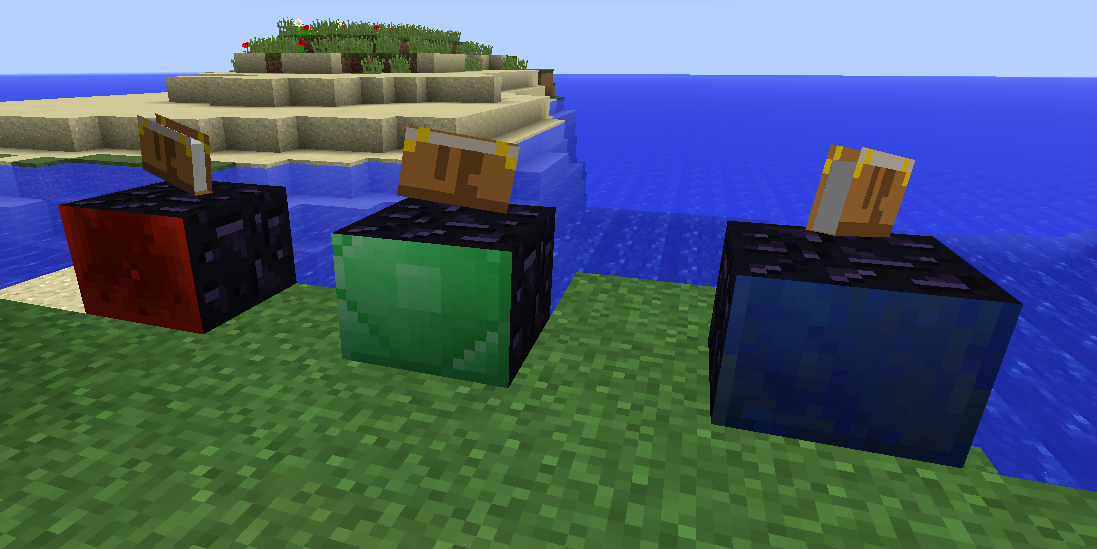
CurseForge · Minecraft mod
Utility Worlds
Player-created useful worlds.
Choose a version Pick your version below, then grab the matching file.
Quick answer
Which Utility Worlds release should I use?
Latest stable file UtilityWorlds-1.20.1_1.1.8.jar
Game version 1.20.1
Loader Forge
Utility Worlds UtilityWorlds-1.20.1_1.1.8.jar targets 1.20.1 with Forge. The project page does not say whether this file belongs on the client, dedicated server, or both. No extra mods listed for this file.
Where it goes
Is Utility Worlds required on the client, server, or both?
The project page does not say whether this file belongs on the client, dedicated server, or both.
Client Source doesn’t say
Dedicated server Source doesn’t say
Loader for this release Forge
Required install it here Optional supported, not mandatory Not supported do not install here Source doesn’t say do not assume
The source does not explicitly classify this release as client-only or server-only.
What else does Utility Worlds UtilityWorlds-1.20.1_1.1.8.jar need?
UtilityWorlds-1.20.1_1.1.8.jar. Change the file and its required mods may change too.
This file does not list any required mods. Do not add a library just because a different file uses it.
This file does not list any required or optional mods.
Before you install it
Add Utility Worlds without breaking your instance.
Built for Utility Worlds UtilityWorlds-1.20.1_1.1.8.jar. Pick another file and the loader, install side or required mods may change.
- 01
Stick to this file
Use UtilityWorlds-1.20.1_1.1.8.jar. It targets 1.20.1 with Forge; another release may have different loader, side or dependency requirements.
- 02
Bring the mods it needs
This file does not list any required mods. Do not add a library just because a different file uses it.
- 03
Put it on the correct side
The project page does not say whether this file belongs on the client, dedicated server, or both.
- 04
Pick the file you checked
Use the “Get this file” button beside UtilityWorlds-1.20.1_1.1.8.jar. It opens that exact file at the source.
About this project
What does Utility Worlds add?
This mod adds three types of worlds that players can access by crafting the corresponding portals: Mining Portal, Void Portal and Garden Portal
- Each crafted portal will - when first activated by right-clicking - create a new dimension and transport the player there.
- At the location where the player arrives in the new dimension, a Return Portal is placed. Use this to get back.
- Portal blocks can be picked up and moved, even to other dimensions. Return Portals can only be moved within the dimension they were generated.
- Server OPs can right-click a new (not yet activated) portal while sneaking to forcibly link to an existing dimension, using a GUI. Linking from within a Utility Worlds dimension to the overworld (via GUI) should be used with caution. The created overworld portal can be in a bad location (coordinates can be specified in UW for 1.14.4+)
Note: For 1.16.5+ you will get warnings about experimental settings for custom worlds. You can use Shutup Experimental Settings! to get rid of it if you want.
Thanks to McJty and Hyperbox (Commoble) for making it possible to figure out dynamic dimension creation in 1.16.5+!
Common for all worlds
- No weather.
- Always noon (sun at zenith).
Mining World characteristics
- Completely flat.
- No caves, water or lava. Note that other mods may override this behavior, there is no attempt to prevent this.
- Flat bedrock.
- Ore generation and mob spawning as in Extreme Hills / Mountains / Windswept Hills.
Void World characteristics
- Black sky. star brightness is configurable, default is no stars (only in UW for MC 1.12.2).
- Considered a plains biome.
- No structures.
- 9 x 9 stone platform where the Return Portal is created.
Garden World characteristics
- Completely flat.
- Only consists of 4 layers of dirt on bedrock.
- No ore generation.
- No mob spawning.
Project description from CurseForge.
Pick your setup
Utility Worlds by Minecraft version and loader
Choose the version and loader you play, then open the matching release.
Minecraft version
1.19.4
1 loader buildMinecraft version
1.19.2
1 loader buildMinecraft version
1.19
1 loader buildMinecraft version
1.18.2
1 loader buildMinecraft version
1.16.5
1 loader buildMinecraft version
1.15.2
1 loader buildMinecraft version
1.14.4
1 loader buildMinecraft version
1.12.2
1 loader buildMinecraft version
1.12
1 loader buildMinecraft version
1.11.2
1 loader buildMinecraft version
1.10.2
1 loader buildShowing the newest 12 of 16 game versions. Older files are in the list below.
Check the dependencies, then try the file in a copied instance before changing a world you care about.
Recent files
Utility Worlds versions and loaders
UtilityWorlds-1.20.1_1.1.8.jar
26 Jan 2025
Client Source doesn’t say Server Source doesn’t say Dependencies No extras listed Listed on Release listing
Check the 1.20.1 · Forge setup 1.20.1Forge release
UtilityWorlds-1.19.2_1.1.7.jar
20 May 2023
Client Source doesn’t say Server Source doesn’t say Dependencies No extras listed Listed on Release listing
Check the 1.19.2 · Forge setup 1.19.2Forge release
UtilityWorlds-1.19.4_1.1.6.jar
13 May 2023
Client Source doesn’t say Server Source doesn’t say Dependencies No extras listed Listed on Release listing
Check the 1.19.4 · Forge setup 1.19.4Forge beta
UtilityWorlds-1.19.2_1.1.5.jar
30 Apr 2023
Client Source doesn’t say Server Source doesn’t say Dependencies No extras listed Listed on Release listing
Check the 1.19.2 · Forge setup 1.19.2Forge beta
UtilityWorlds-1.18.2_1.1.4.jar
3 Jul 2022
Client Source doesn’t say Server Source doesn’t say Dependencies No extras listed Listed on Release listing
Check the 1.18.2 · Forge setup 1.18.2Forge release
UtilityWorlds-1.16.5_1.1.4.jar
3 Jul 2022
Client Source doesn’t say Server Source doesn’t say Dependencies No extras listed Listed on Release listing
Check the 1.16.5 · Forge setup 1.16.5Forge release
UtilityWorlds-1.19_1.1.3.jar
11 Jun 2022
Client Source doesn’t say Server Source doesn’t say Dependencies No extras listed Listed on Release listing
Check the 1.19 · Forge setup Forge1.19 beta
UtilityWorlds-1.18.2_1.1.3.jar
11 Jun 2022
Client Source doesn’t say Server Source doesn’t say Dependencies No extras listed Listed on Release listing
Check the 1.18.2 · Forge setup 1.18.2Forge beta
UtilityWorlds-1.18.2_1.1.2.jar
5 Jun 2022
Client Source doesn’t say Server Source doesn’t say Dependencies No extras listed Listed on Release listing
Check the 1.18.2 · Forge setup 1.18.2Forge beta
UtilityWorlds-1.16.5_1.1.2.jar
5 Jun 2022
Client Source doesn’t say Server Source doesn’t say Dependencies No extras listed Listed on Release listing
Check the 1.16.5 · Forge setup 1.16.5Forge beta
UtilityWorlds-1.16.5_1.1.1.jar
3 Jun 2022
Client Source doesn’t say Server Source doesn’t say Dependencies No extras listed Listed on Release listing
Check the 1.16.5 · Forge setup 1.16.5Forge beta
UtilityWorlds-1.18.2_1.1.1.jar
25 May 2022
Client Source doesn’t say Server Source doesn’t say Dependencies No extras listed Listed on Release listing
Check the 1.18.2 · Forge setup 1.18.2Forge beta
Looking for an older file? The official CurseForge project page is in Resources.
 mod
mod CurseForge · Minecraft
Gamma Hex
This mod is a late-game progression mod that adds unique items and bosses to improve the end game content in minecraft.
 mod
mod CurseForge · Minecraft
Interstellaris
A space exploration and technology mod where you build your own spaceship, develop advanced technologies, build megastructures and explore the universe. [WIP]
 mod
mod CurseForge · Minecraft
Worlds Unknown
Explore an infinite universe of procedurally generated planets, unpredictable gravity, mysterious biomes, rare celestial worlds, and countless discoveries beyond the boundaries of the Overworld.