Minecraft version
Back to mods 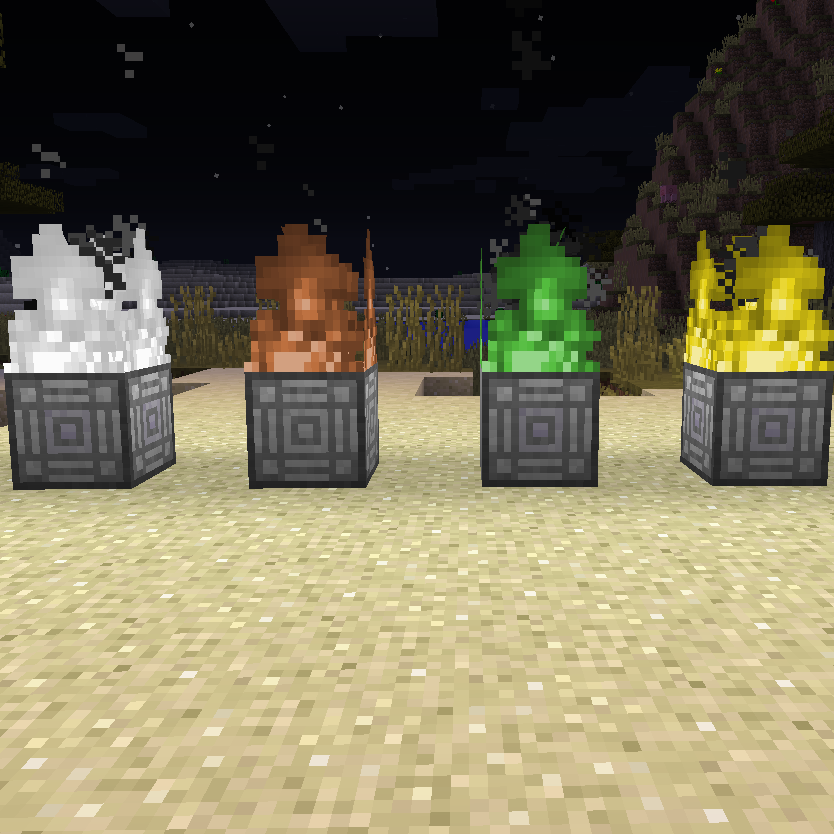
CurseForge · Minecraft mod
World Architect
Create multiple dimensions on your wish (overworld, void, flat, and more)
Choose a version Pick your version below, then grab the matching file.
Quick answer
Which World Architect release matches 1.8?
beta file WorldArchitect-0.5.29.jar
Game version 1.8
Loader Not required
World Architect WorldArchitect-0.5.29.jar targets 1.8. The project page does not say whether this file belongs on the client, dedicated server, or both. No extra mods listed for this file.
Where it goes
Is World Architect required on the client, server, or both?
The project page does not say whether this file belongs on the client, dedicated server, or both.
Client Source doesn’t say
Dedicated server Source doesn’t say
Loader for this release No loader listed
Required install it here Optional supported, not mandatory Not supported do not install here Source doesn’t say do not assume
The source does not explicitly classify this release as client-only or server-only.
What else does World Architect WorldArchitect-0.5.29.jar need?
WorldArchitect-0.5.29.jar on 1.8. Every mod below is checked against that same setup.
This file does not list any required mods. Do not add a library just because a different file uses it.
This file does not list any required or optional mods.
Before you install it
Add World Architect without breaking your instance.
Built for World Architect WorldArchitect-0.5.29.jar on 1.8. Pick another file and the loader, install side or required mods may change.
- 01
Stick to this file
Use WorldArchitect-0.5.29.jar. It targets 1.8; another release may have different loader, side or dependency requirements.
- 02
Bring the mods it needs
This file does not list any required mods. Do not add a library just because a different file uses it.
- 03
Put it on the correct side
The project page does not say whether this file belongs on the client, dedicated server, or both.
- 04
Pick the file you checked
Use the “Get this file” button beside WorldArchitect-0.5.29.jar. It opens that exact file at the source.
About this project
What does World Architect add?
This mod adds a simple way to create new dimensions.
The center of all is the world anchor block, this block has one slot for a world core.
There are 7 kinds of world cores:
- Default Core - Creates an overworld dimension and acts as teleporter to it
- Home Core - Acts as teleporter to the base overworld (world 0) - be careful it only brings you back to homeworld, but where?
- Amplified Core - Creates an amplified dimension and acts as teleporter to it
- Assign Core - Can be assigned to a position and then teleports there
- Flat Core - Creates a flat world and acts as teleporter to it
- Void Core - Creates a void world and acts as teleporter to it
- Water World Core - Creates a water world and acts as teleporter to it
To teleport to a world just step into the flames.
If you log out in a dynamic dimension you get teleported back into you home world(dim=0) at the moment.
All cores can be crafted. In the config file the recipe for every core can be deactivated.
Version 0.4 adds the fire basket, at the moment it can burn with brown and black fire if you put garan roots(found in amplified worlds) or void dust(dropped in void worlds) inside.
Finally allows multiplayer.
Project description from CurseForge.
Pick your setup
World Architect by Minecraft version and loader
Choose the version and loader you play, then open the matching release.
Check the dependencies, then try the file in a copied instance before changing a world you care about.
Recent files
World Architect versions and loaders
WorldArchitect-0.5.29.jar
8 May 2015
Client Source doesn’t say Server Source doesn’t say Dependencies No extras listed Listed on Release listing
Check the 1.8 setup WorldArchitect-0.5.27.jar
6 May 2015
Client Source doesn’t say Server Source doesn’t say Dependencies No extras listed Listed on Release listing
Check the 1.8 setup WorldArchitect-0.4.jar
3 Apr 2015
Client Source doesn’t say Server Source doesn’t say Dependencies No extras listed Listed on Release listing
Check the 1.8 setup WorldArchitect-0.3.jar
30 Mar 2015
Client Source doesn’t say Server Source doesn’t say Dependencies No extras listed Listed on Release listing
Check the 1.8 setup WorldArchitect-0.2.jar
28 Mar 2015
Client Source doesn’t say Server Source doesn’t say Dependencies No extras listed Listed on Release listing
Check the 1.8 setup Looking for an older file? The official CurseForge project page is in Resources.
 mod
CurseForge · Minecraft
Cyclops Core
Library mod for EvilCraft, Integrated Dynamics and others.
 mod
CurseForge · Minecraft
Vault Patcher
Let the hard coded change into localization string in some mods.
 mod
CurseForge + Modrinth · Minecraft
xCraft: Drop, XP & Furnace Multiplier
Multiply ore drops, mob drops, XP and furnace speed. Configurable, server-side, for Fabric, NeoForge & Forge.