Minecraft version
Back to mods 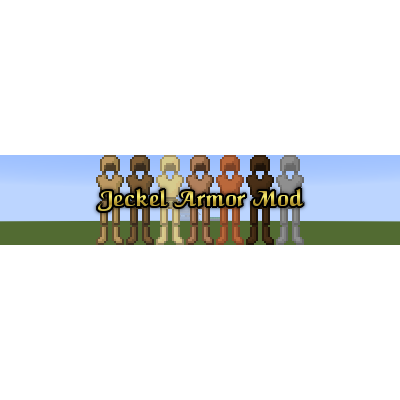
CurseForge · Minecraft mod
JeckelArmorMod
Introduces new sets of basic wooden and stone armor.
Choose a version Pick your version below, then grab the matching file.
Quick answer
Which JeckelArmorMod release matches 1.7.10?
beta file JeckelArmorMod-1.7.10-1.2.0-beta.jar
Game version 1.7.10
Loader Not required
JeckelArmorMod-1.7.10-1.2.0-beta.jar targets 1.7.10. The project page does not say whether this file belongs on the client, dedicated server, or both. No extra mods listed for this file.
Where it goes
Is JeckelArmorMod required on the client, server, or both?
The project page does not say whether this file belongs on the client, dedicated server, or both.
Client Source doesn’t say
Dedicated server Source doesn’t say
Loader for this release No loader listed
Required install it here Optional supported, not mandatory Not supported do not install here Source doesn’t say do not assume
The source does not explicitly classify this release as client-only or server-only.
What else does JeckelArmorMod-1.7.10-1.2.0-beta.jar need?
JeckelArmorMod-1.7.10-1.2.0-beta.jar on 1.7.10. Every mod below is checked against that same setup.
This file does not list any required mods. Do not add a library just because a different file uses it.
This file does not list any required or optional mods.
Before you install it
Add JeckelArmorMod without breaking your instance.
Built for JeckelArmorMod-1.7.10-1.2.0-beta.jar on 1.7.10. Pick another file and the loader, install side or required mods may change.
- 01
Stick to this file
Use JeckelArmorMod-1.7.10-1.2.0-beta.jar. It targets 1.7.10; another release may have different loader, side or dependency requirements.
- 02
Bring the mods it needs
This file does not list any required mods. Do not add a library just because a different file uses it.
- 03
Put it on the correct side
The project page does not say whether this file belongs on the client, dedicated server, or both.
- 04
Pick the file you checked
Use the “Get this file” button beside JeckelArmorMod-1.7.10-1.2.0-beta.jar. It opens that exact file at the source.
About this project
What does JeckelArmorMod add?
JeckelArmorMod is a Forge-based stand-alone mod that adds several new sets of armor. One set for each of the vanilla Minecraft wood types (oak, spruce, birch, jungle, acacia, and dark oak) and a set of stone armor.
Both the wooden and stone armor items are obtainable through normal crafting, similar to vanilla Minecraft armor, and takes a total of 24 blocks of the given material to craft a complete set. In Creative Mode (as of version 1.0.6-beta), the armors can also be found in the mod's custom creative tab.
The mod's armors can be repaired in the vanilla Minecraft Anvil using the material the armor was crafted from and villagers have a chance (as of v1.2.0-beta) of offering the mod armor pieces in trades. In addition, the mod's armors are registered with and can be repaired by the Washing Machine from the Mr Crayfish Furniture Mod, if said mod is installed.
Optionally, wood and/or stone armor can apply an 'Armor Encumbrance' enchantment when worn and will slow the player's movement speed. This is disabled by default and can be enabled for wood armor, stone armor, or both.
To enhance user experience, the mod comes equipped with an automatic update checking mechanism that will inform users when a new version of the mod is available. For those who wish to disable this feature, an appropriate config option is provided.
Additional information can be found through the below links:

Project description from CurseForge.
Pick your setup
JeckelArmorMod by Minecraft version and loader
Choose the version and loader you play, then open the matching release.
Check the dependencies, then try the file in a copied instance before changing a world you care about.
Recent files
JeckelArmorMod versions and loaders
JeckelArmorMod-1.7.10-1.2.0-beta.jar
26 May 2015
Client Source doesn’t say Server Source doesn’t say Dependencies No extras listed Listed on Release listing
Check the 1.7.10 setup 1.7.10 beta
v1.1.0-beta
JeckelArmorMod-1.7.10-1.1.0-beta.jar
20 Apr 2015
Client Source doesn’t say Server Source doesn’t say Dependencies No extras listed Listed on Release listing
Check the 1.7.10 setup 1.7.10 beta
Looking for an older file? The official CurseForge project page is in Resources.