Minecraft version
Back to mods 
CurseForge · Minecraft mod
In-Game Account Switcher
This mod allows you to change your logged in account in-game, without restarting Minecraft
Choose a version Pick your version below, then grab the matching file.
Quick answer
Which In-Game Account Switcher release should I use?
Latest stable file IAS 9.0.7+26.2-neoforge
Game version 26.2
Loader NeoForge
In-Game Account Switcher IAS 9.0.7+26.2-neoforge targets 26.2 with NeoForge. The project page does not say whether it belongs on the client. The project page does not say whether it belongs on the dedicated server. No extra mods listed for this file.
Where it goes
Is In-Game Account Switcher required on the client, server, or both?
The project page does not say whether it belongs on the client. The project page does not say whether it belongs on the dedicated server.
Client Source doesn’t say
Dedicated server Source doesn’t say
Loader for this release NeoForge
Required install it here Optional supported, not mandatory Not supported do not install here Source doesn’t say do not assume
The source does not explicitly classify this release as client-only or server-only.
What else does In-Game Account Switcher IAS 9.0.7+26.2-neoforge need?
IAS 9.0.7+26.2-neoforge. Change the file and its required mods may change too.
This file does not list any required mods. Do not add a library just because a different file uses it.
This file does not list any required or optional mods.
Before you install it
Add In-Game Account Switcher without breaking your instance.
Built for In-Game Account Switcher IAS 9.0.7+26.2-neoforge. Pick another file and the loader, install side or required mods may change.
- 01
Stick to this file
Use IAS 9.0.7+26.2-neoforge. It targets 26.2 with NeoForge; another release may have different loader, side or dependency requirements.
- 02
Bring the mods it needs
This file does not list any required mods. Do not add a library just because a different file uses it.
- 03
Put it on the correct side
The project page does not say whether it belongs on the client. The project page does not say whether it belongs on the dedicated server.
- 04
Pick the file you checked
Use the “Get this file” button beside IAS 9.0.7+26.2-neoforge. It opens that exact file at the source.
About this project
What does In-Game Account Switcher add?
In-Game Account Switcher
In-Game Account Switcher allows you to change which account you are logged in to in-game, without having to restart Minecraft.
Dependencies
Fabric: Fabric API (Required), Mod Menu (Optional)
Quilt: QFAPI/QSL (Required), Mod Menu (Optional)
Forge: (none)
NeoForge: (none)
FAQ
Q: I need help, have some questions, or something else.
A: You can look at the docs for Terms and Privacy, Crypt, Stolen Accounts, Common Errors, Secure Log Sharing, or you can join the Discord server.
Q: Where can I download this mod?
A: Modrinth, CurseForge, GitHub. You can also find unstable builds at GitHub Actions, to download them you'll need a GitHub account.
Q: Which mod loaders are supported?
A: Forge, Fabric, NeoForge. Quilt should work too.
Q: Which versions are supported?
A: Minecraft 1.18.2, 1.19.2, 1.19.4, 1.20.1, 1.20.2, 1.20.4, 1.20.6, 1.21.1, 1.21.3, 1.21.4, 1.21.5. Old mod versions (for MC 1.8.9, 1.12.2, etc.) are not supported.
Q: Do I need Fabric API or Quilt Standard Libraries?
A: Yes, you'll need Fabric API for Fabric/Quilt. On Quilt, you can install QFAPI/QSL instead. Obviously, you do NOT need them for Forge or NeoForge.
Q: Help, I have shared my account with someone! Someone is using my account via In-Game Account Switcher!
A: Read the "Stolen Accounts" page.
Q: I'm using an old version (for 1.8.9/1.12.2) of the mod and it gives me the "SSLHandshakeException" error, how do I fix it?
A: You need to update your Java 8 to a newer build. You can use any Java vendor that you want, there's little to no difference, popular choices: Eclipse Temurin (Windows, macOS, Linux), Azul Zulu (Windows, macOS, Linux), Amazon Corretto (Windows, macOS, Linux).
Q: I'm using Feather/Lunar Client and the mod doesn't work properly (the button doesn't appear, the account list is empty, etc), when you will fix this?
A: These clients break lots of things. Since they are closed-source, we cannot add compatibility with them. You should ask client developers to fix any issues. Many of this clients have their own built-in account switcher, use it instead.
Q: Can I import/export my accounts from/into a file? Can I use access tokens/cookies to add Microsoft accounts? Will you add this?
A: No. This kind of behavior is either shady or prohibited by Minecraft EULA.
Q: Is this mod open source?
A: Yes. (Licensed under GNU LGPLv3)
Q: I've found a bug.
A: Report it here. If you are not sure if this is a bug, you can join the Discord. If you think this bug is critical enough not to be disclosed publicly, please, report it as described in the security policy.
Screenshots
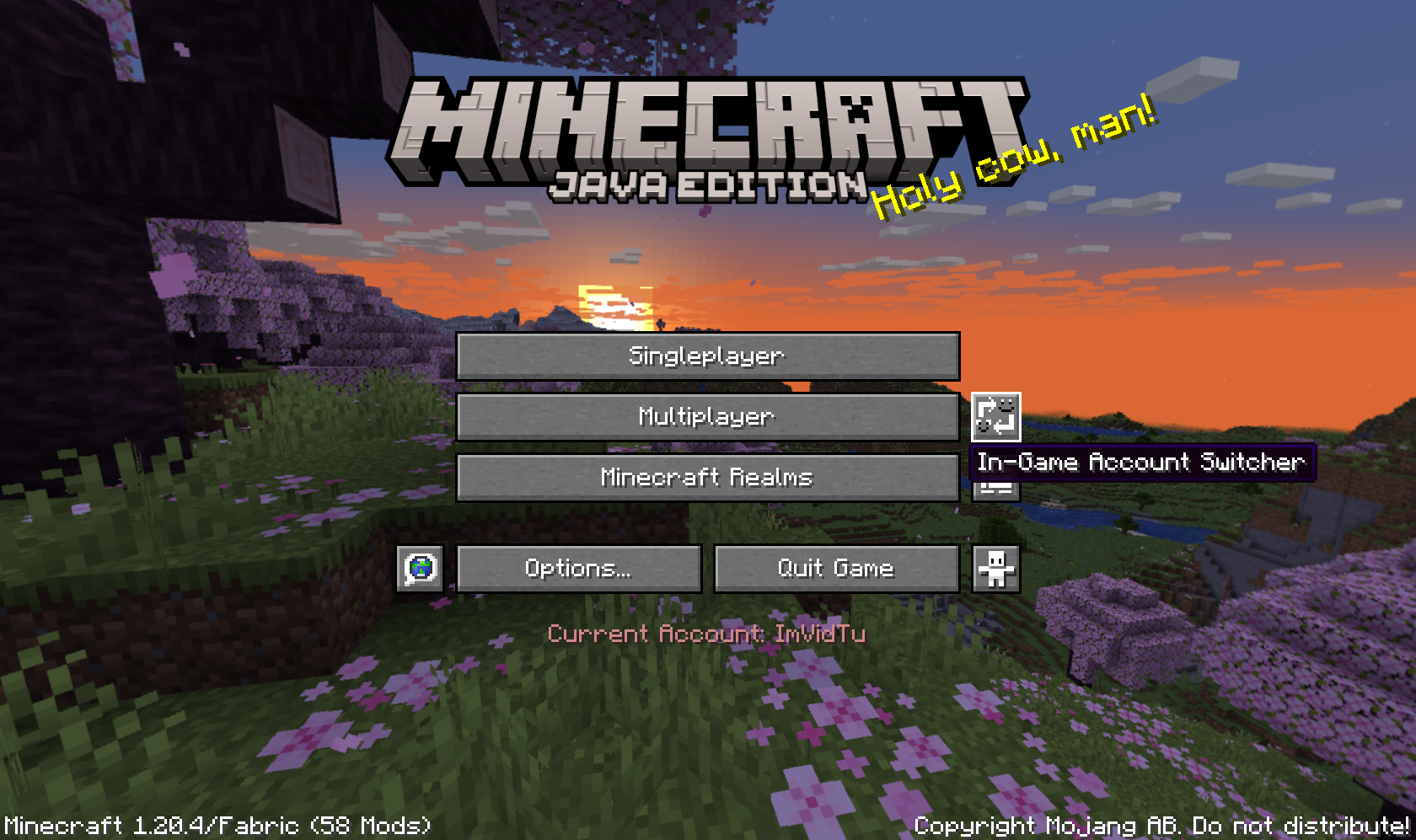
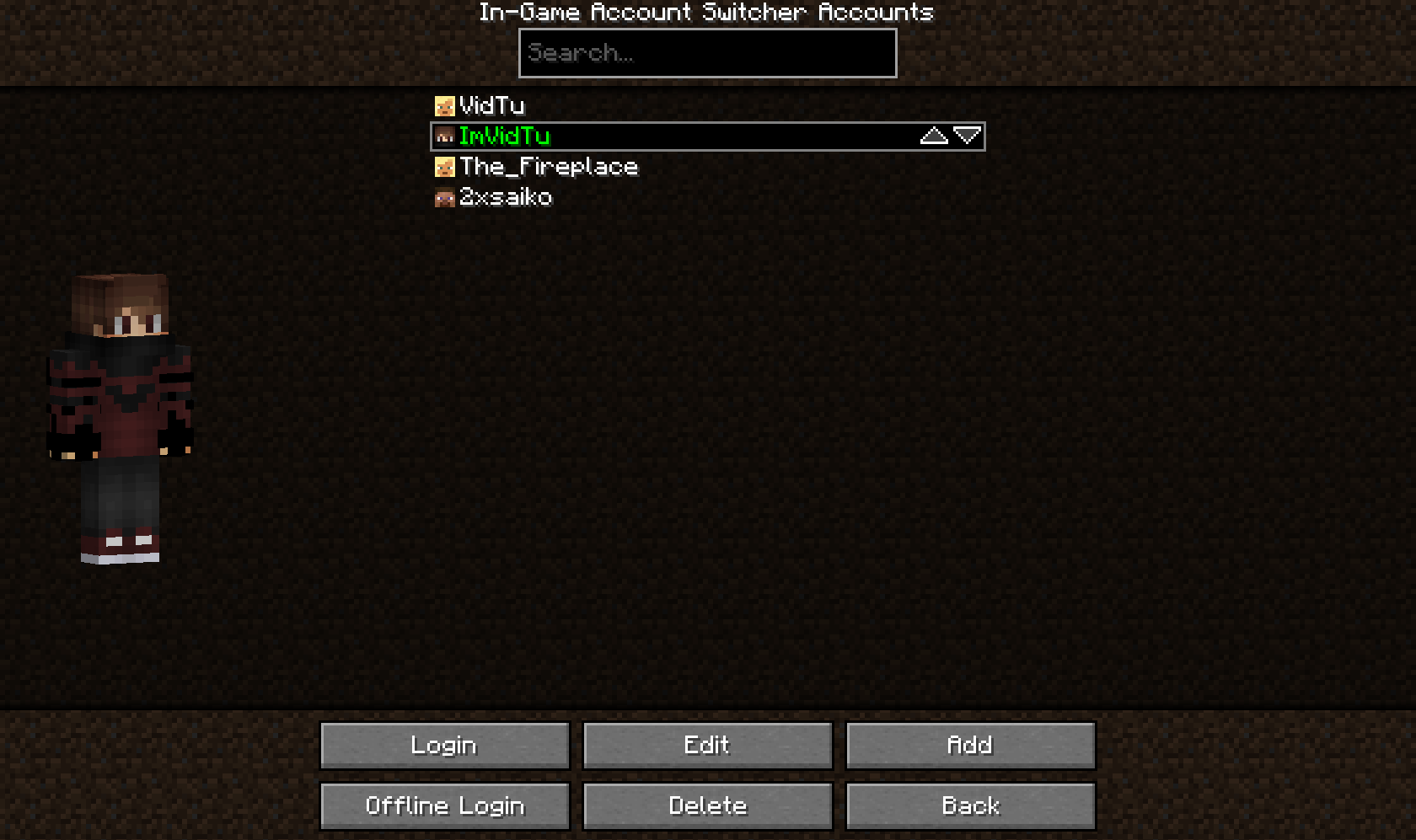
Credits
Thanks to the minecraft.wiki/Microsoft_authentication (previously was on wiki.vg) page contributors for providing useful information about Microsoft authentication.
Thanks to the Methanol developers for providing a cool HTTP client we use to automatically upload 30+ files to Modrinth, CurseForge, and GitHub.
Project description from CurseForge.
Pick your setup
In-Game Account Switcher by Minecraft version and loader
Choose the version and loader you play, then open the matching release.
Minecraft version
26.1.2
4 loader buildsMinecraft version
1.21.11
4 loader buildsMinecraft version
1.21.10
4 loader buildsMinecraft version
1.21.8
4 loader buildsMinecraft version
1.21.7
4 loader buildsMinecraft version
1.21.6
2 loader buildsMinecraft version
1.21.5
4 loader buildsMinecraft version
1.21.4
4 loader buildsMinecraft version
1.21.3
4 loader buildsMinecraft version
1.21.1
4 loader buildsMinecraft version
1.20.6
4 loader buildsShowing the newest 12 of 18 game versions. Older files are in the list below.
Check the dependencies, then try the file in a copied instance before changing a world you care about.
Recent files
In-Game Account Switcher versions and loaders
IAS 9.0.7+26.2-neoforge
IAS-9.0.7+26.2-neoforge.jar
25 Jun 2026
Client Source doesn’t say Server Source doesn’t say Dependencies No extras listed Listed on Release listing
Check the 26.2 · NeoForge setup NeoForge26.2 release
IAS 9.0.7+26.2-forge
IAS-9.0.7+26.2-forge.jar
25 Jun 2026
Client Source doesn’t say Server Source doesn’t say Dependencies No extras listed Listed on Release listing
Check the 26.2 · Forge setup Forge26.2 release
IAS 9.0.7+26.2-fabric
IAS-9.0.7+26.2-fabric.jar
25 Jun 2026
Client Source doesn’t say Server Source doesn’t say Dependencies 1 required · 1 unchecked Listed on Release listing
Check the 26.2 · Fabric setup FabricQuilt26.2 release
IAS 9.0.7+26.1.2-neoforge
IAS-9.0.7+26.1.2-neoforge.jar
25 Jun 2026
Client Source doesn’t say Server Source doesn’t say Dependencies No extras listed Listed on Release listing
Check the 26.1.2 · NeoForge setup NeoForge26.1.2 release
IAS 9.0.7+26.1.2-forge
IAS-9.0.7+26.1.2-forge.jar
25 Jun 2026
Client Source doesn’t say Server Source doesn’t say Dependencies No extras listed Listed on Release listing
Check the 26.1.2 · Forge setup Forge26.1.2 release
IAS 9.0.7+26.1.2-fabric
IAS-9.0.7+26.1.2-fabric.jar
25 Jun 2026
Client Source doesn’t say Server Source doesn’t say Dependencies 1 required · 1 unchecked Listed on Release listing
Check the 26.1.2 · Fabric setup FabricQuilt26.1.2 release
IAS 9.0.7+1.21.11-neoforge
IAS-9.0.7+1.21.11-neoforge.jar
25 Jun 2026
Client Source doesn’t say Server Source doesn’t say Dependencies No extras listed Listed on Release listing
Check the 1.21.11 · NeoForge setup NeoForge1.21.11 release
IAS 9.0.7+1.21.11-forge
IAS-9.0.7+1.21.11-forge.jar
25 Jun 2026
Client Source doesn’t say Server Source doesn’t say Dependencies No extras listed Listed on Release listing
Check the 1.21.11 · Forge setup Forge1.21.11 release
IAS 9.0.7+1.21.11-fabric
IAS-9.0.7+1.21.11-fabric.jar
25 Jun 2026
Client Source doesn’t say Server Source doesn’t say Dependencies 1 required · 1 unchecked Listed on Release listing
Check the 1.21.11 · Fabric setup FabricQuilt1.21.11 release
IAS 9.0.7+1.21.10-neoforge
IAS-9.0.7+1.21.10-neoforge.jar
25 Jun 2026
Client Source doesn’t say Server Source doesn’t say Dependencies No extras listed Listed on Release listing
Check the 1.21.10 · NeoForge setup NeoForge1.21.10 release
IAS 9.0.7+1.21.10-forge
IAS-9.0.7+1.21.10-forge.jar
25 Jun 2026
Client Source doesn’t say Server Source doesn’t say Dependencies No extras listed Listed on Release listing
Check the 1.21.10 · Forge setup Forge1.21.10 release
IAS 9.0.7+1.21.10-fabric
IAS-9.0.7+1.21.10-fabric.jar
25 Jun 2026
Client Source doesn’t say Server Source doesn’t say Dependencies 1 required · 1 unchecked Listed on Release listing
Check the 1.21.10 · Fabric setup FabricQuilt1.21.10 release
Looking for an older file? The official CurseForge project page is in Resources.
 mod
mod CurseForge + Modrinth · Minecraft
Create: Schematic Helper
Automatically uploads schematics to CreateMod.com and makes it easier to download them!
 mod
mod CurseForge · Minecraft
RegionGuard
Inspired by WorldGuard, RegionGuard is a NeoForge Minecraft mod that lets server owners define protected regions with customizable flags.
 mod
mod CurseForge · Minecraft
SkaaaaaGPT
Destroy Minecraft's anvil limits with advanced text formatting, colors, icons and animations. Powered by the § formatting code.