Minecraft version
Back to mods 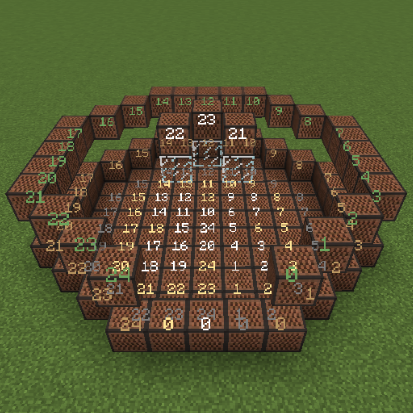
CurseForge · Minecraft mod
Notebot
An automatic noteblock player that plays MIDI files
Choose a version Pick your version below, then grab the matching file.
Quick answer
Which Notebot release matches 1.8.7?
Best match for your filters NoteBot.zip
Game version 1.8.7, 1.8.4, 1.8.3
Loader Not required
NoteBot.zip targets 1.8.7, 1.8.4, 1.8.3. The project page does not say whether this file belongs on the client, dedicated server, or both. No extra mods listed for this file.
Where it goes
Is Notebot required on the client, server, or both?
The project page does not say whether this file belongs on the client, dedicated server, or both.
Client Source doesn’t say
Dedicated server Source doesn’t say
Loader for this release No loader listed
Required install it here Optional supported, not mandatory Not supported do not install here Source doesn’t say do not assume
The source does not explicitly classify this release as client-only or server-only.
What else does NoteBot.zip need?
NoteBot.zip on 1.8.7. Every mod below is checked against that same setup.
This file does not list any required mods. Do not add a library just because a different file uses it.
This file does not list any required or optional mods.
Before you install it
Add Notebot without breaking your instance.
Built for NoteBot.zip on 1.8.7. Pick another file and the loader, install side or required mods may change.
- 01
Stick to this file
Use NoteBot.zip. It targets 1.8.7, 1.8.4, 1.8.3; another release may have different loader, side or dependency requirements.
- 02
Bring the mods it needs
This file does not list any required mods. Do not add a library just because a different file uses it.
- 03
Put it on the correct side
The project page does not say whether this file belongs on the client, dedicated server, or both.
- 04
Pick the file you checked
Use the “Get this file” button beside NoteBot.zip. It opens that exact file at the source.
About this project
What does Notebot add?
This is a forge mod that allows the player to play MIDI files using a piano like instrument built out of noteblocks.
Playing demonstration:
There are 5 instruments that can be played at the same time, you can choose the instruments to be used by the songs.
It works on multiplayer if there's not much lag and if no plugins are conflicting with it.
To play any song you will need the 5 instruments to make a piano, you can either build it yourself, or use the provided map with a complete one.
The map also shows how to build the piano, it needs to be done exactly like in the map or the songs wont sound right.
Some usage demonstration:
The songs must be in the MIDI file format (.mid) to be used.
Not all songs will sound right, you need to edit it to use the right instruments, the simpler the song the better, but that doesn't mean it can't play with multiple channels, it depends on the song.
What works best is music that does not rely on note velocity i.e music that doesn't hold down on the notes too much, because when you hit a noteblock it plays the note for a fixed time, there is no "force" when you hit the noteblock.
Optional:
Included in the download are sample songs, these go in ".minecraft/NoteBot/Converted", use them if you don't feel like converting your own songs.
Tutorial:
You will need to have the piano ready, you can either use the provided map or make your own.
The map also shows how to build your own.
A finished piano looks like this:

Go in the center of the piano, open the GUI (default key G) and press "Center Player".
This will ensure that you are at the absolute center of the piano.


Look in the direction of the entrance hole and press "Map" on all the instruments, a white "?" will appear at the center of each noteblock.
It should look like this:

If you are using the completed piano on the provided map then you can just click "Override" on each instrument.
But if you accidentally right clicked one of the notes, or if you've made your own piano you will now need to tune it.
To tune:
Press "Discover" on each instrument, this will hit all blocks, some of them or all of them should now have a red "X" at the center.
After it's done press "Tune" on each instrument. Then press "Discover" again after tuning.
After discovery it should look like this:

After tuning and discovery again it should look like this (if there is still X's then repeat the process):

Note: Tuning may fail, that is why you need to discover the notes often when tuning. You can change the speed of the discovery and the tuning from the "Other" tab. In single player, a fast speed is fine, but in multiplayer you might want to have a generous delay, if you don't want to spend dozens of minutes tuning.
After Tuning/Overriding:
Put your .mid file in the folder ".minecraft/NoteBot/ToConvert", create the folders if they don't exist.

Using the in-game GUI, go in the "MIDI Converter" tab, choose the file and convert it.

Using the "Editor" tab, choose converted song, then choose the instrument for each channel.

Press "Save" when you're done
Using the "Player" tab, choose the song and play it.

Some tips for successful playing:
- Use music that doesn't rely on note velocity, or note force.
- Not all channels need to be played, just the most important elements for the song
- Hitting the same note twice doesn't work right, so if there are mirror channels you should either make them play different instruments or mute one of them
- If you have to, analyse the song in a program that offers more flexibility on the preview. I recommend Minecraft Note Block Studio (no relation), basically anything that allows you to isolate channels and preview the changes will help with songs that have many channels.
Project description from CurseForge.
Pick your setup
Notebot by Minecraft version and loader
Choose the version and loader you play, then open the matching release.
Minecraft version
1.8.6
1 loader buildMinecraft version
1.8.5
1 loader buildMinecraft version
1.8.4
1 loader buildMinecraft version
1.8.3
1 loader buildMinecraft version
1.8.2
1 loader buildMinecraft version
1.8.1
1 loader buildMinecraft version
1.8
1 loader buildCheck the dependencies, then try the file in a copied instance before changing a world you care about.
Recent files
Notebot versions and loaders
NoteBot.zip
22 Aug 2015
Client Source doesn’t say Server Source doesn’t say Dependencies No extras listed Listed on Release listing
Check the 1.8.7 setup 1.8.71.8.41.8.31.8.6 release
Notebot.zip
8 Aug 2015
Client Source doesn’t say Server Source doesn’t say Dependencies No extras listed Listed on Release listing
Check the 1.8.7 setup 1.8.71.8.41.8.31.8.6 release
Notebot.zip
8 Aug 2015
Client Source doesn’t say Server Source doesn’t say Dependencies No extras listed Listed on Release listing
Check the 1.8.7 setup 1.8.71.8.41.8.31.8.6 release
Looking for an older file? The official CurseForge project page is in Resources.