Minecraft version
Back to mods 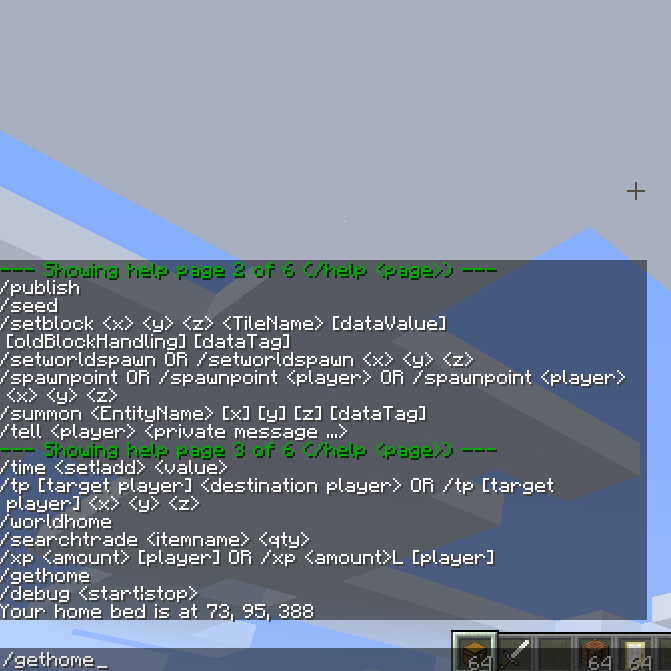
CurseForge · Minecraft mod
Search Commands
New commands: /searchitem, /searchtrade, /enderchest, /home, /gethome, /worldhome
Choose a version Pick your version below, then grab the matching file.
Quick answer
Which Search Commands release matches 1.8?
Best match for your filters SearchCommands-1.8-1.0.0.jar
Game version 1.8
Loader Not required
Search Commands SearchCommands-1.8-1.0.0.jar targets 1.8. The project page does not say whether this file belongs on the client, dedicated server, or both. No extra mods listed for this file.
Where it goes
Is Search Commands required on the client, server, or both?
The project page does not say whether this file belongs on the client, dedicated server, or both.
Client Source doesn’t say
Dedicated server Source doesn’t say
Loader for this release No loader listed
Required install it here Optional supported, not mandatory Not supported do not install here Source doesn’t say do not assume
The source does not explicitly classify this release as client-only or server-only.
What else does Search Commands SearchCommands-1.8-1.0.0.jar need?
SearchCommands-1.8-1.0.0.jar on 1.8. Every mod below is checked against that same setup.
This file does not list any required mods. Do not add a library just because a different file uses it.
This file does not list any required or optional mods.
Before you install it
Add Search Commands without breaking your instance.
Built for Search Commands SearchCommands-1.8-1.0.0.jar on 1.8. Pick another file and the loader, install side or required mods may change.
- 01
Stick to this file
Use SearchCommands-1.8-1.0.0.jar. It targets 1.8; another release may have different loader, side or dependency requirements.
- 02
Bring the mods it needs
This file does not list any required mods. Do not add a library just because a different file uses it.
- 03
Put it on the correct side
The project page does not say whether this file belongs on the client, dedicated server, or both.
- 04
Pick the file you checked
Use the “Get this file” button beside SearchCommands-1.8-1.0.0.jar. It opens that exact file at the source.
About this project
What does Search Commands add?
UPDATE 1.10.2 : This still exists but no longer as a standalone single item mod. See downloads at https://mods.curse.com/mc-mods/minecraft/239286-cyclic , a mod where you can turn off any items you dont want in config.
New commands: /searchitem, /searchtrade, /enderchest, /home, /gethome, /worldhome. (Not every command searches for something, but thats just the name of the mod).
Search nearby containers and villagers to help you find out if certain items or villagers are nearby.
So "/searchitem piston" will direct you to nearby containers with pistons by saying something like (4 west 2 north), or displaying coordinates if the config file allows it.
Home will send you to your bed (if set and if you are in the overworld only). Gethome will just display your bed location, and worldhome sends you to the map spawn point.
I suggest turning 'enderchest' to OP only, since the command is overpowered a little in survival.
Each command can be turned off in the config file (in case it conflicts with a command added by another mod with the same name)
Also, you can set for each command whether it requires OP or not, and sometimes the search radius.
Project description from CurseForge.
Pick your setup
Search Commands by Minecraft version and loader
Choose the version and loader you play, then open the matching release.
Minecraft version
1.8
1 loader buildMinecraft version
1.7.10
1 loader buildCheck the dependencies, then try the file in a copied instance before changing a world you care about.
Recent files
Search Commands versions and loaders
SearchCommands-1.8-1.0.0.jar
23 Aug 2015
Client Source doesn’t say Server Source doesn’t say Dependencies No extras listed Listed on Release listing
Check the 1.8 setup 1.8 release
Looking for an older file? The official CurseForge project page is in Resources.