Minecraft version
Back to mods ![RPG-Hud [Forge] project artwork](https://media.forgecdn.net/avatars/287/873/637309689284475357.png)
CurseForge · Minecraft mod
RPG-Hud [Forge]
This mod will change your HUD (Heads Up Display) and add a few new features to it!
Choose a version Pick your version below, then grab the matching file.
Quick answer
Which RPG-Hud [Forge] release should I use?
Latest stable file [1.20.1][Forge] RPG-HUD-3.13
Game version 1.20.1
Loader Forge, NeoForge
RPG-Hud [Forge] [1.20.1][Forge] RPG-HUD-3.13 targets 1.20.1 with Forge, NeoForge. The project page does not say whether this file belongs on the client, dedicated server, or both. No extra mods listed for this file.
Where it goes
Is RPG-Hud [Forge] required on the client, server, or both?
The project page does not say whether this file belongs on the client, dedicated server, or both.
Client Source doesn’t say
Dedicated server Source doesn’t say
Loader for this release Forge, NeoForge
Required install it here Optional supported, not mandatory Not supported do not install here Source doesn’t say do not assume
The source does not explicitly classify this release as client-only or server-only.
What else does RPG-Hud [Forge] [1.20.1][Forge] RPG-HUD-3.13 need?
[1.20.1][Forge] RPG-HUD-3.13. Change the file and its required mods may change too.
This file does not list any required mods. Do not add a library just because a different file uses it.
This file does not list any required or optional mods.
Before you install it
Add RPG-Hud [Forge] without breaking your instance.
Built for RPG-Hud [Forge] [1.20.1][Forge] RPG-HUD-3.13. Pick another file and the loader, install side or required mods may change.
- 01
Stick to this file
Use [1.20.1][Forge] RPG-HUD-3.13. It targets 1.20.1 with Forge, NeoForge; another release may have different loader, side or dependency requirements.
- 02
Bring the mods it needs
This file does not list any required mods. Do not add a library just because a different file uses it.
- 03
Put it on the correct side
The project page does not say whether this file belongs on the client, dedicated server, or both.
- 04
Pick the file you checked
Use the “Get this file” button beside [1.20.1][Forge] RPG-HUD-3.13. It opens that exact file at the source.
About this project
What does RPG-Hud [Forge] add?
THIS is the Forge Version of this Mod.
For the Fabric Version, click here
This mod is now available on Modrinth
Special Thanks to
OnyxKnight for contributing the config to reposition HUD elements relative to their original position. Check out his projects!
and zero_one_nine for porting the mod to 1.18.2
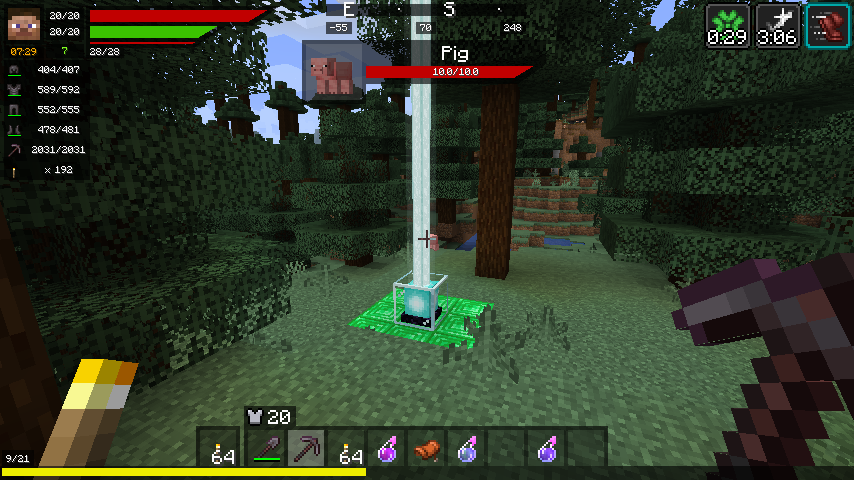
This mod will change your HUD (Heads Up Display) and add a few new features to it!
Features:
- Health bar
- Hunger bar
- Experience bar
- Breath bar
- Horse jump bar
- Character widget
- Numeric values
- Health
- Stamina
- Experience
- Clock widget (See the world's time!)
- Different time formats (24h,12h)
- Immersive (Set it to only display if you carry a clock!)
- Compass widget (See the direction you are going)
- Immersive (Set it to only display if you carry a compass)
- Item details
- Display the item durability of your armor and equipped items
- Display how many of the equipped block you have in your inventory
- Display which arrow will be shot and how many of that type you carry
- EntityInspect
- Display Health and armor of the Creature you are looking at
- Status Effects
- See your active Status Effects with a timer
- Resize the Status Effects to your liking
- Render the Status Effects vertically instead
- Free repositioning
- You can reposition every single element of the mod
- Debug settings (If this mod conflicts with another)
- Disable anything you want of this mod
- Disable the event other mods use to render certain elements (e.g. the health event)
- Different HUD types (plus possible plugins!) - see Media for screenshots!
- Vanilla HUD (you only want the other features, not the RPG-styled HUDs)
- Simple HUD (My favorite - similar to vanilla but with bars!)
- Default HUD (simple, effective)
- Extended HUD (also simple, also effective)
- Full Texture HUD (if you want to re-texture the entire thing)
- Modern HUD (smooth, simple, transparent)
- Hotbar HUD (widget combined with the hotbar)
Almost everything is customizable (and there will be even more customization possibilities in the future) via the ingame settings menu.
You can find the settings menu at the top right of your menu screen.
You have my sincere gratitude,
Raelzaryn
Project description from CurseForge.
Pick your setup
RPG-Hud [Forge] by Minecraft version and loader
Choose the version and loader you play, then open the matching release.
Minecraft version
26.1.2
1 loader buildMinecraft version
26.1.1
1 loader buildMinecraft version
26.1
1 loader buildMinecraft version
1.21.11
1 loader buildMinecraft version
1.21.8
1 loader buildMinecraft version
1.21.1
1 loader buildMinecraft version
1.20.6
1 loader buildMinecraft version
1.20.1
2 loader buildsMinecraft version
1.19.4
1 loader buildMinecraft version
1.19.2
1 loader buildMinecraft version
1.18.2
1 loader buildShowing the newest 12 of 29 game versions. Older files are in the list below.
Check the dependencies, then try the file in a copied instance before changing a world you care about.
Recent files
RPG-Hud [Forge] versions and loaders
[1.20.1][Forge] RPG-HUD-3.13
[1.20.1][Forge] RPG-HUD-3.13.jar
21 Jun 2026
Client Source doesn’t say Server Source doesn’t say Dependencies No extras listed Listed on Release listing
Check the 1.20.1 · Forge setup 1.20.1ForgeNeoForge release
[26.2][NeoForge] RPG-HUD 3.13
[26.2][NeoForge] RPG-HUD 3.13.jar
20 Jun 2026
Client Source doesn’t say Server Source doesn’t say Dependencies No extras listed Listed on Release listing
Check the 26.2 · NeoForge setup NeoForge26.2 release
[26.1.X][NeoForge] RPG-HUD 3.13
[26.1.X][NeoForge] RPG-HUD 3.13.jar
20 Jun 2026
Client Source doesn’t say Server Source doesn’t say Dependencies No extras listed Listed on Release listing
Check the 26.1.2 · NeoForge setup NeoForge26.126.1.126.1.2 release
[1.21.8][NeoForge] RPG-HUD 3.13
[1.21.8][NeoForge] RPG-HUD 3.13.jar
20 Jun 2026
Client Source doesn’t say Server Source doesn’t say Dependencies No extras listed Listed on Release listing
Check the 1.21.8 · NeoForge setup 1.21.8NeoForge release
[1.21.11][NeoForge] RPG-HUD 3.13
[1.21.11][NeoForge] RPG-HUD 3.13.jar
20 Jun 2026
Client Source doesn’t say Server Source doesn’t say Dependencies No extras listed Listed on Release listing
Check the 1.21.11 · NeoForge setup NeoForge1.21.11 release
[1.21.1][NeoForge] RPG-HUD 3.13
[1.21.1][NeoForge] RPG-HUD 3.13.jar
20 Jun 2026
Client Source doesn’t say Server Source doesn’t say Dependencies No extras listed Listed on Release listing
Check the 1.21.1 · NeoForge setup 1.21.1NeoForge release
[26.2][NeoForge] RPG-HUD 3.10.3
[26.2][NeoForge] RPG-HUD 3.10.3.jar
20 Jun 2026
Client Source doesn’t say Server Source doesn’t say Dependencies No extras listed Listed on Release listing
Check the 26.2 · NeoForge setup NeoForge26.2 release
[26.1.2][NeoForge] RPG-HUD 3.10.3
[26.1.2][NeoForge] RPG-HUD 3.10.3.jar
9 Jun 2026
Client Source doesn’t say Server Source doesn’t say Dependencies No extras listed Listed on Release listing
Check the 26.1.2 · NeoForge setup NeoForge26.126.1.126.1.2 release
[1.21.11][NeoForge] RPG-HUD 3.10.3
[1.21.11][NeoForge] RPG-HUD 3.10.3.jar
9 Jun 2026
Client Source doesn’t say Server Source doesn’t say Dependencies No extras listed Listed on Release listing
Check the 1.21.11 · NeoForge setup NeoForge1.21.11 release
[1.21.8][NeoForge] RPG-HUD 3.10.3
[1.21.8][NeoForge] RPG-HUD 3.10.3.jar
9 Jun 2026
Client Source doesn’t say Server Source doesn’t say Dependencies No extras listed Listed on Release listing
Check the 1.21.8 · NeoForge setup 1.21.8NeoForge release
[1.21.1][NeoForge] RPG-HUD 3.10.3
[1.21.1][NeoForge] RPG-HUD 3.10.3.jar
8 Jun 2026
Client Source doesn’t say Server Source doesn’t say Dependencies No extras listed Listed on Release listing
Check the 1.21.1 · NeoForge setup 1.21.1NeoForge release
[1.20.6][NeoForge] RPG-HUD 3.10.3
[1.20.6][NeoForge] RPG-HUD 3.10.3.jar
7 Jun 2026
Client Source doesn’t say Server Source doesn’t say Dependencies No extras listed Listed on Release listing
Check the 1.20.6 · NeoForge setup 1.20.6NeoForge release
Looking for an older file? The official CurseForge project page is in Resources.
 mod
mod CurseForge · Minecraft
Hitbox Plus+ Utility
A lightweight client-side Fabric mod for customizable Minecraft hitboxes with easy toggles, colors, overlays, and rendering controls.
 mod
mod CurseForge · Minecraft
classes RPG
A Minecraft mod that adds unique character classes, each with special abilities, skills, and playstyles. Choose your class, develop your powers, and experience survival in a whole new way.
 mod
mod CurseForge · Minecraft
Polis
A registry for land, contracts, money and a court - it records what players do and never prevents it.