Minecraft version
Back to mods 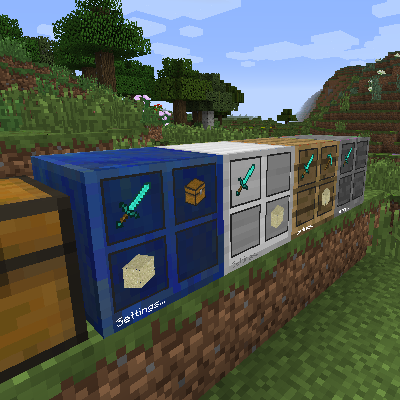
CurseForge · Minecraft mod
Gear Swapper
Gear Swapper is a simple but flexible block to allow swapping hotbar+armor easily
Choose a version Pick your version below, then grab the matching file.
Quick answer
Which Gear Swapper release matches 1.8.9?
Best match for your filters gearswap-1.8.9-1.2.6.jar
Game version 1.8.9
Loader Not required
Gear Swapper gearswap-1.8.9-1.2.6.jar targets 1.8.9. The project page does not say whether this file belongs on the client, dedicated server, or both. No extra mods listed for this file.
Where it goes
Is Gear Swapper required on the client, server, or both?
The project page does not say whether this file belongs on the client, dedicated server, or both.
Client Source doesn’t say
Dedicated server Source doesn’t say
Loader for this release No loader listed
Required install it here Optional supported, not mandatory Not supported do not install here Source doesn’t say do not assume
The source does not explicitly classify this release as client-only or server-only.
What else does Gear Swapper gearswap-1.8.9-1.2.6.jar need?
gearswap-1.8.9-1.2.6.jar on 1.8.9. Every mod below is checked against that same setup.
This file does not list any required mods. Do not add a library just because a different file uses it.
This file does not list any required or optional mods.
Before you install it
Add Gear Swapper without breaking your instance.
Built for Gear Swapper gearswap-1.8.9-1.2.6.jar on 1.8.9. Pick another file and the loader, install side or required mods may change.
- 01
Stick to this file
Use gearswap-1.8.9-1.2.6.jar. It targets 1.8.9; another release may have different loader, side or dependency requirements.
- 02
Bring the mods it needs
This file does not list any required mods. Do not add a library just because a different file uses it.
- 03
Put it on the correct side
The project page does not say whether this file belongs on the client, dedicated server, or both.
- 04
Pick the file you checked
Use the “Get this file” button beside gearswap-1.8.9-1.2.6.jar. It opens that exact file at the source.
About this project
What does Gear Swapper add?
With Gear Swapper you can easily define up to four different sets of hotbar + armor and switch with them easily. It works in-game with a block.
By default it works as follows:
- Sneak-left-click on one of the four slots to remember your current hotbar+armor selection in that slot. Your armor and hotbar remains on you. The block will also remember how many you had of the given item and it will attempt to restore that amount later.
- Right-click on one of the four slots to restore the hotbar+armor as it was remembered then. All items currently in your hotbar or armor that are in the way for the remembered items will be stored in your inventory. All slots that were empty when you remembered your setup will be unchanged (i.e. it will by default not empty them).
- When restoring a selection the block will first look in the player inventory, then in the local inventory (a 4x4 internal buffer) and finally in any possible adjacent inventories until it finds the items it needs.
- The Bauble inventory (when present) is also supported.
However, this block can be configured for more control. If you right-click the block on the 'Settings...' label or on the sides of the block then it will show a GUI:
{width=514 height=496}
The example above shows a gui with four different configurations:
- The top-left configuration (top row in the gui) is configured with your prefered mining gear. i.e. sword, pickaxe, torches, some sand and good armor. The slots that are crossed out (two of them in this selection) will be cleared. The other two slots are left alone (i.e. whatever is there will remain there).
- The top-right configuration (second row in the gui) is configured for gardening. No armor is desired here.
- The bottom-left configuration (third row in the gui) is configured for tech work.
- The bottom-right configuration (last row in the gui) is configured to clear the hotbar and armor slots completely.
The three icons on the top-left of the gui show the preference for storing items from your hotbar and armor when you restore a different selection. The default settings are to first store items back in the players inventory. If that is full it will go to the internal inventory and if that also fails it will store it in an adjacent inventory. If that final fallback would also fail it will simply throw the items in the world. Nothing will be lost.
By clicking those three icons you can change the priority. For example. If you prefer that armor and tools that are stored away should go to the internal inventory then you can change the top icon until it resembles the wooden icon with the four boxes on it.
There are five different gear swappers (stone, wood, lapis lazuli, iron, and glass) and you can also configure another one with a modded texture through the config.
Source code: github.com/McJty/GearSwapper
Modpack Policy: Feel free to use this in any modpack.
Demonstration video:
Project description from CurseForge.
Pick your setup
Gear Swapper by Minecraft version and loader
Choose the version and loader you play, then open the matching release.
Minecraft version
1.12.1
1 loader buildMinecraft version
1.12
1 loader buildMinecraft version
1.11.2
1 loader buildMinecraft version
1.11
1 loader buildMinecraft version
1.10.2
1 loader buildMinecraft version
1.10
1 loader buildMinecraft version
1.9.4
1 loader buildMinecraft version
1.8.9
1 loader buildMinecraft version
1.8.8
1 loader buildMinecraft version
1.7.10
1 loader buildCheck the dependencies, then try the file in a copied instance before changing a world you care about.
Recent files
Gear Swapper versions and loaders
gearswap-1.8.9-1.2.6.jar
10 Mar 2016
Client Source doesn’t say Server Source doesn’t say Dependencies No extras listed Listed on Release listing
Check the 1.8.9 setup 1.8.9 release
gearswap-1.8.9-1.2.5.jar
15 Feb 2016
Client Source doesn’t say Server Source doesn’t say Dependencies No extras listed Listed on Release listing
Check the 1.8.9 setup 1.8.9 release
gearswap-1.8.9-1.2.4.jar
5 Jan 2016
Client Source doesn’t say Server Source doesn’t say Dependencies No extras listed Listed on Release listing
Check the 1.8.9 setup 1.8.9 release
Looking for an older file? The official CurseForge project page is in Resources.