Minecraft version
Back to mods 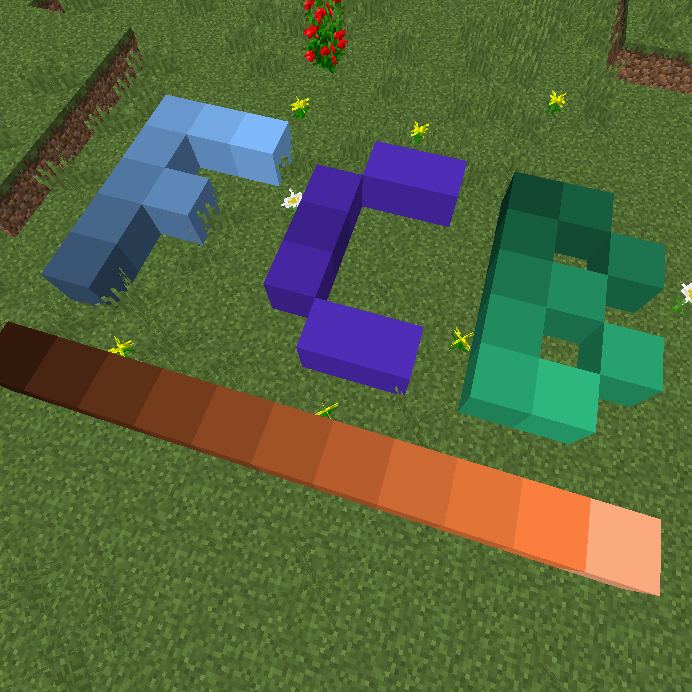
CurseForge · Minecraft mod
Flat Colored Blocks - For Forge
Vast quantities of colored blocks, that's all.
Choose a version Pick your version below, then grab the matching file.
Quick answer
Which Flat Colored Blocks - For Forge release should I use?
Latest stable file flatcoloredblocks - 21.1.16 - release
Game version 1.21.1
Loader NeoForge
Flat Colored Blocks - For Forge flatcoloredblocks - 21.1.16 - release targets 1.21.1 with NeoForge. The project page does not say whether this file belongs on the client, dedicated server, or both. No extra mods listed for this file.
Where it goes
Is Flat Colored Blocks - For Forge required on the client, server, or both?
The project page does not say whether this file belongs on the client, dedicated server, or both.
Client Source doesn’t say
Dedicated server Source doesn’t say
Loader for this release NeoForge
Required install it here Optional supported, not mandatory Not supported do not install here Source doesn’t say do not assume
The source does not explicitly classify this release as client-only or server-only.
What else does Flat Colored Blocks - For Forge flatcoloredblocks - 21.1.16 - release need?
flatcoloredblocks - 21.1.16 - release. Change the file and its required mods may change too.
This file does not list any required mods. Do not add a library just because a different file uses it.
This file does not list any required or optional mods.
Before you install it
Add Flat Colored Blocks - For Forge without breaking your instance.
Built for Flat Colored Blocks - For Forge flatcoloredblocks - 21.1.16 - release. Pick another file and the loader, install side or required mods may change.
- 01
Stick to this file
Use flatcoloredblocks - 21.1.16 - release. It targets 1.21.1 with NeoForge; another release may have different loader, side or dependency requirements.
- 02
Bring the mods it needs
This file does not list any required mods. Do not add a library just because a different file uses it.
- 03
Put it on the correct side
The project page does not say whether this file belongs on the client, dedicated server, or both.
- 04
Pick the file you checked
Use the “Get this file” button beside flatcoloredblocks - 21.1.16 - release. It opens that exact file at the source.
About this project
What does Flat Colored Blocks - For Forge add?
Flat Colored Blocks
A mod that generates a selection of simple colored blocks, transparent blocks, and glowing blocks ( all configurable ) for use in building and creative projects. Highly configurable with settings to adjust number of hues, values, and saturation, as well as min/max ranges.
Makes a great companion to one of my other mods Chisels & Bits:
http://minecraft.curseforge.com/projects/chisels-bits ( requires 1.5.1 or better ) which allows you to use the colored blocks as bits.
Requries: Forge
Frequently Asked Questions
Can I use this in my mod pack?
- Yes.
The texture on the blocks isn't completely flat, can that be changed?
- I choose to make use a slightly textured option as the default since I think it fits better with MC. However, there a several options you can use the mod configuration screen, such as flawless ( no defects ), stone, or hardened clay. If the options available do not suit your tastes you can also change the textures using a resource pack.
Why can't I see any blocks in the crafting tool?
- Make sure you have dyes and cobblestone/glass/glowstone in your inventory, if you are missing either then nothing will be craft-able. Any dyes registered with the ore dictionary should be usable. ( if you can't find anything, check your configs, its possible to change the crafting ingredient. )
Can I change which blocks are used to craft them? or how many blocks I get per craft?
- Absolutely, check the mod config gui, in the crafting tab you can change how many per craft, and which block is used to craft the item.
Why does this mod use so many block ids?
- This mod uses block states to generate mod compatible blocks, this means that other mods can detect and use these blocks for advanced features, such as chisels & bits, micro-blocks, or other features. They are also much more lightweight than a tile entity based implementation. Effort was made to ensure that the minimum required block ids were used for the generated shades.
Can I increase or decreases the shades, or what if I only want brighter variations?
- You can use the configuration screen to change the minimum, and maximum range for Hue, Value, and Saturation ( HSV Color space. ), as well as the number of variations for each color dimension. It is recommended to test your settings in a creative test world before accepting your choice.
- Important Note: You should not change your settings in a world that is already using the mod, doing so will change the colors of the blocks already in the world.
Crafting Tool Recipe:
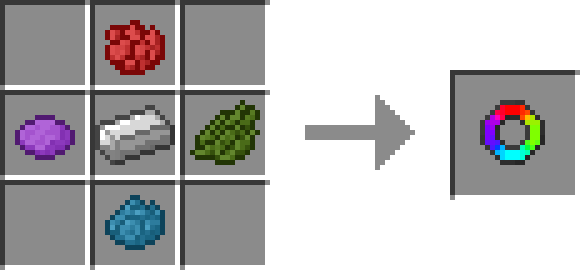
Using the item crafted you just need to have dyes and cobblestone/glass/glowstone in your inventory to craft items after opening the items gui. Some blocks require a few dyes to craft so try different dyes to see all the options.
Crafting Table Helper Recipe(s) - Version 4.3+
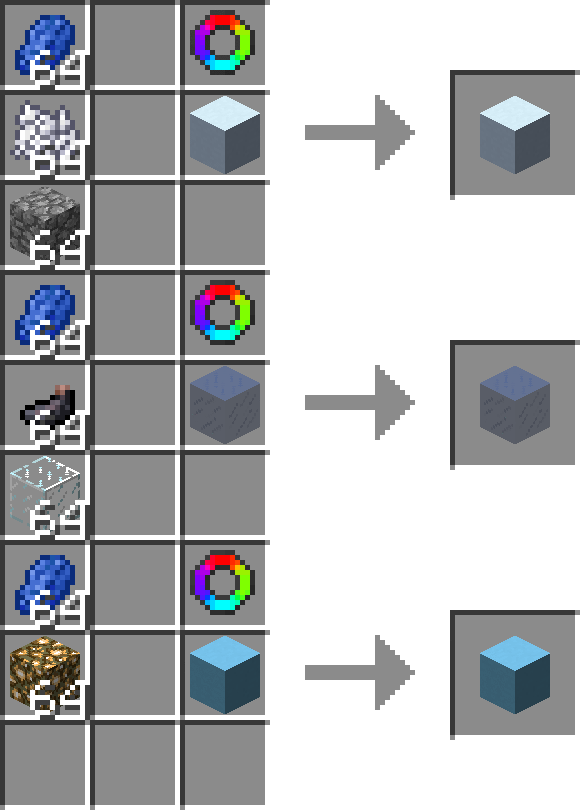
Recpie is Shapeless, Flat Colored Block You want to make more of + Colored Block Crafter, and any required ingredients, only the ingredients are consumed by crafting.
Technical Notes:
This mod can use a large number of block ids if configured wrongly or if you want to have a large range of shades, just be aware.
No tile entities are used and all rendering is done using a single model + texture, this is done to ensure mod compatibility.
Project description from CurseForge.
Pick your setup
Flat Colored Blocks - For Forge by Minecraft version and loader
Choose the version and loader you play, then open the matching release.
Minecraft version
1.20.4
1 loader buildMinecraft version
1.19.2
1 loader buildMinecraft version
1.12.2
1 loader buildMinecraft version
1.12.1
1 loader buildMinecraft version
1.12
1 loader buildCheck the dependencies, then try the file in a copied instance before changing a world you care about.
Recent files
Flat Colored Blocks - For Forge versions and loaders
flatcoloredblocks - 21.1.16 - release
flatcoloredblocks-neoforge-21.1.16.jar
11 Mar 2025
Client Source doesn’t say Server Source doesn’t say Dependencies No extras listed Listed on Release listing
Check the 1.21.1 · NeoForge setup NeoForge1.21.1 release
flatcoloredblocks - 21.1.14 - release
flatcoloredblocks-neoforge-21.1.14.jar
9 Mar 2025
Client Source doesn’t say Server Source doesn’t say Dependencies No extras listed Listed on Release listing
Check the 1.21.1 · NeoForge setup NeoForge1.21.1 release
flatcoloredblocks - 21.1.12 - release
flatcoloredblocks-neoforge-21.1.12.jar
9 Mar 2025
Client Source doesn’t say Server Source doesn’t say Dependencies No extras listed Listed on Release listing
Check the 1.21.1 · NeoForge setup NeoForge1.21.1 release
flatcoloredblocks - 21.1.9 - release
flatcoloredblocks-neoforge-21.1.9.jar
9 Mar 2025
Client Source doesn’t say Server Source doesn’t say Dependencies No extras listed Listed on Release listing
Check the 1.21.1 · NeoForge setup NeoForge1.21.1 release
flatcoloredblocks-neoforge-1.0.12.jar
30 Apr 2024
Client Source doesn’t say Server Source doesn’t say Dependencies No extras listed Listed on Release listing
Check the 1.20.4 · NeoForge setup NeoForge1.20.4 release
flat-colored-blocks-forge-1.0.11.jar
21 May 2023
Client Source doesn’t say Server Source doesn’t say Dependencies No extras listed Listed on Release listing
Check the 1.19.2 · Forge setup 1.19.2Forge release
flat-colored-blocks-forge-1.0.10.jar
21 May 2023
Client Source doesn’t say Server Source doesn’t say Dependencies No extras listed Listed on Release listing
Check the 1.19.2 · Forge setup 1.19.2Forge release
flat-colored-blocks-forge-1.0.9.jar
13 Jan 2023
Client Source doesn’t say Server Source doesn’t say Dependencies No extras listed Listed on Release listing
Check the 1.19.2 · Forge setup 1.19.2Forge release
flat-colored-blocks-forge-1.0.8.jar
12 Dec 2022
Client Source doesn’t say Server Source doesn’t say Dependencies No extras listed Listed on Release listing
Check the 1.19.2 · Forge setup 1.19.2Forge release
flatcoloredblocks-mc1.12-6.8.jar
25 May 2019
Client Source doesn’t say Server Source doesn’t say Dependencies No extras listed Listed on Release listing
Check the 1.12.2 setup 1.12.11.121.12.2 release
Looking for an older file? The official CurseForge project page is in Resources.
 mod
mod CurseForge · Minecraft
The Seven Deadly Sins | Nanatsu no Taizai
😈 Seven Deadly Sins Mod for Minecraft 1.20.1 (Forge) adds new abilities, powers of darkness and unique mechanics inspired by anime. Get a new combat experience and unlock powerful capabilities. The mod is actively developing 🚀
 mod
mod CurseForge · Minecraft
Electronic Devices
Decorative mod that adds plenty of electronic devices to decorate your house.
 mod
mod CurseForge + Modrinth · Minecraft
Quality Food
This mod adds quality to food and certain food-related material (e.g. crops)