Minecraft version
Back to mods 
CurseForge · Minecraft mod
Graves
Create a gravestone upon death with your items in it
Choose a version Pick your version below, then grab the matching file.
Quick answer
Which Graves release matches 1.8.9?
beta file graves-1.8.9-b47-universal.jar
Game version 1.8.9
Loader Not required
graves-1.8.9-b47-universal.jar targets 1.8.9. The project page does not say whether this file belongs on the client, dedicated server, or both. No extra mods listed for this file.
Where it goes
Is Graves required on the client, server, or both?
The project page does not say whether this file belongs on the client, dedicated server, or both.
Client Source doesn’t say
Dedicated server Source doesn’t say
Loader for this release No loader listed
Required install it here Optional supported, not mandatory Not supported do not install here Source doesn’t say do not assume
The source does not explicitly classify this release as client-only or server-only.
What else does graves-1.8.9-b47-universal.jar need?
graves-1.8.9-b47-universal.jar on 1.8.9. Every mod below is checked against that same setup.
This file does not list any required mods. Do not add a library just because a different file uses it.
This file does not list any required or optional mods.
Before you install it
Add Graves without breaking your instance.
Built for graves-1.8.9-b47-universal.jar on 1.8.9. Pick another file and the loader, install side or required mods may change.
- 01
Stick to this file
Use graves-1.8.9-b47-universal.jar. It targets 1.8.9; another release may have different loader, side or dependency requirements.
- 02
Bring the mods it needs
This file does not list any required mods. Do not add a library just because a different file uses it.
- 03
Put it on the correct side
The project page does not say whether this file belongs on the client, dedicated server, or both.
- 04
Pick the file you checked
Use the “Get this file” button beside graves-1.8.9-b47-universal.jar. It opens that exact file at the source.
About this project
What does Graves add?
Graves
I will NOT answer issues posted in comments. post your issues on [GITHUB]
About
The graves mod is a mod that holds onto your items when you die so you can later retrieve them.
Simply break the grave.
JourneyMap integration coming soon™
Chisels & Bits Support
Use a Chisels & Bits creation on a headstone to set your headstone.
Use an empty hand on a headstone to clear the headstone.
TomTom Support
Just install TomTom and we will do the rest.
Customization
if you would like to customize your headstone checkout my Patreon.
Project Links
License
- Graves
- (c) 2016 FireBall1725
The graves mod can be freely used and modified as long as no profit is made directly from this Minecraft mod. This mod can be included into any modpacks without asking for permissions.
Downloads
Official downloads for the Graves mod can be found on CurseForge
Issues
Graves crashing, have a suggestion, found a bug? Create an issue now!
- Make sure your issue has not already been answered or fixed and you are using the latest version. Also think about whether your issue is a valid one before submitting it.
- Go to the issues page and click new issue.
- Enter your a title of your issue (something that summarizes your issue), and then create a detailed description of the issue.
- Do not tag it with something like
[Feature]or[Bug]. When it is applicable, we will take care of it. - The following details are required. Not including them can cause the issue to be closed.
- Forge version
- Graves version
- Crash log, when reporting a crash (Please make sure to use pastebin)
- Do not post an excerpt of what you consider important, instead:
- Post the full log
- Other mods and their version, when reporting an issue between AE and another mod
- Also consider updating these before submitting a new issue, it might be already fixed
- A detailed description of the bug or feature
- To further help in resolving your issues please try to include the follow if applicable:
- What was expected?
- How to reproduce the problem?
- This is usually a great detail and allows us to fix it way faster
- Server or Single Player?
- Screen shots or Pictures of the problem
- Mod Pack using and version?
- Keep in mind that some mods might use an outdated version of Graves
- If so you should report it to your modpack
- Do not tag it with something like
- Click
Submit New Issue, and wait for feedback!
Credits
Thanks to the following people:
- FireBall1725 for Graves
- Boq for some of the help with logic behind graves (from open blocks)
- ganymedes01 for letting me use the player model code from Headcrumbs
- FusionLord for helping with the project and the model work
- Gooderness for the awesome sounds
- all the contributors
Beta Releases
Looking for the latest and greatest version?
Recipes and Anvil
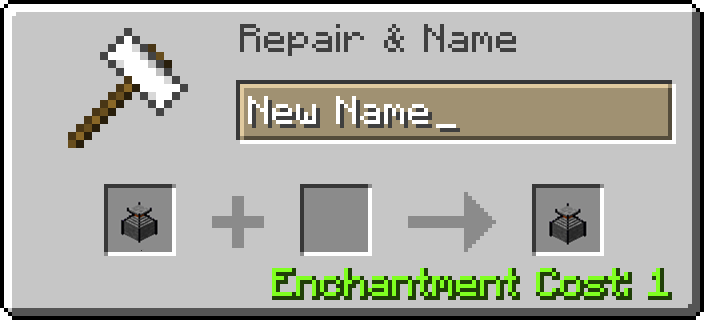
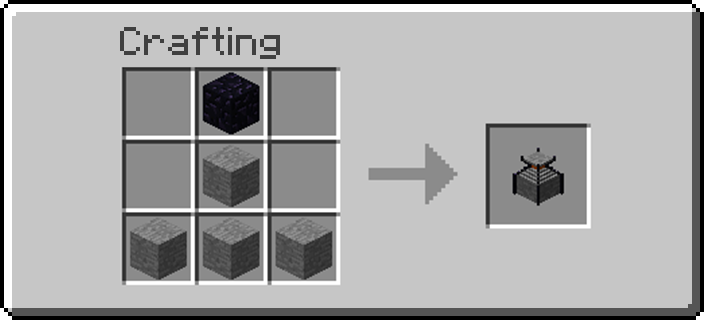
Project description from CurseForge.
Pick your setup
Graves by Minecraft version and loader
Choose the version and loader you play, then open the matching release.
Minecraft version
1.10.2
1 loader buildMinecraft version
1.10
1 loader buildMinecraft version
1.9.4
1 loader buildMinecraft version
1.9
1 loader buildMinecraft version
1.8.9
1 loader buildCheck the dependencies, then try the file in a copied instance before changing a world you care about.
Recent files
Graves versions and loaders
graves-1.8.9-b47-universal.jar
29 Mar 2016
Client Source doesn’t say Server Source doesn’t say Dependencies No extras listed Listed on Release listing
Check the 1.8.9 setup 1.8.9 beta
Looking for an older file? The official CurseForge project page is in Resources.