Minecraft version
Back to mods 
CurseForge · Minecraft mod
ObsTrophies
Trophies for your favourite Mobs!
Choose a version Pick your version below, then grab the matching file.
Quick answer
Which ObsTrophies release should I use?
Latest stable file obstrophies-1.6.0_mc1.7.10.jar
Game version 1.7.10
Loader Not required
obstrophies-1.6.0_mc1.7.10.jar targets 1.7.10. The project page does not say whether this file belongs on the client, dedicated server, or both. No extra mods listed for this file.
Where it goes
Is ObsTrophies required on the client, server, or both?
The project page does not say whether this file belongs on the client, dedicated server, or both.
Client Source doesn’t say
Dedicated server Source doesn’t say
Loader for this release No loader listed
Required install it here Optional supported, not mandatory Not supported do not install here Source doesn’t say do not assume
The source does not explicitly classify this release as client-only or server-only.
What else does obstrophies-1.6.0_mc1.7.10.jar need?
obstrophies-1.6.0_mc1.7.10.jar. Change the file and its required mods may change too.
This file does not list any required mods. Do not add a library just because a different file uses it.
This file does not list any required or optional mods.
Before you install it
Add ObsTrophies without breaking your instance.
Built for obstrophies-1.6.0_mc1.7.10.jar. Pick another file and the loader, install side or required mods may change.
- 01
Stick to this file
Use obstrophies-1.6.0_mc1.7.10.jar. It targets 1.7.10; another release may have different loader, side or dependency requirements.
- 02
Bring the mods it needs
This file does not list any required mods. Do not add a library just because a different file uses it.
- 03
Put it on the correct side
The project page does not say whether this file belongs on the client, dedicated server, or both.
- 04
Pick the file you checked
Use the “Get this file” button beside obstrophies-1.6.0_mc1.7.10.jar. It opens that exact file at the source.
About this project
What does ObsTrophies add?
(Remember to get ObsCore here as well! It's required for ObsTrophies to work!)
What is ObsTrophies?
ObsTrophies adds Trophy drops for mobs added by other Mods. Currently it adds Trophies for mobs from eleven different mobs. Even more Mod compatibility is planned. ObsTrophies is inspired by OpenBlocks' trophies, Headcrumbs, Twilight Forest and Advent of Ascension, all of which add trophies or statues as rewards for defeating mobs.
Too Many Words! Show me a Video!
Ok! Look in the spoiler below. And check my YouTube Channel for more! Also see the Minecraft Forum Thread for more.
What Mobs does it add Trophies for?
ObsTrophies adds Trophies for:
- nearly all Advent of Ascension mobs: Hunter mobs, NPCs and Minions included! There are no Trophies for Bosses as Advent of Ascension already has statues for those, and none for Pixons.
- all Lycanite's mobs
- most Twilight Forest mobs (including some bosses)
- all Animals+ mobs
- all DivineRPG mobs except bosses (DivineRPG already has statues for bosses)
- all Natura mobs
- all Dark Menagerie mobs
- most Mutant Creatures mobs (all Mutants, not pets or Spider Pig)
- all Ender Zoo mobs except the Fallen Steed
- most Erebus mobs
- most Betweenlands mobs
- All Abyssalcraft mobs (including bosses)
- most Aether II mobs
- most Mowzies Mobs
- all Exotic Birds mobs
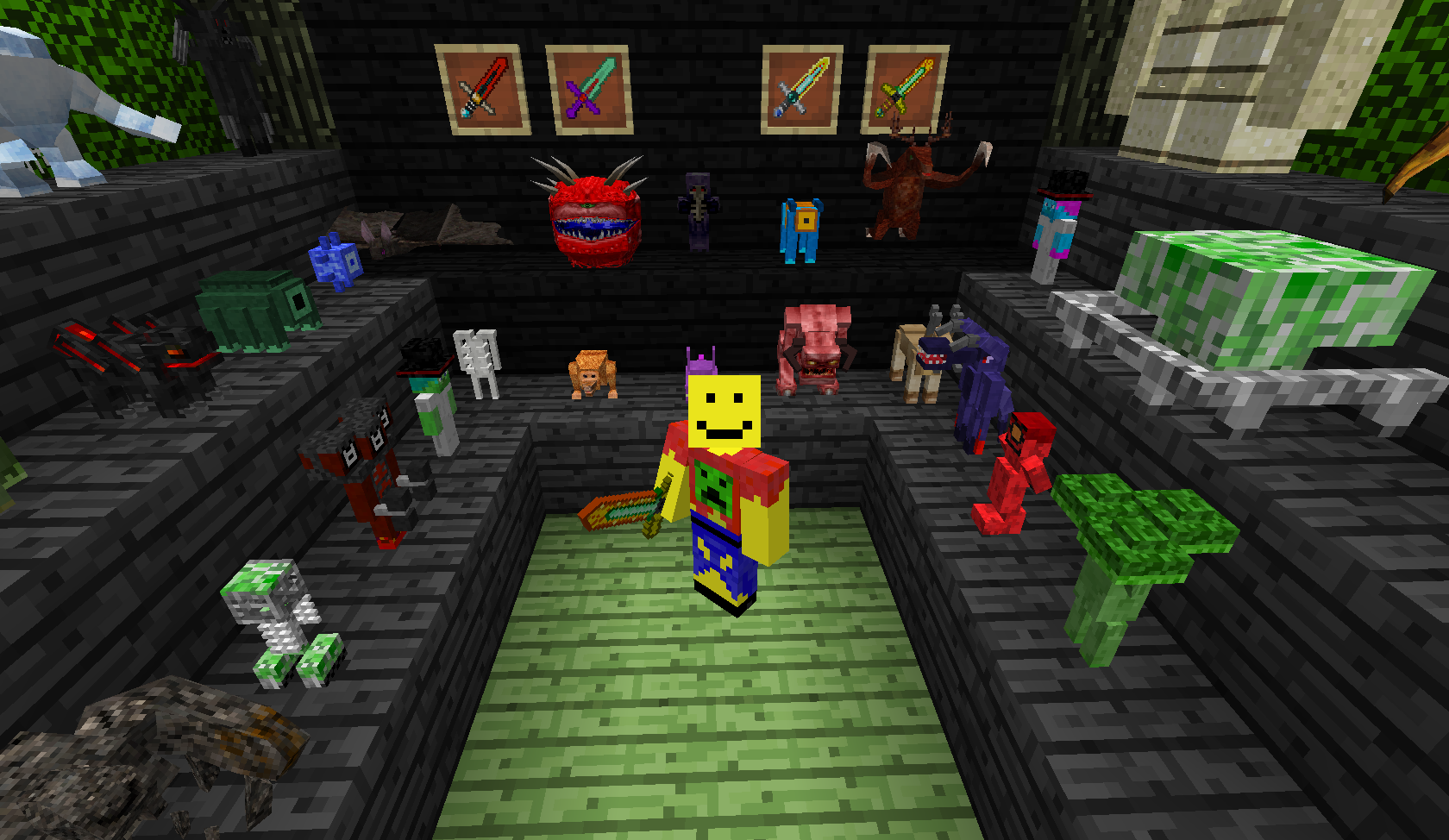
Here is just a sample!
How do I get Trophies?
To get a trophy simply kill a mob that has a trophy and there is a chance it will drop one. The chance is determined by how the mob is killed and who kills it. ObsTrophies adds some special swords to increase your chances of getting a trophy.
Here's your chances:
- If a mob dies by any means other than a (real) player it has a 1% chance to drop a trophy
- If a player kills a mob with a weapon other than a sword (e.g with a Bow and Arrow), it has a 2% chance to drop a trophy
- If a player kills a mob with nearly any sword it has a 5% chance to drop a trophy
- If that sword has Looting I on it, the chance increases to 8%
- Looting II, the chance is 10%
- Looting III, the chance is 15%
- If a player uses one of ObsTrophies' special swords, the chance is 30%
- with Looting I, 35%
- with Looting II, 40%
- with Looting III, 50%
- If a player uses one of ObsTrophies' super special swords, the chance is 80%
- with Looting I, 85%
- with Looting II, 90%
- with Looting III, 100% - you are guaranteed to get a Trophy!
What are these Special and Super Swords and how do I get them?
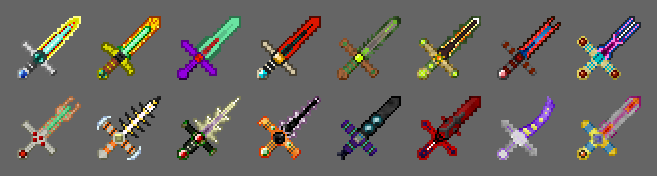
ObsTrophies adds some swords to help you improve your chances of getting a trophy. The particular sword to use depends on the Mod the Mob belongs to and what chance you want to have. Each sword requires you to craft the hilt and blade separately, before crafting them together into the final sword.
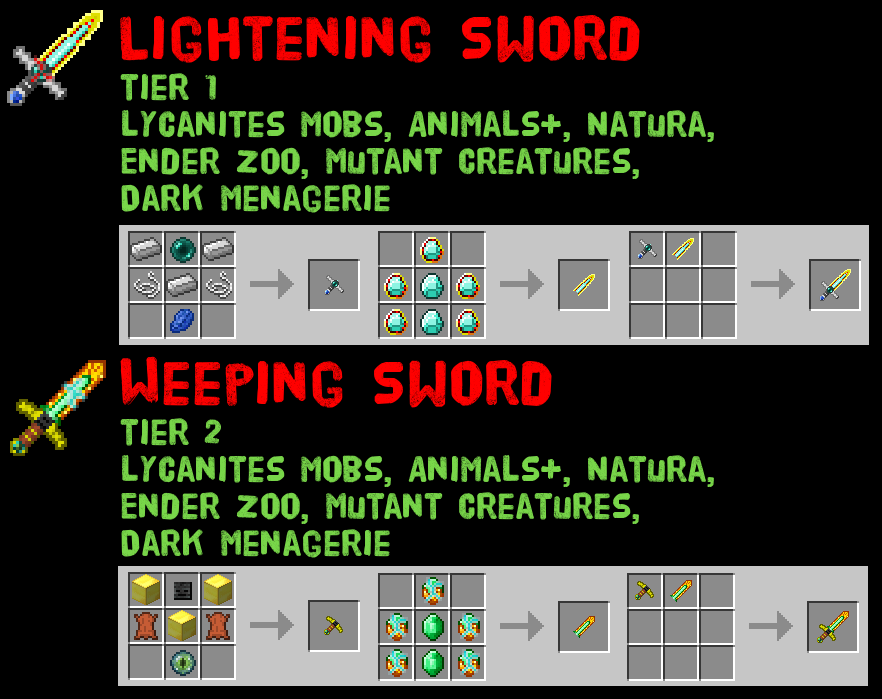
Here's the stats for them and how to craft them:

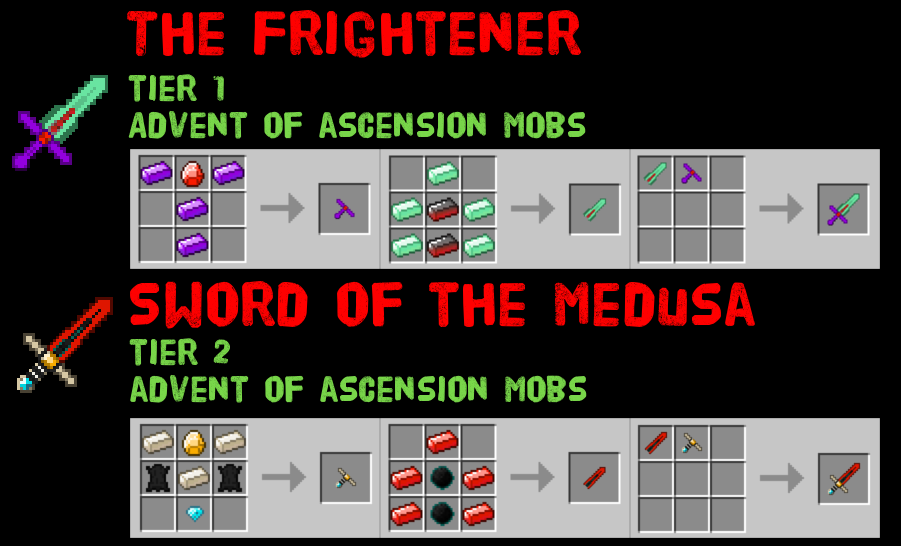
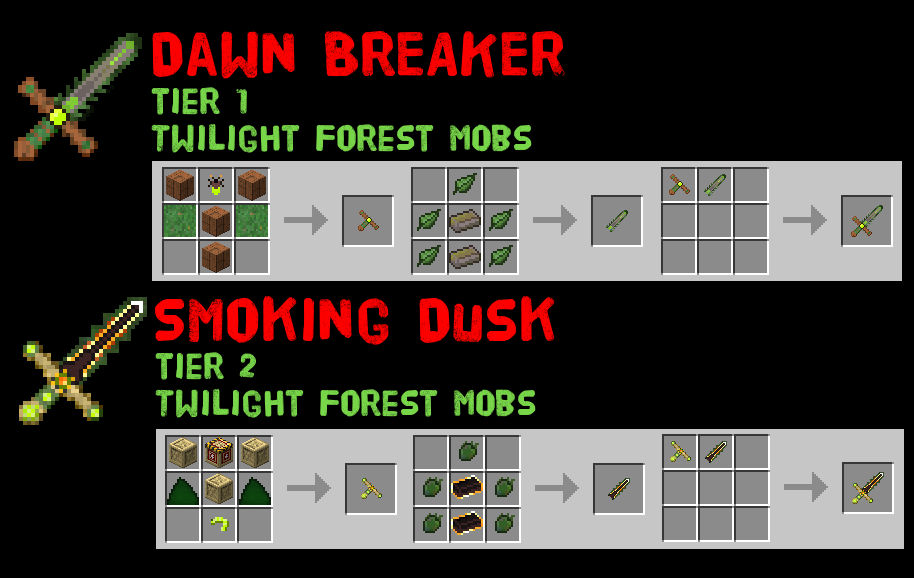
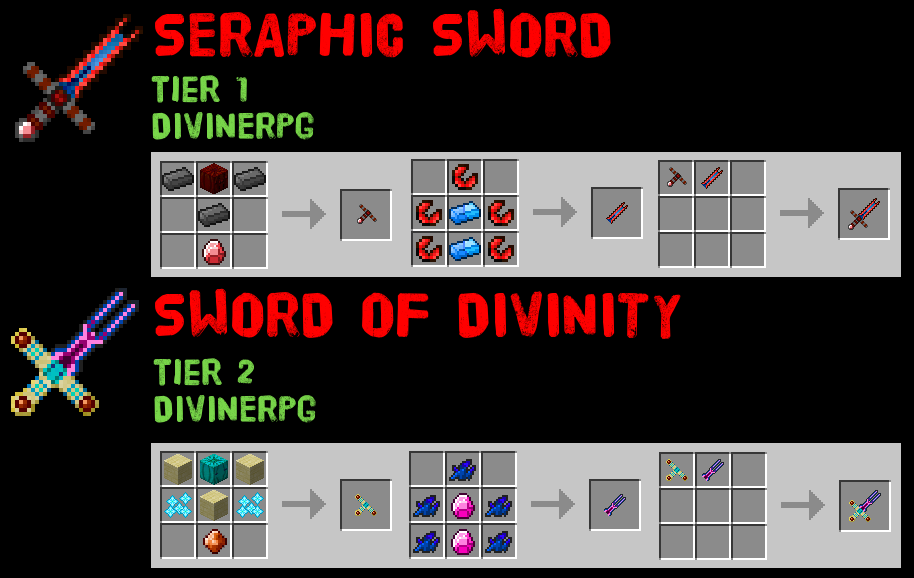
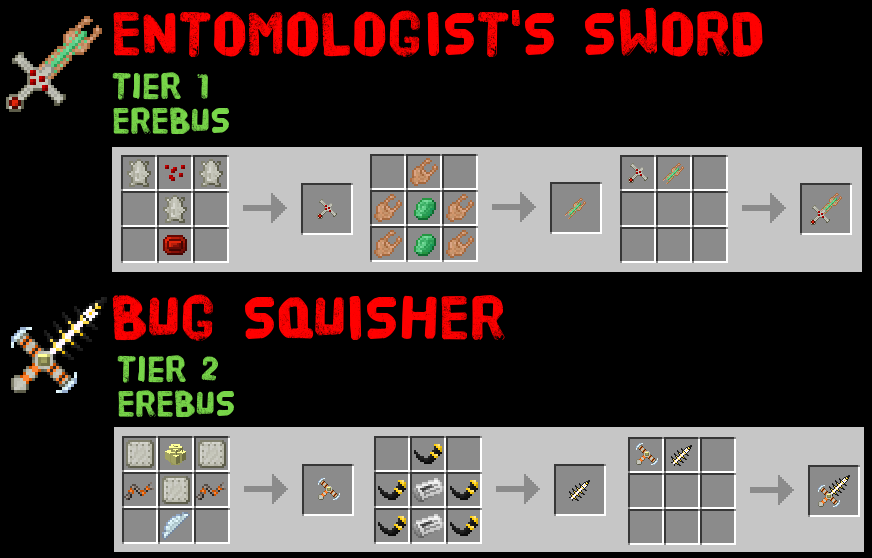
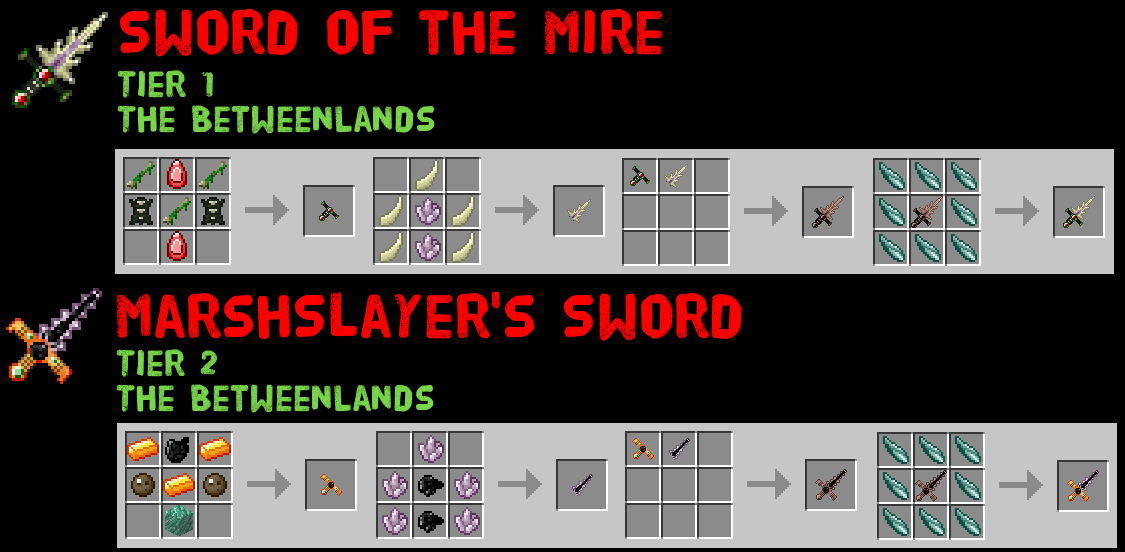
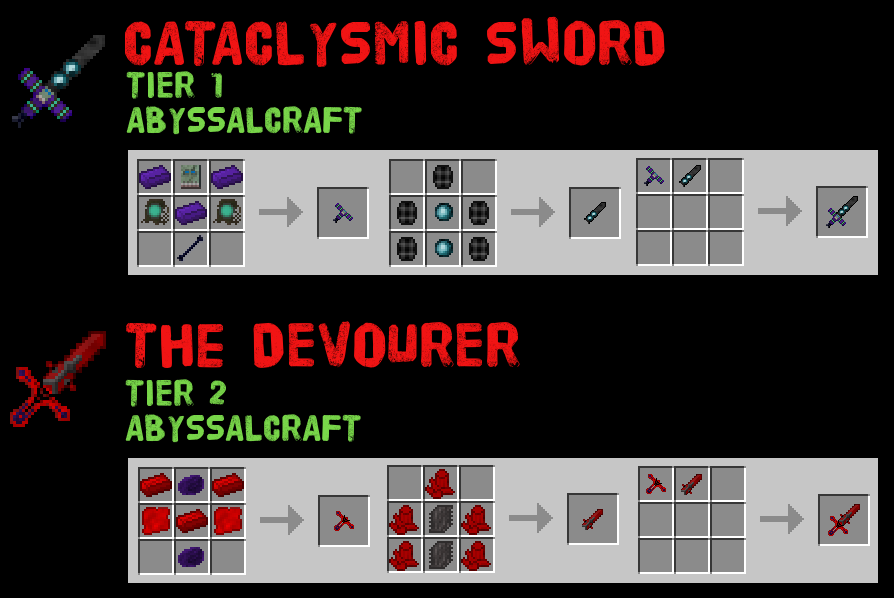
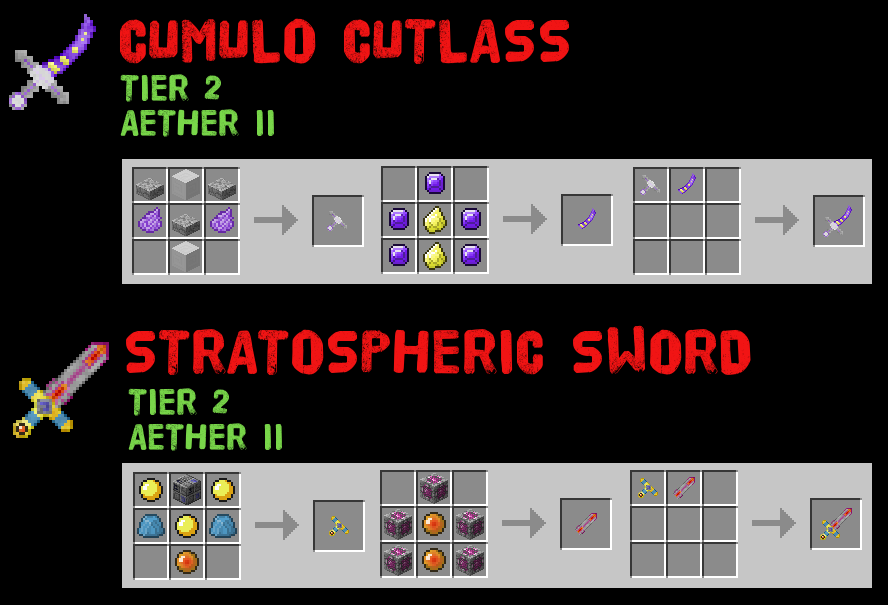
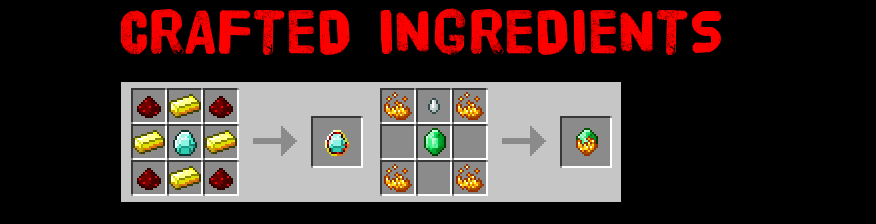
I can't remember all those numbers!
Thats ok! Each sword has a tooltip with the Mod to use the sword on and the chances of a trophy drop, with and without looting.
What else do the Trophies do?
Other than look pretty, right clicking a Trophy will play the Mob's sound! Scare your friends!
You can also resize your trophies! Shift Right Click will increase the trophy size, Shift Left Click will decrease it.
Trophies will also react to redstone. Give them a redstone signal and they will play the Mob's sound. Scare your friends even more!
You can add a trophy stand to your trophy:
- Right-click a trophy with an Oak Wood Slab
- Then right-click with nearly any block and the texture of the block will be used on the stand
- Most vanilla and Modded blocks can be used
- Slab and Block are not consumed
- Break the trophy to remove the stand
How do I install the mod?
- Download and Install Minecraft Forge
- Download ObsCore from here
- Download ObsTrophies
- Place both ObsCore and ObsTrophies in your mods directory
- (Optional) Download and Install Advent of Ascension from here
- (Optional) Download and Install Lycanites Mobs from here
- (Optional) Download and Install Twilight Forest from here
- (Optional) Download and Install Animals+ from here
- (Optional) Download and Install DivineRPG from here
- (Optional) Download and Install Ender Zoo from here
- (Optional) Download and Install Natura from here
- (Optional) Download and Install Dark Menagerie from here
- (Optional) Download and Install Mutant Creatures from here
- (Optional) Download and Install Erebus from here
- (Optional) Download and Install Betweenlands from here
- (Optional) Download and Install Abyssalcraft from here
- (Optional) Download and Install Aether II from here
- (Optional) Download and Install Mowzies Mobs from here
- (Optional) Download and Install Exotic Birds from here
- Play!
You don't need all the mods installed - you can have one or some or all or none. But you will only have trophies for the mods that are installed - if none are installed then you'll have no trophies! Go get Advent of Ascension, Lycanites Mobs, Twilight Forest, Animals+, DivineRPG, Mutant Creatures, Natura, Dark Menagerie, Ender Zoo, Erebus, the Betweenlands, Abyssalcraft, Aether II, Mowzies Mobs and Exotic Birds.
What other mods are you planning to make trophies for?
Check out the Minecraft Forum Thread for the current list!
Can you add Mob X from Mod Y?
Probably! Leave a suggestion in the Minecraft Forum Thread here. Don't worry if I don't respond - I am reading your comments! You just may find the trophy in the next update. Keep an eye on my Youtube Channel for previews!
Can I use this in a Modpack?
Yes! Let me know which one so I can have a sticky beak!
How does the mod work?
Thanks to the awesomeness of Forge, all I need to store with the trophy is the entity id. Then I can just say "Hey Minecraft! Draw this mob here!". That's a pretty big over-simplification, but essentially its what it boils down to. Big thanks to OpenBlocks - it is open source and helped me figure out the render side of things (everything else I knew how, but that part is pretty important!). All trophies also only take up a single block ID.
Project description from CurseForge.
Pick your setup
ObsTrophies by Minecraft version and loader
Choose the version and loader you play, then open the matching release.
Check the dependencies, then try the file in a copied instance before changing a world you care about.
Recent files
ObsTrophies versions and loaders
obstrophies-1.6.0_mc1.7.10.jar
4 Mar 2017
Client Source doesn’t say Server Source doesn’t say Dependencies No extras listed Listed on Release listing
Check the 1.7.10 setup 1.7.10 release
obstrophies-1.5.1_mc1.7.10.jar
27 Jul 2016
Client Source doesn’t say Server Source doesn’t say Dependencies No extras listed Listed on Release listing
Check the 1.7.10 setup 1.7.10 release
obstrophies-1.5.0_mc1.7.10.jar
16 Jul 2016
Client Source doesn’t say Server Source doesn’t say Dependencies No extras listed Listed on Release listing
Check the 1.7.10 setup 1.7.10 release
obstrophiesaoa-1.4.1_mc1.7.10.jar
14 Jul 2016
Client Source doesn’t say Server Source doesn’t say Dependencies No extras listed Listed on Release listing
Check the 1.7.10 setup 1.7.10 release
obstrophiesaoa-1.4.0_mc1.7.10.jar
26 Jun 2016
Client Source doesn’t say Server Source doesn’t say Dependencies No extras listed Listed on Release listing
Check the 1.7.10 setup 1.7.10 release
obstrophiesaoa-1.3.1_mc1.7.10.jar
14 May 2016
Client Source doesn’t say Server Source doesn’t say Dependencies No extras listed Listed on Release listing
Check the 1.7.10 setup 1.7.10 release
obstrophiesaoa-1.3.0_mc1.7.10.jar
2 Apr 2016
Client Source doesn’t say Server Source doesn’t say Dependencies No extras listed Listed on Release listing
Check the 1.7.10 setup 1.7.10 release
obstrophiesaoa-1.2.0_mc1.7.10.jar
25 Mar 2016
Client Source doesn’t say Server Source doesn’t say Dependencies No extras listed Listed on Release listing
Check the 1.7.10 setup 1.7.10 release
ObsTrophies 1.1.0
obstrophiesaoa-1.1.0_mc1.7.10.jar
10 Feb 2016
Client Source doesn’t say Server Source doesn’t say Dependencies No extras listed Listed on Release listing
Check the 1.7.10 setup 1.7.10 release
obstrophiesaoa-1.0.3.jar
30 Jan 2016
Client Source doesn’t say Server Source doesn’t say Dependencies No extras listed Listed on Release listing
Check the 1.7.10 setup 1.7.10 release
Looking for an older file? The official CurseForge project page is in Resources.
 mod
CurseForge · Minecraft
Umas Luches
This mod includes a great experience for Umamusume fans, including cool plushies with a gacha machine, each with sounds and achievements, and a nice decoration for your server or world.
 mod
CurseForge + Modrinth · Minecraft
Tinkers' Schema
Data-driven registration of custom tools for Tinkers' Construct 2 using JSON, with no Java required.
 mod
CurseForge · Minecraft
Disenchanting Grindstone
Challenging grindstone: extract one chosen enchantment onto a book, at a price.