Minecraft version
Back to mods 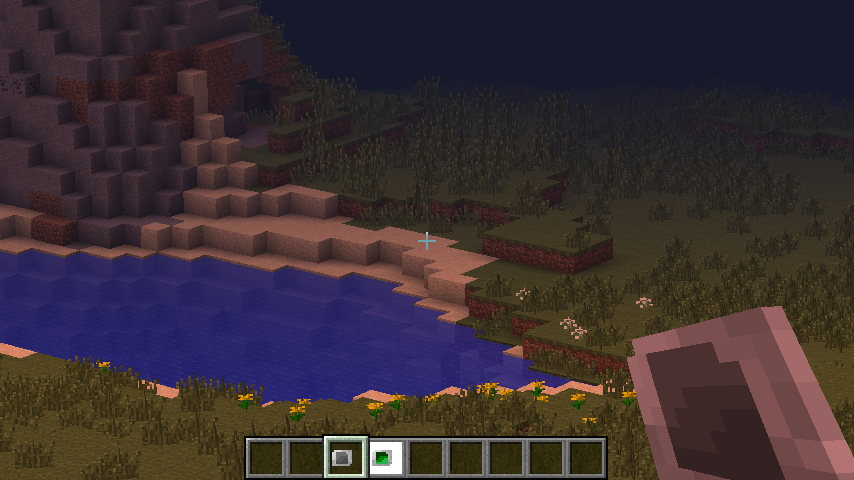
CurseForge · Minecraft mod
Stellar API
General API for mods related with celestial objects.
Choose a version Pick your version below, then grab the matching file.
Quick answer
Which Stellar API release matches 1.12.2?
Best match for your filters Stellar API 1.12.2-0.4.2.9 [1.12.x]
Game version 1.12, 1.12.2
Loader Not required
Stellar API 1.12.2-0.4.2.9 [1.12.x] targets 1.12, 1.12.2. The project page does not say whether this file belongs on the client, dedicated server, or both. No extra mods listed for this file.
Where it goes
Is Stellar API required on the client, server, or both?
The project page does not say whether this file belongs on the client, dedicated server, or both.
Client Source doesn’t say
Dedicated server Source doesn’t say
Loader for this release No loader listed
Required install it here Optional supported, not mandatory Not supported do not install here Source doesn’t say do not assume
The source does not explicitly classify this release as client-only or server-only.
What else does Stellar API 1.12.2-0.4.2.9 [1.12.x] need?
Stellar API 1.12.2-0.4.2.9 [1.12.x] on 1.12.2. Every mod below is checked against that same setup.
This file does not list any required mods. Do not add a library just because a different file uses it.
This file does not list any required or optional mods.
Before you install it
Add Stellar API without breaking your instance.
Built for Stellar API 1.12.2-0.4.2.9 [1.12.x] on 1.12.2. Pick another file and the loader, install side or required mods may change.
- 01
Stick to this file
Use Stellar API 1.12.2-0.4.2.9 [1.12.x]. It targets 1.12, 1.12.2; another release may have different loader, side or dependency requirements.
- 02
Bring the mods it needs
This file does not list any required mods. Do not add a library just because a different file uses it.
- 03
Put it on the correct side
The project page does not say whether this file belongs on the client, dedicated server, or both.
- 04
Pick the file you checked
Use the “Get this file” button beside Stellar API 1.12.2-0.4.2.9 [1.12.x]. It opens that exact file at the source.
About this project
What does Stellar API add?
Stellar API is general API for mods related with celestial objects.
This will be basis API for Stellar Sky, Stellarium, and Photoptics.
Latest version on 1.12.2 presents configurable day length and month length. You can change them only with Stellar API.
Features
Celestial API
Since this is API about celstial objects, there is celestial API which allows better compatibility.
Optical System
Currently there is optical system which is celestial objects.
- DEFAULT: There are default telescopes which provides magnification can be used using right-click.
- Photoptics is the mod enhancing this part of Stellar API.
Overlay System (HUD)
- Currently there is overlay system in Stellar API, which is easily configurable HUD elements.
- It can be manipulated by the HUD which can be displayed by pressing key 'U'. You can also disable some HUDs here.
- DEFAULT: Day Descriptor Information on the TopRight side of the HUD. (Which is positionable)
Wake Condition Configurations
There is wake configurations which can used to configure wake condition and time.
Per-Dimension Resources
Currently there is per-dimension resource(textrue) commands to replace resources per-dimension. (/perdimres list/available/set/remove)
The resources will be applied directly after the command is run.
- /perdimres available: View the list of per-dimension resource IDs available to replace.
- /perdimres list: View currently replaced per-dimension resources.
- /perdimres set <PerDimResID> <resource location>: Replace per-dimension resources using
- The resource location is '(location in assets)' in vanilla and '(modid):(location in per-mod resource location)'.
- /perdimres remove <PerDimResID>: Can remove per-dimension resource replacement using
New Feature - WorldSets
WorldSets are for determining the world to apply celestial settings.
Named WorldSets can be configured with world names.
New Feature - Adjustable Day/Month length (without Stellar Sky)
Now day length and month length is adjustable - See World Settings in config for this.
It can be configured for each WorldSet. To change day length of a custom dimension, create named WorldSet with the name of the dimension and configure it.
Day/Month offset and minimum sky brightness are also available - check the details in the comments.
Stellar API tweak should be enabled - it is in the world settings as well.
There's also Force Configuration flag. When it's on, changes in configuration is applied to any world you open. When it's off, world which has been loaded at least once with Stellar API won't be affected.
Screenshots
These are screenshots using the default telescopes.
{width=337 height=190}{width=331 height=186}
{width=339 height=191}{width=329 height=185}
The texture error above is removed on the latest version.
Planned Updates
Stellar API is currently in total rewrite stage, so it would serve its role well as API for Celestial Objects and Optics.
- Several wavelengths (Gamma/X/UV/IR/Radiowave) will be supported, along with custom signal types. (Like gravitational waves)
- Celestial Entries to express Galaxies, Planetary Systems, and Stars/Planets.
- Allows Configurable Procedural Generation of Celestial Objects along with PreExisting Systems.
Development of Stellarium should be trivial when this rewrite is successfully finished.
Things are subjected to change; Gradual change will occur.
Project description from CurseForge.
Pick your setup
Stellar API by Minecraft version and loader
Choose the version and loader you play, then open the matching release.
Minecraft version
1.12.1
1 loader buildMinecraft version
1.12
1 loader buildMinecraft version
1.11.2
1 loader buildMinecraft version
1.11
1 loader buildMinecraft version
1.10.2
1 loader buildMinecraft version
1.10
1 loader buildMinecraft version
1.9.4
1 loader buildMinecraft version
1.9
1 loader buildMinecraft version
1.8.9
1 loader buildMinecraft version
1.7.10
1 loader buildCheck the dependencies, then try the file in a copied instance before changing a world you care about.
Recent files
Stellar API versions and loaders
Stellar API 1.12.2-0.5.2.2 [1.12.x]
Stellar API-1.12.2-0.5.2.2.jar
12 Jul 2018
Client Source doesn’t say Server Source doesn’t say Dependencies No extras listed Listed on Release listing
Check the 1.12.2 setup 1.121.12.2 alpha
Stellar API 1.12.2-0.5.2.1 [1.12.x]
Stellar API-1.12.2-0.5.2.1.jar
12 Jul 2018
Client Source doesn’t say Server Source doesn’t say Dependencies No extras listed Listed on Release listing
Check the 1.12.2 setup 1.121.12.2 alpha
Stellar API 1.12.2-0.5.1.1 [1.12.x]
Stellar API-1.12.2-0.5.1.1.jar
9 Jul 2018
Client Source doesn’t say Server Source doesn’t say Dependencies No extras listed Listed on Release listing
Check the 1.12.2 setup 1.121.12.2 alpha
Stellar API 1.12.2-0.4.2.9 [1.12.x]
Stellar API-1.12.2-0.4.2.9.jar
2 Jun 2018
Client Source doesn’t say Server Source doesn’t say Dependencies No extras listed Listed on Release listing
Check the 1.12.2 setup 1.121.12.2 release
Stellar API 1.12.2-0.4.2.8 [1.12.x]
Stellar API-1.12.2-0.4.2.8.jar
18 May 2018
Client Source doesn’t say Server Source doesn’t say Dependencies No extras listed Listed on Release listing
Check the 1.12.2 setup 1.121.12.2 beta
Stellar API 1.12.2-0.4.2.7 [1.12.x]
Stellar API-1.12.2-0.4.2.7.jar
19 Jan 2018
Client Source doesn’t say Server Source doesn’t say Dependencies No extras listed Listed on Release listing
Check the 1.12.2 setup 1.121.12.2 release
Stellar API 1.12.2-0.4.2.6 [1.12.x]
Stellar API-1.12.2-0.4.2.6.jar
14 Jan 2018
Client Source doesn’t say Server Source doesn’t say Dependencies No extras listed Listed on Release listing
Check the 1.12.2 setup 1.121.12.2 beta
Stellar API 1.12.2-0.4.2.5 [1.12.x]
Stellar API-1.12.2-0.4.2.5.jar
9 Jan 2018
Client Source doesn’t say Server Source doesn’t say Dependencies No extras listed Listed on Release listing
Check the 1.12.2 setup 1.121.12.2 beta
Stellar API 1.12.2-0.4.2.4 [1.12.x]
Stellar API-1.12.2-0.4.2.4.jar
8 Jan 2018
Client Source doesn’t say Server Source doesn’t say Dependencies No extras listed Listed on Release listing
Check the 1.12.2 setup 1.121.12.2 beta
Stellar API 1.12.2-0.4.2.3 [1.12.x]
Stellar API-1.12.2-0.4.2.3.jar
8 Jan 2018
Client Source doesn’t say Server Source doesn’t say Dependencies No extras listed Listed on Release listing
Check the 1.12.2 setup 1.121.12.2 beta
Stellar API 1.12.2-0.4.2.2 [1.12.x]
Stellar API-1.12.2-0.4.2.2.jar
7 Jan 2018
Client Source doesn’t say Server Source doesn’t say Dependencies No extras listed Listed on Release listing
Check the 1.12.2 setup 1.121.12.2 beta
Stellar API 1.12.2-0.4.2.1 [1.12.x]
Stellar API-1.12.2-0.4.2.1.jar
6 Jan 2018
Client Source doesn’t say Server Source doesn’t say Dependencies No extras listed Listed on Release listing
Check the 1.12.2 setup 1.121.12.2 beta
Looking for an older file? The official CurseForge project page is in Resources.