Minecraft version
Back to mods 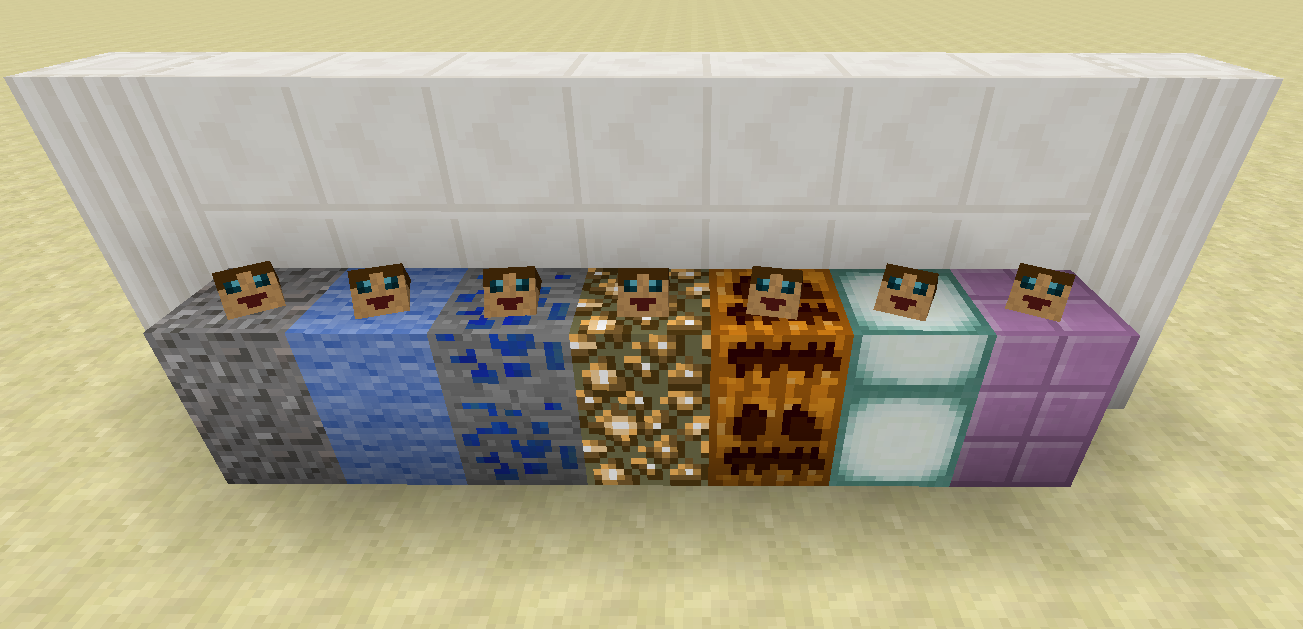
CurseForge · Minecraft mod
Tomb Many Graves
A grave system that adapts to every style of play. Special feature: Items may return to their original slots!
Choose a version Pick your version below, then grab the matching file.
Quick answer
Which Tomb Many Graves release should I use?
Latest stable file TombManyGraves-1.9.4-2.1.5
Game version 1.9.4
Loader Not required
Tomb Many Graves TombManyGraves-1.9.4-2.1.5 targets 1.9.4. The project page does not say whether this file belongs on the client, dedicated server, or both. No extra mods listed for this file.
Where it goes
Is Tomb Many Graves required on the client, server, or both?
The project page does not say whether this file belongs on the client, dedicated server, or both.
Client Source doesn’t say
Dedicated server Source doesn’t say
Loader for this release No loader listed
Required install it here Optional supported, not mandatory Not supported do not install here Source doesn’t say do not assume
The source does not explicitly classify this release as client-only or server-only.
What else does Tomb Many Graves TombManyGraves-1.9.4-2.1.5 need?
TombManyGraves-1.9.4-2.1.5. Change the file and its required mods may change too.
This file does not list any required mods. Do not add a library just because a different file uses it.
This file does not list any required or optional mods.
Before you install it
Add Tomb Many Graves without breaking your instance.
Built for Tomb Many Graves TombManyGraves-1.9.4-2.1.5. Pick another file and the loader, install side or required mods may change.
- 01
Stick to this file
Use TombManyGraves-1.9.4-2.1.5. It targets 1.9.4; another release may have different loader, side or dependency requirements.
- 02
Bring the mods it needs
This file does not list any required mods. Do not add a library just because a different file uses it.
- 03
Put it on the correct side
The project page does not say whether this file belongs on the client, dedicated server, or both.
- 04
Pick the file you checked
Use the “Get this file” button beside TombManyGraves-1.9.4-2.1.5. It opens that exact file at the source.
About this project
What does Tomb Many Graves add?
The 1.11.2+ version of this mod has its own project page: https://minecraft.curseforge.com/projects/tomb-many-graves-2
Thanks for your continuous support! :-)
Please let me know if you have any suggestions/comments/complaints; I want to make this a mod that can be adapted to every style of gameplay!
For those who don't like to read:
Check out the amazing spotlight done by Rorax!
Tomb Many Graves adds just one block: a grave. You can't craft it, you can't harvest it, but it's important. Upon a player's death (assuming you haven't disabled graves in the configs, but if you do that why did you install the mod?), a grave block will be spawned that contains all of the dying player's inventory (including Baubles) and a chat message telling you the exact location of the spawned grave will be given to you.
Graves will adapt to the block beneath them (to some extent); if you don't die on a "suitable" ground substance, the grave will appear with the dirt texture (or as just a floating head in the case that you weren't even on the ground when you died...you acrobat you...).
{width=1920 height=1017}
By default, only the player who died can get the items from their grave by sneaking over it while it is unlocked. All other players will simply pass through the block. Wait...unlocked graves? What are those? By default, only the player who owns the grave can toggle whether a grave is locked or unlocked by shift-clicking it (in the image below, unlocked graves are on the left, locked are on the right). When a grave is locked, no player will be able to obtain the items in it. (This is useful if you need to make the area "safe" while sneaking so you don't accidentally pick up your items if you aren't ready for them.)
{width=1920 height=1017}
The graves are smart (they have a head after all...) and will remember which inventory slot had which item when you died. When you retrieve your items, the grave will attempt to place them back in their original slots (Baubles included, if you have it installed). Any item in the grave whose original slot is not empty will instead be placed at the player's feet, similarly to if you had broken another mod's grave.
Graves are indestructible, so the only way to remove one is to have the original player retrieve their items, or have a creative member break the graves. (If broken in creative, the graves will drop all of their items on the ground.)
Friends
Each player now has a friend list!
/tmg_friend [player]
will add a friend to your list (if that player is currently online, you can use TAB to auto-complete their name)
/tmg_removefriend [player]
will remove a friend from your list (again, use TAB to auto-complete any names already in the list)
/tmg_list
will display all your current friends in chat.
Players in your friend list will be able to interact with your graves in the exact same way you can (lock/unlock/retrieve).
Restoring Inventory
Unless you have turned off this feature in the configs, every time a player dies a file will be generated that stores the contents of their inventory/baubles. As long as you have permissions (OP/cheats are on), you can use the following commands:
/tmg_restore [player] <timestamp>
/tmg_drop [player] <timestamp>
The first command will restore the inventory similar to walking over a grave while the second will drop the items at the location of the player instead. You can use TAB to auto-complete any player's name who is currently online and to auto-complete any time stamp for which there is a file created. (The format for the time stamp is yyyy-MM-dd_HH-mm-ss.) Note that the file will not be created if the game rule "keepInventory" is marked to true, nor will it be created if the death event is cancelled "too soon" (for example, if a player is wearing the Golden Laurel Crown from Botania upon death, the crown will be destroyed as normal, the player will live, and no file will be created).
NOTE: As of the 1.0.2 update, you can also use "latest" as a time stamp to retrieve your most recent death file.
Death Inventory Lists
{width=854 height=480}
Assuming you haven't disabled the death inventory files mentioned in the previous section, upon re-spawning after death you will receive a list of all items you had on your body when you died. Right-clicking with it in your main hand will open the GUI; throwing the list on the ground (via "Q" or drag/dropping it while your inventory GUI is open) will destroy it (that way you don't have to keep it around).
If, by some chance, you accidentally destroyed your list, you can get a new one by using the command
/tmg_getdeathlist [player] <timestamp>
(Remember you can use "latest" as a time stamp, assuming you've died after updating to 1.0.2.)
{width=854 height=480}
{width=854 height=480}
Extra Stuff
You may use this mod alone or in a pack in accordance to its license. Feel free to let me know you're including it in a pack; it's fun for me to see how it's being used!
If you want to get a hold of me quickly, you can find me on Discord: https://discord.gg/HXtZRHn.
Please report any/all bugs on the issues page of github (if the issue is for the 1.9 version, please state so in the issue report). If you have suggestions for features/additions/changes, please let me know! I will listen to the suggestions and maybe implement a few! :-)
Please note: As of the release of Minecraft Forge for 1.9.4, I will not be developing TMG for 1.9 (I will still fix bugs if they are reported, but I will not be adding any new content unless I feel incredibly inspired), and all the new development will be for 1.9.4.
Project description from CurseForge.
Pick your setup
Tomb Many Graves by Minecraft version and loader
Choose the version and loader you play, then open the matching release.
Minecraft version
1.10.1
1 loader buildMinecraft version
1.10
1 loader buildMinecraft version
1.9.4
1 loader buildMinecraft version
1.9
1 loader buildCheck the dependencies, then try the file in a copied instance before changing a world you care about.
Recent files
Tomb Many Graves versions and loaders
TombManyGraves-1.10.2-2.1.16
TombManyGraves-1.10.2-2.1.16.jar
16 Jan 2017
Client Source doesn’t say Server Source doesn’t say Dependencies No extras listed Listed on Release listing
Check the 1.10.2 setup 1.10.2 beta
TombManyGraves-1.10.2-2.1.15
TombManyGraves-1.10.2-2.1.15.jar
4 Jan 2017
Client Source doesn’t say Server Source doesn’t say Dependencies No extras listed Listed on Release listing
Check the 1.10.2 setup 1.10.2 beta
TombManyGraves-1.10.2-2.1.14
TombManyGraves-1.10.2-2.1.14.jar
15 Dec 2016
Client Source doesn’t say Server Source doesn’t say Dependencies No extras listed Listed on Release listing
Check the 1.10.2 setup 1.10.2 beta
TombManyGraves-1.10.2-2.1.13
TombManyGraves-1.10.2-2.1.13.jar
19 Oct 2016
Client Source doesn’t say Server Source doesn’t say Dependencies No extras listed Listed on Release listing
Check the 1.10.2 setup 1.10.2 beta
TombManyGraves-1.10.2-2.1.12
TombManyGraves-1.10.2-2.1.12.jar
17 Oct 2016
Client Source doesn’t say Server Source doesn’t say Dependencies No extras listed Listed on Release listing
Check the 1.10.2 setup 1.10.2 beta
TombManyGraves-1.10.2-2.1.11
TombManyGraves-1.10.2-2.1.11.jar
12 Oct 2016
Client Source doesn’t say Server Source doesn’t say Dependencies No extras listed Listed on Release listing
Check the 1.10.2 setup 1.10.2 beta
TombManyGraves-1.10.2-2.1.10
TombManyGraves-1.10.2-2.1.10.jar
23 Sept 2016
Client Source doesn’t say Server Source doesn’t say Dependencies No extras listed Listed on Release listing
Check the 1.10.2 setup 1.10.2 beta
TombManyGraves-1.10.2-2.1.9
TombManyGraves-1.10.2-2.1.9.jar
22 Sept 2016
Client Source doesn’t say Server Source doesn’t say Dependencies No extras listed Listed on Release listing
Check the 1.10.2 setup 1.10.2 beta
TombManyGraves-1.9.4_1.10.2-2.1.8
TombManyGraves-1.9.4_1.10.2-2.1.8.jar
23 Jul 2016
Client Source doesn’t say Server Source doesn’t say Dependencies No extras listed Listed on Release listing
Check the 1.10.2 setup 1.9.41.10.21.101.10.1 beta
TombManyGraves-1.9.4_1.10.2-2.1.7
TombManyGraves-1.9.4_1.10.2-2.1.7.jar
22 Jul 2016
Client Source doesn’t say Server Source doesn’t say Dependencies No extras listed Listed on Release listing
Check the 1.10.2 setup 1.9.41.10.21.101.10.1 beta
TombManyGraves-1.9.4-2.1.6
TombManyGraves-1.9.4-2.1.6.jar
1 Jul 2016
Client Source doesn’t say Server Source doesn’t say Dependencies No extras listed Listed on Release listing
Check the 1.10.2 setup 1.9.41.10.21.10 beta
TombManyGraves-1.10-3.0.0
TombManyGraves-1.10-3.0.0.jar
23 Jun 2016
Client Source doesn’t say Server Source doesn’t say Dependencies No extras listed Listed on Release listing
Check the 1.10 setup Looking for an older file? The official CurseForge project page is in Resources.
 mod
mod CurseForge · Minecraft
Debris Pouch
A mining utility pouch that automatically absorbs, sorts, and recycles stone debris directly from your inventory into Bone Meal and XP
 mod
mod Modrinth · Minecraft
InventoryWizard
Transform your chaotic inventory into organized perfection with InventoryWizard! 🧙♂️
 mod
mod CurseForge · Minecraft
Beyond Dimensions
Beyond Dimensions is a mod that provides storage solutions. It introduces a virtual storage system obtainable in the late-game of vanilla game