Quick answer
Which Multi-Hotbar release matches 1.12.2?
Best match for your filters multihotbar-1.12.2-4.0.1-build-T116.jar
Game version 1.12.2
Loader Not required
Multi-Hotbar multihotbar-1.12.2-4.0.1-build-T116.jar targets 1.12.2. The project page does not say whether this file belongs on the client, dedicated server, or both. All 1 required mods have matching files.
Where it goes
Is Multi-Hotbar required on the client, server, or both?
The project page does not say whether this file belongs on the client, dedicated server, or both.
Client Source doesn’t say
Dedicated server Source doesn’t say
Loader for this release No loader listed
Required install it here Optional supported, not mandatory Not supported do not install here Source doesn’t say do not assume
The source does not explicitly classify this release as client-only or server-only.
What else does Multi-Hotbar multihotbar-1.12.2-4.0.1-build-T116.jar need?
multihotbar-1.12.2-4.0.1-build-T116.jar on 1.12.2. Every mod below is checked against that same setup.
Install Multi-Hotbar Core first. We found matching files for this game-version and loader setup.
Matching file found Matched file: multihotbarcore-1.12.2-1.0.1-build-T22.jar
Matching file found Matched file: Inventory Tweaks 1.63
We only count dependency files that match this setup. A file for another loader does not fill the gap.
Before you install it
Add Multi-Hotbar without breaking your instance.
Built for Multi-Hotbar multihotbar-1.12.2-4.0.1-build-T116.jar on 1.12.2. Pick another file and the loader, install side or required mods may change.
- 01
Stick to this file
Use multihotbar-1.12.2-4.0.1-build-T116.jar. It targets 1.12.2; another release may have different loader, side or dependency requirements.
- 02
Bring the mods it needs
Install Multi-Hotbar Core first. We found matching files for this game-version and loader setup.
- 03
Put it on the correct side
The project page does not say whether this file belongs on the client, dedicated server, or both.
- 04
Pick the file you checked
Use the “Get this file” button beside multihotbar-1.12.2-4.0.1-build-T116.jar. It opens that exact file at the source.
About this project
What does Multi-Hotbar add?
Multi-Hotbar
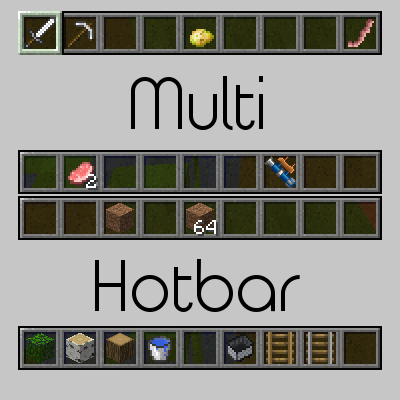
Multi-Hotbar is a Minecraft Forge mod that extends Minecraft's hotbar past nine slots.
The mod is open source and available on GitHub. If you have any issues, please report them there.
Status
Current: Release 3.2 | Beta 4.0
Note: Multi-Hotbar Core is required for version 4+. Vanilla server support is also dropped.
Status Definitions
Alpha: Not all features for the current release have been implemented and suggestions (preferably via GitHub issues) are welcomed.
Beta: All features for the current release have been implemented. Report bugs to the Github issue tracker. Any feature suggestions will apply to the next alpha phase.
Release: There are no planned features and no known or major bugs. Bugfixes will be applied.
Features
- Adds 2 to 3 additional hotbars
- Scroll through all hotbars
- Tap a hotbar key (e.g. 1, 2, 9) multiple times to change hotbar selection
- Hold ALT (configurable) and scroll to change hotbars
- Hold ALT and press a hotbar key (1-4) to go to that hotbar
- Toggle the hotbar with the grave (` ) key
- Compatible with InventoryTweaks' auto-refill
- Client side - can connect to vanilla servers (Versions previous than version 4)
Screenshots
{width=773 height=168}{width=768 height=147}{width=779 height=163}
Project description from CurseForge.
Pick your setup
Multi-Hotbar by Minecraft version and loader
Choose the version and loader you play, then open the matching release.
Minecraft version
1.12.2
1
loader build Minecraft version
1.12.1
1
loader build Minecraft version
1.12
1
loader build Minecraft version
1.11.2
1
loader build Minecraft version
1.10.2
1
loader build Minecraft version
1.7.10
1
loader build Check the dependencies, then try the file in a copied instance before changing a world you care about.
Recent files
Multi-Hotbar versions and loaders
22 Feb 2018
Client Source doesn’t say Server Source doesn’t say Dependencies 1 required · 1 unchecked Listed on Release listing
Check the 1.12.2 setup → 19 Jan 2018
Client Source doesn’t say Server Source doesn’t say Dependencies 1 required · 1 unchecked Listed on Release listing
Check the 1.12.2 setup → 14 Jan 2018
Client Source doesn’t say Server Source doesn’t say Dependencies 1 required · matched Listed on Release listing
Check the 1.12.2 setup → 26 Nov 2017
Client Source doesn’t say Server Source doesn’t say Dependencies No extras listed Listed on Release listing
Check the 1.12.2 setup → 25 Oct 2017
Client Source doesn’t say Server Source doesn’t say Dependencies 1 required · 1 unchecked Listed on Release listing
Check the 1.12.2 setup → 19 Oct 2017
Client Source doesn’t say Server Source doesn’t say Dependencies 1 required · 1 unchecked Listed on Release listing
Check the 1.12.2 setup → 12 Oct 2017
Client Source doesn’t say Server Source doesn’t say Dependencies No extras listed Listed on Release listing
Check the 1.12.2 setup → 9 Oct 2017
Client Source doesn’t say Server Source doesn’t say Dependencies No extras listed Listed on Release listing
Check the 1.12.2 setup → 8 Oct 2017
Client Source doesn’t say Server Source doesn’t say Dependencies No extras listed Listed on Release listing
Check the 1.12.2 setup → 28 Sept 2017
Client Source doesn’t say Server Source doesn’t say Dependencies No extras listed Listed on Release listing
Check the 1.12.2 setup → 28 Sept 2017
Client Source doesn’t say Server Source doesn’t say Dependencies No extras listed Listed on Release listing
Check the 1.12.2 setup → 22 Sept 2017
Client Source doesn’t say Server Source doesn’t say Dependencies No extras listed Listed on Release listing
Check the 1.12.2 setup →