Minecraft version
Back to mods 
CurseForge · Minecraft mod
Resource Pack Organizer
Enhances the Resource Pack menu by adding folder support for easier pack organization, ability to search packs by name or description, new sorting options, and quick refresh button directly in the GUI. Supports Forge & Fabric.
Choose a version Pick your version below, then grab the matching file.
Quick answer
Which Resource Pack Organizer release should I use?
Latest stable file Release 1.2.0 for MC 1.16.2/.3 (Forge)
Game version 1.16.3, 1.16.2
Loader Forge
Resource Pack Organizer Release 1.2.0 for MC 1.16.2/.3 (Forge) targets 1.16.3, 1.16.2 with Forge. The project page does not say whether this file belongs on the client, dedicated server, or both. No extra mods listed for this file.
Where it goes
Is Resource Pack Organizer required on the client, server, or both?
The project page does not say whether this file belongs on the client, dedicated server, or both.
Client Source doesn’t say
Dedicated server Source doesn’t say
Loader for this release Forge
Required install it here Optional supported, not mandatory Not supported do not install here Source doesn’t say do not assume
The source does not explicitly classify this release as client-only or server-only.
What else does Resource Pack Organizer Release 1.2.0 for MC 1.16.2/.3 (Forge) need?
Release 1.2.0 for MC 1.16.2/.3 (Forge). Change the file and its required mods may change too.
This file does not list any required mods. Do not add a library just because a different file uses it.
This file does not list any required or optional mods.
Before you install it
Add Resource Pack Organizer without breaking your instance.
Built for Resource Pack Organizer Release 1.2.0 for MC 1.16.2/.3 (Forge). Pick another file and the loader, install side or required mods may change.
- 01
Stick to this file
Use Release 1.2.0 for MC 1.16.2/.3 (Forge). It targets 1.16.3, 1.16.2 with Forge; another release may have different loader, side or dependency requirements.
- 02
Bring the mods it needs
This file does not list any required mods. Do not add a library just because a different file uses it.
- 03
Put it on the correct side
The project page does not say whether this file belongs on the client, dedicated server, or both.
- 04
Pick the file you checked
Use the “Get this file” button beside Release 1.2.0 for MC 1.16.2/.3 (Forge). It opens that exact file at the source.
About this project
What does Resource Pack Organizer add?
Resource Pack Organizer overhauls the Resource Pack screen to give you finer control and a couple new quality-of-life features. It supports the Forge and Fabric mod loaders.
- Organize resource pack into folders that you can navigate from within the game
- Choose between folder view (navigate in and out of folders) and flat view (packs from all folders shown in a single list)
- Search pack names and description (supports the * wildcard)
- Sort packs and folders alphabetically A-Z or Z-A
- Option to display a list of active packs on your screen (configurable position and color; Forge only)
- Hold Alt when clicking 'Resource Packs...' button to show the vanilla screen instead (it will still show packs from all folders like with flat view)
- Stop Minecraft from removing incompatible packs after each restart
Follow @chylexmc for development news and updates.
Installation
The mod supports both Forge and Fabric since Minecraft 1.15.2. Any older versions only support Forge.
Forge
Download and install Forge.
Download the mod file for your version, and place it into .minecraft/mods.
Fabric
Download and install Fabric Loader 0.6.4 or newer (you do not need to install the Fabric API).
Download the mod file for your version, and place it into .minecraft/mods.
License
The mod is licensed under MPL 2.0, which allows you to use it in modpacks.
The mod uses a folder icon by FatCow under the CC BY 3.0 US license: http://fatcow.com/free-icons
Screenshot
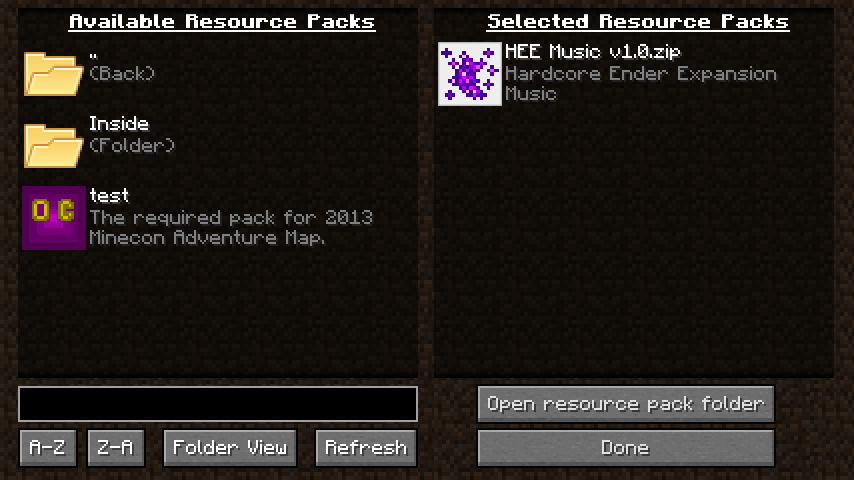
Project description from CurseForge.
Pick your setup
Resource Pack Organizer by Minecraft version and loader
Choose the version and loader you play, then open the matching release.
Minecraft version
1.16.3
1 loader buildMinecraft version
1.16.2
1 loader buildMinecraft version
1.16.1
1 loader buildMinecraft version
1.16-Snapshot
1 loader buildMinecraft version
1.15.2
2 loader buildsMinecraft version
1.12.2
1 loader buildMinecraft version
1.12.1
1 loader buildMinecraft version
1.12
1 loader buildMinecraft version
1.11.2
1 loader buildMinecraft version
1.11
1 loader buildMinecraft version
1.10
1 loader buildShowing the newest 12 of 16 game versions. Older files are in the list below.
Check the dependencies, then try the file in a copied instance before changing a world you care about.
Recent files
Resource Pack Organizer versions and loaders
Release 1.2.0 for MC 1.16.2/.3 (Forge)
ResourcePackOrganizer-1.16.3-v1.2.0.jar
11 Sept 2020
Client Source doesn’t say Server Source doesn’t say Dependencies No extras listed Listed on Release listing
Check the 1.16.3 · Forge setup 1.16.3Forge1.16.2 release
Release 1.2.0 for MC 1.16.1 (Forge)
ResourcePackOrganizer-1.16.1-v1.2.0.jar
24 Jul 2020
Client Source doesn’t say Server Source doesn’t say Dependencies No extras listed Listed on Release listing
Check the 1.16.1 · Forge setup 1.16.1Forge release
Release 1.1.0 for MC 1.15.2+ (Fabric)
ResourcePackOrganizer-1.15.2.up-v1.1.0-Fabric.jar
24 Feb 2020
Client Source doesn’t say Server Source doesn’t say Dependencies No extras listed Listed on Release listing
Check the 20w09a · Fabric setup 1.16-SnapshotFabric1.15.220w09a release
Release 1.1.0 for MC 1.15.2 (Forge)
ResourcePackOrganizer-1.15.2-v1.1.0.jar
23 Feb 2020
Client Source doesn’t say Server Source doesn’t say Dependencies No extras listed Listed on Release listing
Check the 1.15.2 · Forge setup 1.15.2Forge release
Release 1.0.4 for MC 1.12[.2]
ResourcePackOrganizer MC-1.12 v1.0.4.jar
29 Jun 2017
Client Source doesn’t say Server Source doesn’t say Dependencies No extras listed Listed on Release listing
Check the 1.12.2 · Forge setup 1.12.11.121.12.2Forge release
Release 1.0.3 for MC 1.11[.2]
ResourcePackOrganizer MC-1.11 v1.0.3.jar
19 Nov 2016
Client Source doesn’t say Server Source doesn’t say Dependencies No extras listed Listed on Release listing
Check the 1.11.2 · Forge setup 1.111.11.2Forge release
Release 1.0.3 for MC 1.10
ResourcePackOrganizer MC-1.10 v1.0.3.jar
24 Jun 2016
Client Source doesn’t say Server Source doesn’t say Dependencies No extras listed Listed on Release listing
Check the 1.10 · Forge setup 1.10Forge release
Release 1.0.3 for MC 1.9.4
ResourcePackOrganizer MC-1.9.4 v1.0.3.jar
24 Jun 2016
Client Source doesn’t say Server Source doesn’t say Dependencies No extras listed Listed on Release listing
Check the 1.9.4 · Forge setup 1.9.4Forge release
Release 1.0.3 for MC 1.9
ResourcePackOrganizer MC-1.9 v1.0.3.jar
24 Jun 2016
Client Source doesn’t say Server Source doesn’t say Dependencies No extras listed Listed on Release listing
Check the 1.9 · Forge setup 1.9Forge release
Release 1.0.3 for MC 1.8.9
ResourcePackOrganizer MC-1.8.9 v1.0.3.jar
24 Jun 2016
Client Source doesn’t say Server Source doesn’t say Dependencies No extras listed Listed on Release listing
Check the 1.8.9 · Forge setup 1.8.9Forge release
Release 1.0.2 for MC 1.9.4
ResourcePackOrganizer MC-1.9.4 v1.0.2.jar
17 Jun 2016
Client Source doesn’t say Server Source doesn’t say Dependencies No extras listed Listed on Release listing
Check the 1.9.4 · Forge setup 1.9.4Forge release
Release 1.0.2 for MC 1.9
ResourcePackOrganizer MC-1.9 v1.0.2.jar
17 Jun 2016
Client Source doesn’t say Server Source doesn’t say Dependencies No extras listed Listed on Release listing
Check the 1.9 · Forge setup 1.9Forge release
Looking for an older file? The official CurseForge project page is in Resources.
 mod
CurseForge + Modrinth · Minecraft
World Portal
Create custom world portal to travel between dimensions.
 mod
Modrinth · Minecraft
Reimagined Anvils
Rethought and tweaked Anvil usage to have more fair prices
 mod
Modrinth · Minecraft
Poly+ (PolyPlus)
The best world hosting and friends mod. By Polyfrost, best with OneClient.