Minecraft version
Back to mods 
CurseForge · Minecraft mod
Custom TNT Igniter (Discontinued)
This mod adds a new tnt igniter that allows customization of nearly all functional aspects of a tnt explosion.
Choose a version Pick your version below, then grab the matching file.
Quick answer
Which Custom TNT Igniter (Discontinued) release should I use?
Latest stable file CustomTNTIgniter-1.8.9-1.0.jar
Game version 1.8.9
Loader Not required
Custom TNT Igniter (Discontinued) CustomTNTIgniter-1.8.9-1.0.jar targets 1.8.9. The project page does not say whether this file belongs on the client, dedicated server, or both. No extra mods listed for this file.
Where it goes
Is Custom TNT Igniter (Discontinued) required on the client, server, or both?
The project page does not say whether this file belongs on the client, dedicated server, or both.
Client Source doesn’t say
Dedicated server Source doesn’t say
Loader for this release No loader listed
Required install it here Optional supported, not mandatory Not supported do not install here Source doesn’t say do not assume
The source does not explicitly classify this release as client-only or server-only.
What else does Custom TNT Igniter (Discontinued) CustomTNTIgniter-1.8.9-1.0.jar need?
CustomTNTIgniter-1.8.9-1.0.jar. Change the file and its required mods may change too.
This file does not list any required mods. Do not add a library just because a different file uses it.
This file does not list any required or optional mods.
Before you install it
Add Custom TNT Igniter (Discontinued) without breaking your instance.
Built for Custom TNT Igniter (Discontinued) CustomTNTIgniter-1.8.9-1.0.jar. Pick another file and the loader, install side or required mods may change.
- 01
Stick to this file
Use CustomTNTIgniter-1.8.9-1.0.jar. It targets 1.8.9; another release may have different loader, side or dependency requirements.
- 02
Bring the mods it needs
This file does not list any required mods. Do not add a library just because a different file uses it.
- 03
Put it on the correct side
The project page does not say whether this file belongs on the client, dedicated server, or both.
- 04
Pick the file you checked
Use the “Get this file” button beside CustomTNTIgniter-1.8.9-1.0.jar. It opens that exact file at the source.
About this project
What does Custom TNT Igniter (Discontinued) add?

Custom TNT Igniter adds a new TNT igniter that allows customization of nearly all functional aspects of a TNT explosion. Right-clicking a TNT block with the igniter will ignite the TNT. The player igniting the TNT will be immune to the blast but is still vulnerable to the resulting physics.
The igniter resembles that of a TNT plunger box and is crafted as shown in the following picture.
Crafting Recipe:
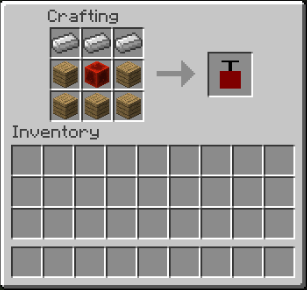
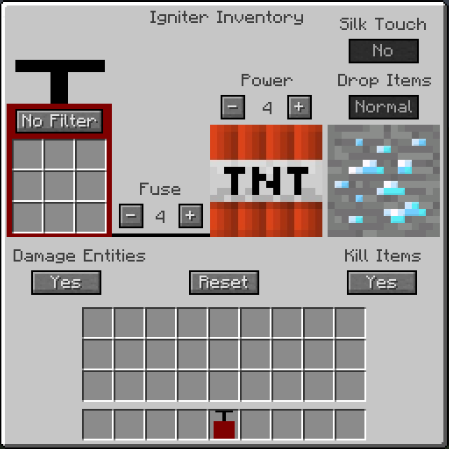
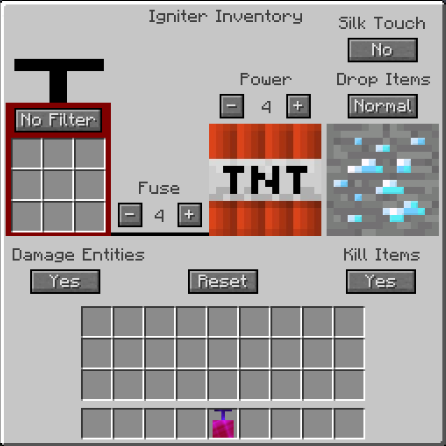
The igniter has its own interface, which is accessed via right-clicking with the item in hand. The interface displays all the adjustable parameters of the explosion along with the current settings. A few settings are limited to only being accessible if the silk touch enchantment is put on the igniter.
Interface (without Silk Touch):
Interface (with Silk Touch):
Adjustable Settings:
All of these settings are changed by clicking the buttons in the interface. The longer buttons cycle through the options, whereas the Fuse and Power increment the fuse time or power, indicated by the number between the - and + buttons.
Filter
This option, along with the 9 slots, enables the user to whitelist or blacklist certain blocks.
If "No Filter" is selected, the TNT explosion blows up all blocks normally. This is the default setting.
If "Whitelist" is selected, only blocks placed in the nine slots will be exploded.
If "Blacklist" is selected, blocks in the nine slots will be excluded from the explosion.
Both whitelist and blacklist are metadata specific, i.e. if oak wood log is placed in a whitelist, only oak wood log will be exploded but not any other version of log.
Default: No Filter
Power
This option changes the power of the explosion.
Clicking the +/- buttons will increment the power by 1 in the designated direction.
Shift-clicking the buttons will instead increment the power by 5 in the designated direction.
The lowest power setting is 0 and the highest is 64.
For explosions greater than the default power level, gunpowder is needed in an amount equal to the power level, i.e. you need 5 gunpowder for a power of 5 and 64 gunpowder for a power of 64, but no gunpowder is needed for below the default level.
Default: 4
Fuse
This option changes the fuse time (in seconds) before the explosion.
Clicking the +/- buttons will increment the time by 1 second in the designated direction.
Shift-clicking the buttons will instead increment the time by 5 seconds in the designated direction.
The lowest fuse time is 0 seconds and the highest is 20 seconds.
Default: 4
Damage Entities
This option changes whether or not mob entities will be damaged by the explosion.
Default: Yes
Note: The player igniting the TNT is immune regardless.
Kill Items
This option changes whether or not items already on the ground will be destroyed from the blast.
Default: Yes
Silk Touch
This option allows the explosion to drop the Silk-Touch drop from blocks (ore blocks, leaves, etc.).
Default: No
Note: This setting requires the silk-touch enchantment to be put on the igniter to be used.
Drop Items
This option allows the explosion to drop items in a set way.
If "Normal" is selected, the explosion will drop items with the same chance as normal TNT.
If "All" is selected, the explosion will drop all blocks as their given drop item.
If "None" is selected, no items will be dropped from the explosion.
Default: Normal
Note: This setting requires the silk-touch enchantment to be put on the igniter to be used.
Reset
This option sets all other settings back to the default.
Might only be working in SSP.
Project description from CurseForge.
Pick your setup
Custom TNT Igniter (Discontinued) by Minecraft version and loader
Choose the version and loader you play, then open the matching release.
Minecraft version
1.8
1 loader buildCheck the dependencies, then try the file in a copied instance before changing a world you care about.
Recent files
Custom TNT Igniter (Discontinued) versions and loaders
CustomTNTIgniter-1.8.9-1.0.jar
11 Jul 2016
Client Source doesn’t say Server Source doesn’t say Dependencies No extras listed Listed on Release listing
Check the 1.8.9 setup 1.8.9 release
CustomTNTIgniter-1.8-1.0.jar
5 Jul 2016
Client Source doesn’t say Server Source doesn’t say Dependencies No extras listed Listed on Release listing
Check the 1.8 setup 1.8 release
Looking for an older file? The official CurseForge project page is in Resources.
 mod
Modrinth · Minecraft
Tröööt [Fog Horn]
A simple mod that adds a loud fog horn that plays a sound when powered by redstone.
 mod
CurseForge · Minecraft
Realistic Walkie-Talkie
Tango-Oscar-November-India; Walkie-talkies for Simple Voice Chat: tune a frequency and talk to everyone on it, with radio sound, beeps, signal bars and a clean HUD.
 mod
CurseForge · Minecraft
TONI's Base Defense
Reinforce any block so nobody else can break it, then guard your base with turrets, a force field dome and nasty traps that never hurt you or your friends.