Minecraft version
Back to mods 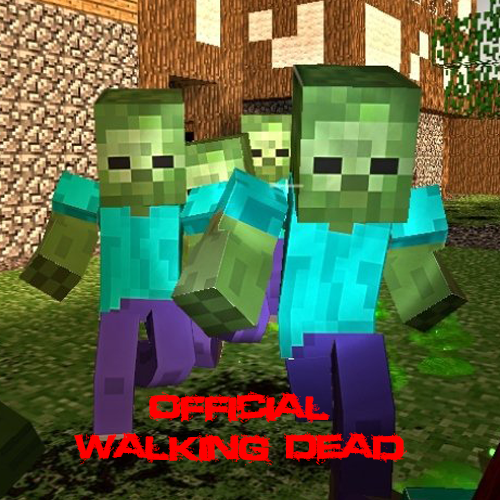
CurseForge · Minecraft mod
Walking Dead
Survive a zombie apocalypse! Alone or with some friends!
Choose a version Pick your version below, then grab the matching file.
Quick answer
Which Walking Dead release should I use?
Latest stable file Walking Dead Titanium 1.0.6
Game version 1.6.4
Loader Not required
Walking Dead Titanium 1.0.6 targets 1.6.4. The project page does not say whether this file belongs on the client, dedicated server, or both. No extra mods listed for this file.
Where it goes
Is Walking Dead required on the client, server, or both?
The project page does not say whether this file belongs on the client, dedicated server, or both.
Client Source doesn’t say
Dedicated server Source doesn’t say
Loader for this release No loader listed
Required install it here Optional supported, not mandatory Not supported do not install here Source doesn’t say do not assume
The source does not explicitly classify this release as client-only or server-only.
What else does Walking Dead Titanium 1.0.6 need?
Walking Dead Titanium 1.0.6. Change the file and its required mods may change too.
This file does not list any required mods. Do not add a library just because a different file uses it.
This file does not list any required or optional mods.
Before you install it
Add Walking Dead without breaking your instance.
Built for Walking Dead Titanium 1.0.6. Pick another file and the loader, install side or required mods may change.
- 01
Stick to this file
Use Walking Dead Titanium 1.0.6. It targets 1.6.4; another release may have different loader, side or dependency requirements.
- 02
Bring the mods it needs
This file does not list any required mods. Do not add a library just because a different file uses it.
- 03
Put it on the correct side
The project page does not say whether this file belongs on the client, dedicated server, or both.
- 04
Pick the file you checked
Use the “Get this file” button beside Walking Dead Titanium 1.0.6. It opens that exact file at the source.
About this project
What does Walking Dead add?
This Is
Walking Dead
Description
The Walking Dead is a mod that aims to put you into a zombie apocalypsed world. Create bases and kill endless amounts of zombies. Customize your characters with guns and different items of clothing, Guns are coming soon!, they will be fully customizable with a range of attachments and skins! Walking Dead hasn't been around for very long and is still very much unfinished, We are working every hour we possibly can to make the mod and the community the best it can be for you! We are also working on releasing Official Servers!
Currently in version: 1.0.6 Titanium
Install
Our installation process has been made the simplest it can possibly be.
All you are required to do is download & install the technic launcher
Then, sign into your Minecraft account on the technic launcher,
Now you can navigate to the modpacks tab at the top,
Towards the top left, you should now see a search bar,
Into the search bar type in "http://api.technicpack.net/modpack/the-walking-dead-surivival",
Now you should see our modpack click it, then navigate to the bottom right and click install,
Once the modpack is installed you will now be able to click the play button in the bottom left.
Server Download
We will soon be releasing a server download, the server download will require all of the necessary files required to make a Walking Dead server.
General Information
As our modpack has only just been released you may have guessed that we have a very small staff team. Our current staff team consists of only 8 members(Including me), We are recruiting for staff, you may apply using this link: http://walkingdeadcure.enjin.com/forum/viewforum/7385095/m/39581571
Our staff team consists of:
Leadership
- MCS_Gaming - Owner | Developer
- Golden_DaggerXx - Manager
- The_Real_MD - Head Administrator
Administration
- VLk_x_Braddy - Administrator
- Hex_Apollo - Administrator | Head Builder
Moderators
- Linkachu101 - Moderator
- KillzHoly - Moderator
- MaybeLater_ / NoSkiin_ - Moderator
Project description from CurseForge.
Pick your setup
Walking Dead by Minecraft version and loader
Choose the version and loader you play, then open the matching release.
Check the dependencies, then try the file in a copied instance before changing a world you care about.
Recent files
Walking Dead versions and loaders
Walking Dead Titanium 1.0.6
WalkingDead 1.0.6.zip
8 Aug 2016
Client Source doesn’t say Server Source doesn’t say Dependencies No extras listed Listed on Release listing
Check the 1.6.4 setup 1.6.4 release
Looking for an older file? The official CurseForge project page is in Resources.
 mod
Modrinth · Minecraft
OrbitalStrikeCannon
This mod adds the Orbital Strike Cannon from Wembu's videos.
 mod
Modrinth · Minecraft
Dark Doppelganger - Irons Spells And Spellbooks Addon
Summon a boss that looks just like you
 mod
CurseForge · Minecraft
Plinco's Upgrade Table
Upgrade any weapon or armor from +1 to +13 at a magic table using upgrade stones, with risky odds, protection stones and fully configurable bonuses from any mod.