Minecraft version
Back to mods 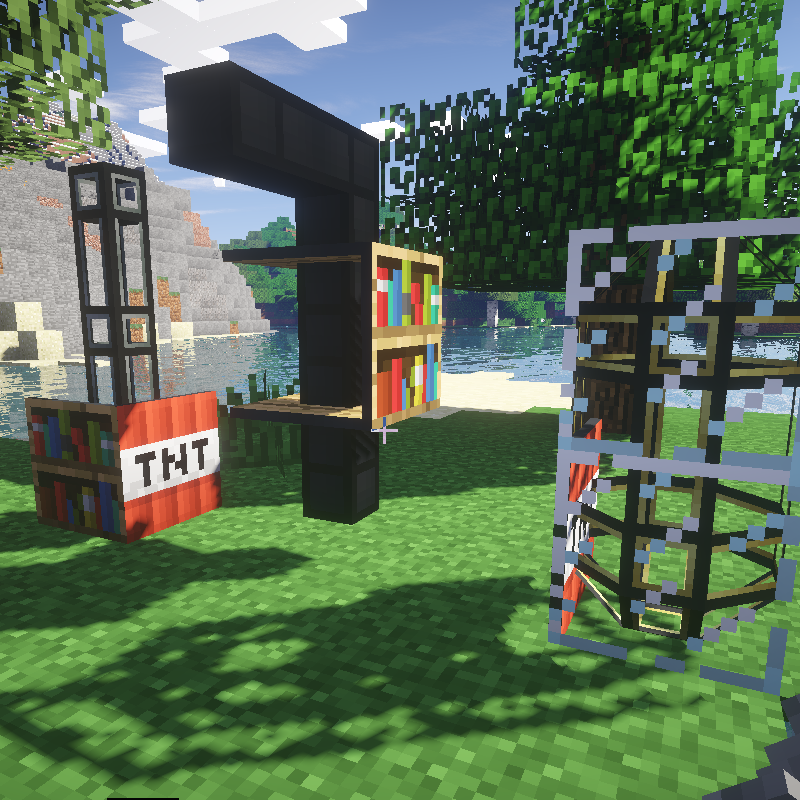
CurseForge · Minecraft mod
ThermalShade
A small fix to make Thermal Dynamics Duct Covers work with ShadersModCore
Choose a version Pick your version below, then grab the matching file.
Quick answer
Which ThermalShade release should I use?
Latest stable file ThermalShade-1.7.10-1.0.jar
Game version 1.7.10
Loader Not required
ThermalShade-1.7.10-1.0.jar targets 1.7.10. The project page does not say whether this file belongs on the client, dedicated server, or both. No extra mods listed for this file.
Where it goes
Is ThermalShade required on the client, server, or both?
The project page does not say whether this file belongs on the client, dedicated server, or both.
Client Source doesn’t say
Dedicated server Source doesn’t say
Loader for this release No loader listed
Required install it here Optional supported, not mandatory Not supported do not install here Source doesn’t say do not assume
The source does not explicitly classify this release as client-only or server-only.
What else does ThermalShade-1.7.10-1.0.jar need?
ThermalShade-1.7.10-1.0.jar. Change the file and its required mods may change too.
This file does not list any required mods. Do not add a library just because a different file uses it.
This file does not list any required or optional mods.
Before you install it
Add ThermalShade without breaking your instance.
Built for ThermalShade-1.7.10-1.0.jar. Pick another file and the loader, install side or required mods may change.
- 01
Stick to this file
Use ThermalShade-1.7.10-1.0.jar. It targets 1.7.10; another release may have different loader, side or dependency requirements.
- 02
Bring the mods it needs
This file does not list any required mods. Do not add a library just because a different file uses it.
- 03
Put it on the correct side
The project page does not say whether this file belongs on the client, dedicated server, or both.
- 04
Pick the file you checked
Use the “Get this file” button beside ThermalShade-1.7.10-1.0.jar. It opens that exact file at the source.
About this project
What does ThermalShade add?
ThermalShade is more of a patch that fixes broken duct cover rendering when using Thermal Dynamics with ShadersMod.
This mod makes a few adjustments to Thermal Dynamics to correct the problem. It modifies a value in the Thermal Dynamics code and disables the holes in the duct covers.
Details of the problem:
The ShadersModCore mod overrides the vanilla tesselator with it's own version that stores 18 integers per vertex.
This causes a lot of problems with Thermal Dynamics and it's bizarre yet clever duct cover tesselator code that relies on the standard 8 integers per vertex of the original tesselator. This mod changes the Thermal Dynamics expected tesselator vertex size to match the changes made by the ShadersModCore mod. The Thermal Dynamics code to create holes in the panels also has issues with ShadersCore mod and causes it to crash outright. I wasn't able to fix the Thermal Dynamics holifier code so I just disabled it.
Issues and workaround:
Do not use this mod without ShadersMod installed or it will crash Minecraft.
If you remove the ShadersMod then you need to also remove this mod.
If you're looking for a 1.12.2 solution try Unifine https://www.curseforge.com/minecraft/mc-mods/unifine
Project description from CurseForge.
Pick your setup
ThermalShade by Minecraft version and loader
Choose the version and loader you play, then open the matching release.
Check the dependencies, then try the file in a copied instance before changing a world you care about.
Recent files
ThermalShade versions and loaders
ThermalShade-1.7.10-1.0.jar
18 Aug 2016
Client Source doesn’t say Server Source doesn’t say Dependencies No extras listed Listed on Release listing
Check the 1.7.10 setup 1.7.10 release
Looking for an older file? The official CurseForge project page is in Resources.
 mod
mod CurseForge · Minecraft
Cobblemon Roulette
Cobblemon Roulette is an exciting Minecraft mod that lets players spin a customizable roulette to win random Pokémon and items, featuring multiplayer support and in-game configuration!
 mod
mod CurseForge · Minecraft
Cobblemon: Simple Radar
📡 Rasgo Cobble Radar is a customizable Pokémon radar for Cobblemon 1.8.2, featuring a compact HUD, Pokémon filters, and automatic directional tracking for Legendary Pokémon, Mythicals, and Ultra Beasts!
 mod
mod CurseForge · Minecraft
Smart Moving Armor Compatibility
Finally, you can enjoy Minecraft 1.7.10 with Smart Moving, Thaumcraft, Botania, and other mods that add custom 3D armor, accessories, wings, backpacks, and player-model attachments.