Minecraft version
Back to mods 
CurseForge · Minecraft mod
KAGIC
The Steven Universe mod that adamantly denies it is a Steven Universe mod.
Choose a version Pick your version below, then grab the matching file.
Quick answer
Which KAGIC release should I use?
Latest stable file kagic-X11p13.jar
Game version 1.12.2
Loader Not required
kagic-X11p13.jar targets 1.12.2. The project page does not say whether this file belongs on the client, dedicated server, or both. No extra mods listed for this file.
Where it goes
Is KAGIC required on the client, server, or both?
The project page does not say whether this file belongs on the client, dedicated server, or both.
Client Source doesn’t say
Dedicated server Source doesn’t say
Loader for this release No loader listed
Required install it here Optional supported, not mandatory Not supported do not install here Source doesn’t say do not assume
The source does not explicitly classify this release as client-only or server-only.
What else does kagic-X11p13.jar need?
kagic-X11p13.jar. Change the file and its required mods may change too.
This file does not list any required mods. Do not add a library just because a different file uses it.
This file does not list any required or optional mods.
Before you install it
Add KAGIC without breaking your instance.
Built for kagic-X11p13.jar. Pick another file and the loader, install side or required mods may change.
- 01
Stick to this file
Use kagic-X11p13.jar. It targets 1.12.2; another release may have different loader, side or dependency requirements.
- 02
Bring the mods it needs
This file does not list any required mods. Do not add a library just because a different file uses it.
- 03
Put it on the correct side
The project page does not say whether this file belongs on the client, dedicated server, or both.
- 04
Pick the file you checked
Use the “Get this file” button beside kagic-X11p13.jar. It opens that exact file at the source.
About this project
What does KAGIC add?
{width=633 height=175}
Join the Official KAGIC/Gempire Discord server here.
((Joining the Discord gives you access to early alpha releases!))
UPDATE FROM THE KAGIC TEAM: This mod is now considered LEGACY content! Please visit the Gempire wiki and Gempire Discord server (linked above) for up-to-date content and new alpha releases exclusive to our server! Gempire is the official replacement and continuation of KAGIC, and our next alpha release should be publicly released for all to test and enjoy. Thank you for supporting KAGIC and its team, and sorry for taking so long on getting content out!!
An official statement on the source code of KAGIC:

KAGIC is a mod that adds machines to your Minecraft world that let you harvest your own servants and soldiers from the ores in the ground.
The Gems:
KAGIC lets you create up to nine different kinds of servants, called "gems", each variation of gem can do different things for you. Here is a list of gems and their purposes:
The Ruby is a very common and versatile gem that will follow and defend you from hostile mobs and anything with the intent to hurt you. The more they are hit, the stronger they get, and they have innate fire powers.
{width=250 height=350}
The Quartz is a beefed up version of the Ruby that are nearly invincible. They come in four different species, Amethysts, which have lightning powers, Jaspers, which have powerful area-of-effect attacks, Carnelians, which are just a blast, and Rose Quartzes, which heal nearby players and gems.
{width=250 height=350}{width=250 height=350}{width=250 height=350}{width=250 height=350}
The Peridot is a useful gem that helps manage Kindergartens (where you create your gems) by automatically taming gems for you and telling you where you can make the best gems. When equipped with a hoe, Peridots will harvest and replant nearby crops.
{width=250 height=350}
The Pearl is a multicolored gem that carries a chest inside of it. With a Pearl, you can have multiple inventories that follow you and pick up nearby items. They also have customizable outfits, hair, and colors.
{width=500 height=350}
The Lapis Lazuli is a flying gem that you can ride. When equipped with a hoe, Lapis Lazulis will water nearby farmland.
{width=250 height=350}
The Sapphire is a gem that can predict the future and give you good luck.
{width=250 height=350}
The Bismuth is a tall and powerful gem that automatically smelts the items you right click it with.
{width=250 height=350}
The Agate is a commanding, multicolored gem that ensures your gems are in line and on post and keeping all nearby mobs on edge.
{width=250 height=350}
The Topaz is a powerful warrior gem that can fuse and carry enemies on its shoulders.
{width=250 height=350}
The Aquamarine is a flighty fairy gem that follows you and makes a mockery of your enemies.
{width=250 height=350}
The Rutile is a bright gem that, when given torches, lights up the area for you.
{width=250 height=350}
The Zircon is a lawyer. I rest my case.
{width=250 height=350}
The Hessonite is an elusive combat gem with the innate ability to pull of backhand tactics when fighting enemies, including teleportation, sword stealing, and quick maneuvers.
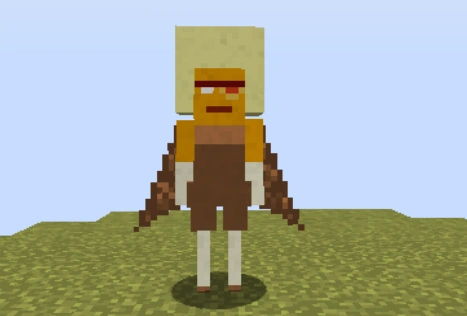
The Slag is a hostile reject gem that your Peridots will make short work of the moment they see it.
The Items and Blocks:
The Gem Staff allows you to control your gems. To tame a gem, you can right click it with your Gem Staff and it will serve you. If you want your gems to move to a specific location, you can right click on a block and all of your gems will stop what they are doing and go to that specific block.
{width=160 height=80}
The Inactive Gem Base is the item that becomes a Gem Seed once activated and injected into the ground.
{width=160 height=80}
The Activated Gem Base is a Gem Base after being exposed to heat. To use it, right click on an Injector block and provide a redstone current to the Injector block.
{width=160 height=80}
The Incubator is the top part of the injector. It can hold up to nine gem bases.
{width=160 height=80}
The Automatic Injector is the block used to harbor the next gem base that will be injected.
{width=160 height=80}
The Gem Drill is the block that allows the Injector to inject the gem base into the ground.
{width=160 height=80}
The Transfer Contract is used to give your gems to other people, simply give it to the person and once they right click a gem it will notify you that that gem now belongs to them. If you decide not to use the Transfer Contract, you can smelt it to receive a diamond!
{width=160 height=80}
The Joint Contract is used to give a gem more than one owner. This is useful for people who want to share gems. If you decide not to use the Joint Contract, you can smelt it to receive a diamond!
{width=160 height=80}
The Liberation Contract is used to free a gem from her owners, allowing her to be tamed by someone else. If you decide not to use the Liberation Contract, you can smelt it to receive a diamond!
{width=160 height=80}
The Autonomy Contract is used to free a gem from her owners forever, letting her become an autonomous gem who won't serve anyone. If you decide not to use the Autonomy Contract, you can smelt it to receive a diamond!
{width=160 height=80}
The Warp Pad Core is the central part of a warp pad. When surrounded by nether quartz columns and stairs, it can be given a name with the Gem Staff and used to teleport to other warp pads in the same dimension.
{width=160 height=80}
The Warp Whistle is used to select which warp pad to warp to.
{width=160 height=80}
Video Tutorials
Here are some video tutorials by Rayne, be sure to give them a like!
Here is a warp pad tutorial I made:
Permissions:
You may use this mod in a modpack provided you give credit to Tourmaline-Iris and associated team.
Steven Universe and all related characters and elements are trademarks of Cartoon Network.
Project description from CurseForge.
Pick your setup
KAGIC by Minecraft version and loader
Choose the version and loader you play, then open the matching release.
Minecraft version
1.12.1
1 loader buildMinecraft version
1.12
1 loader buildMinecraft version
1.11.2
1 loader buildCheck the dependencies, then try the file in a copied instance before changing a world you care about.
Recent files
KAGIC versions and loaders
kagic-X11p13.jar
13 Sept 2019
Client Source doesn’t say Server Source doesn’t say Dependencies No extras listed Listed on Release listing
Check the 1.12.2 setup 1.12.2 release
KAGIC X10
kagic-X10.jar
7 Apr 2018
Client Source doesn’t say Server Source doesn’t say Dependencies No extras listed Listed on Release listing
Check the 1.12.2 setup 1.12.2 beta
KAGIC 1.10.0
kagic-1.10.0.jar
9 Feb 2018
Client Source doesn’t say Server Source doesn’t say Dependencies No extras listed Listed on Release listing
Check the 1.12.2 setup 1.12.2 release
KAGIC-1.9.4-mc1.11.2.jar
25 Aug 2017
Client Source doesn’t say Server Source doesn’t say Dependencies No extras listed Listed on Release listing
Check the 1.11.2 setup 1.11.2 release
kagic-1.9.4.jar
25 Aug 2017
Client Source doesn’t say Server Source doesn’t say Dependencies No extras listed Listed on Release listing
Check the 1.12.1 setup 1.12.11.12 release
Looking for an older file? The official CurseForge project page is in Resources.
 mod
CurseForge + Modrinth · Minecraft
Terracart Reloaded
Terraria Cart in Minecraft, Right click track and have fun!
 mod
Modrinth · Minecraft
Antarchy
Adding 45+ mobs, 8+ bosses, 3 fleshed out dimensions, and more
 mod
CurseForge · Minecraft
Topsy Turvy
Water burns. Lava is a nice warm bath. Zombies burn at night, fish breathe air, and the best mining tool in the game is your fist.