Minecraft version
Back to mods 
CurseForge · Minecraft mod
Server.Properties for LAN
Get server.properties file for each Local World ...!
Choose a version Pick your version below, then grab the matching file.
Quick answer
Which Server.Properties for LAN release matches 1.12?
Best match for your filters Server.Properties for LAN v2.65-1.8.9+
Game version 1.9.1, 1.9.3, 1.10-Snapshot
Loader Not required
Server.Properties for LAN v2.65-1.8.9+ targets 1.9.1, 1.9.3, 1.10-Snapshot. The project page does not say whether this file belongs on the client, dedicated server, or both. No extra mods listed for this file.
Where it goes
Is Server.Properties for LAN required on the client, server, or both?
The project page does not say whether this file belongs on the client, dedicated server, or both.
Client Source doesn’t say
Dedicated server Source doesn’t say
Loader for this release No loader listed
Required install it here Optional supported, not mandatory Not supported do not install here Source doesn’t say do not assume
The source does not explicitly classify this release as client-only or server-only.
What else does Server.Properties for LAN v2.65-1.8.9+ need?
Server.Properties for LAN v2.65-1.8.9+ on 1.12. Every mod below is checked against that same setup.
This file does not list any required mods. Do not add a library just because a different file uses it.
This file does not list any required or optional mods.
Before you install it
Add Server.Properties for LAN without breaking your instance.
Built for Server.Properties for LAN v2.65-1.8.9+ on 1.12. Pick another file and the loader, install side or required mods may change.
- 01
Stick to this file
Use Server.Properties for LAN v2.65-1.8.9+. It targets 1.9.1, 1.9.3, 1.10-Snapshot; another release may have different loader, side or dependency requirements.
- 02
Bring the mods it needs
This file does not list any required mods. Do not add a library just because a different file uses it.
- 03
Put it on the correct side
The project page does not say whether this file belongs on the client, dedicated server, or both.
- 04
Pick the file you checked
Use the “Get this file” button beside Server.Properties for LAN v2.65-1.8.9+. It opens that exact file at the source.
About this project
What does Server.Properties for LAN add?
LAN Server Properties Modifier
Ever thought of playing offline Modded Minecraft Multiplayer with friends...
but realized that setting up a server is really annoying !
Well then... This Mod Is For YOU .!
To know how to play on LAN shared worlds over The Internet please scroll down
Server.Properties for LAN is a mod which creates a server.properties file inside every world folder and forces your LAN World to use the settings in this file. It also creates a serverGlobalConfig.properties file inside the config folder for Global Default properties ...!
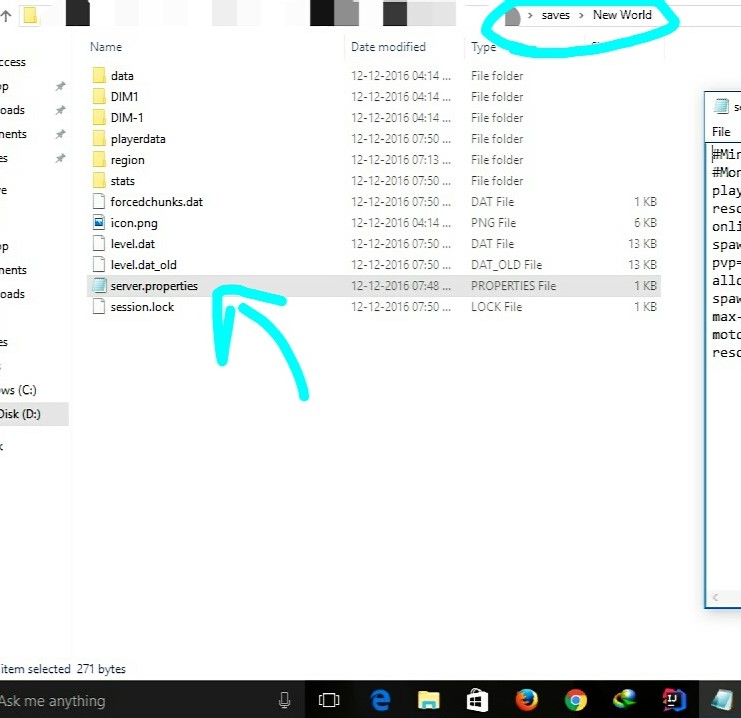
This means that all of the settings of a server can now be done for a Local World.
It, however, does not provide all the settings of a Multiplayer Server... ...but only provides the useful ones which are not editable in-game
Currently, it creates the server.properties file with the following options:--


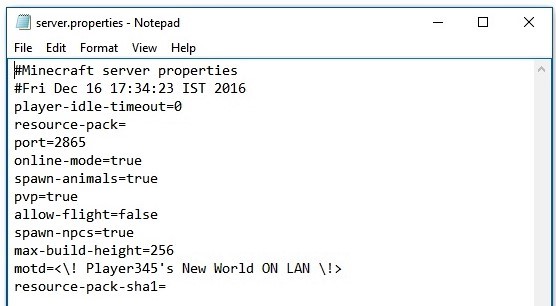
Requirements:--
- Minecraft 1.8.9+/Minecraft 1.7.x
- Minecraft Forge
IT SHOULD WORK ON ALL VERSIONS AFTER 1.8.9(+NOW 1.7.x)
...If you want to Open the world for LAN and invite your friends over the internet to join...
With the new Port Config option, you can do just that.
Let me explain how ...
- For the people over The Internet to be able to detect your Server(Open to LAN),
they must be able to communicate with you on the Port on which your Server is running.
- To do this you must tell your Router(Modem thingy) to route all traffic on that Port to you(Local IP).
This is done by a method called PORT FORWARDING
- Generally Port Forwarding requires setting up your router manually, however
There is an EASY way called UPNP Port Mapping
- For this, I recommend any UPNP Port Forwarding application to forward your server's port to your PC running the server.
- Use this for Windows...!(Click Here)
- Before Forwarding the Port, you need to put an exception for your Port in your local Firewall.
- (One time process only, for a particular port number)
- To do this in Windows... Go to Firewall Settings -> Advanced Firewall Settings ->
- And Create a New Rule in both the Inbound and Outbound Sections.
- Each section should have two new rules to allow your Port via TCP and UDP.
- So there will be a total of four rules.
- After you are done with Port Forwarding(TCP and UDP), all you have to do is give your friends your Public IP.
- Search Google for "My IP" and it will tell you your public IP.
- For your friends to connect to your server, they have to add your server to their Server List with the Server Address as
<YourPublicIP>:<ServerPort>
And that is it ...!
Once Done, your friends will be able to connect to your LAN world over The Internet ...!
CHANGE-LOG
GitHub ResetReset GitHub page to setup multiversion environment and prepare for revamp.
**Appologies for lost Issues, Forks and all repo. data.v2.65-1.7.x**
- Ported to Minecraft 1.7.x...!
v2.65
- Added version check function.
- Updated mcmod.info
- Some minor code optimisations.
- ModID changed to 'splan'.
v2.6
- Fixed a bug causing the port number to ignore provided settings.
- Now setting port to 0 uses a random port.
v2.5
- Fixed file path issue on OSs other than Windows.
v2.4
- Added Global Config file, found in the config folder by the name of "serverGlobalConfig.properties".
- Added option "overrideGlobalDefaults" in local config files to override the global settings when needed.
- DO NOT FORGET to set "overrideGlobalDefaults" to true for the local properties file to be used.
v2.3
- Fixed Reflection Obfuscation issues.(maxViewDistance and maxPlayers work now !)
- Updated to latest MCP Mappings.
v2.2
- Fixed fatal Bug causing Server-Full in first run...!
- Added max-view-distance for servers(Set it to any number below 0 for default minecraft behavior)...!
v2.1
- Added MaxPlayers config support...!
- Added white-list support(Reflection)...
- NOTE :
- The white-list feature works using the whitelist.json file made by Minecraft Servers.
- See the configuration for the whitelist.json file Here.
- The whitelist.json file should be manually configured.
- !...YOU NEED TO PUT YOUR OWN UUID AND USERNAME IN IT TOO...!
- The whitelist.json file is only created if white-list is set to true in the server.properties file.
- On the first run, with white-list set to true, the white-list feature DOES NOT WORK.
- The server must be Stopped and Started again after the first run with white-list set to true.
v2
- Port Setup Support (Set Port to 0 for Vanilla Random Port)(CoreMod)
- Bug Fixes
v1
- Initial release.
Steps To Install:--
- Download the .jar file from here.
- Paste it into your mods folder.
- Done!
To Apply The Changes In Settings Of The server.properties File,
...You Only Have To Close Your World And Open It Again...
... NO NEED TO RESTART MINECRAFT ...!
View Source At
https://github.com/jaideepheer/MinecraftForge-Mods-ServerPropertiesLAN
< It Is Well Documented :) >
Also checkout Custom DiscordRPC
It allows custom Discord rich text
and you can use JavaScript...!
Feel free to use this in any mod pack.
Project description from CurseForge.
Pick your setup
Server.Properties for LAN by Minecraft version and loader
Choose the version and loader you play, then open the matching release.
Minecraft version
1.12.1
1 loader buildMinecraft version
1.12-Snapshot
1 loader buildMinecraft version
1.12
1 loader buildMinecraft version
1.11.2
1 loader buildMinecraft version
1.11.1
1 loader buildMinecraft version
1.11-Snapshot
1 loader buildMinecraft version
1.11
1 loader buildMinecraft version
1.10.2
1 loader buildMinecraft version
1.10.1
1 loader buildMinecraft version
1.10-Snapshot
1 loader buildMinecraft version
1.10
1 loader buildShowing the newest 12 of 36 game versions. Older files are in the list below.
Check the dependencies, then try the file in a copied instance before changing a world you care about.
Recent files
Server.Properties for LAN versions and loaders
Server.Properties for LAN v2.65-1.8.9+
ServerPropertiesLAN-2.65.jar
15 Jan 2018
Client Source doesn’t say Server Source doesn’t say Dependencies No extras listed Listed on Release listing
Check the 1.12 setup 1.9.11.9.31.10-Snapshot1.9.4 release
Server.Properties for LAN v2.6-1.8.9+
ServerPropertiesLAN-2.6.jar
27 Dec 2017
Client Source doesn’t say Server Source doesn’t say Dependencies No extras listed Listed on Release listing
Check the 1.12 setup 1.9.11.9.31.10-Snapshot1.9.4 release
Server.Properties for LAN v2.5-1.8.9+
ServerPropertiesLAN-2.5.jar
29 Sept 2017
Client Source doesn’t say Server Source doesn’t say Dependencies No extras listed Listed on Release listing
Check the 1.12 setup 1.9.11.9.31.10-Snapshot1.9.4 release
Server.Properties for LAN v2.4-1.8.9+
ServerPropertiesLAN-2.4.jar
30 Jan 2017
Client Source doesn’t say Server Source doesn’t say Dependencies No extras listed Listed on Release listing
Check the 1.12 setup 1.9.11.9.31.10-Snapshot1.9.4 release
Looking for an older file? The official CurseForge project page is in Resources.