Minecraft version
Back to mods 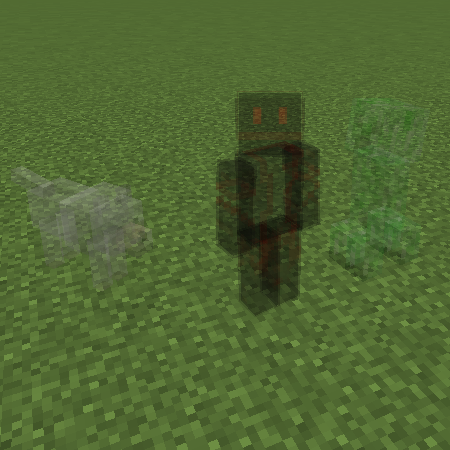
CurseForge · Minecraft mod
Omniscience
Allows you to see invisible creatures and players.
Choose a version Pick your version below, then grab the matching file.
Quick answer
Which Omniscience release matches 1.11.2?
Best match for your filters Omniscience 1.1.0 for 1.11.2
Game version 1.11.2
Loader Not required
Omniscience 1.1.0 for 1.11.2 targets 1.11.2. The project page does not say whether this file belongs on the client, dedicated server, or both. No extra mods listed for this file.
Where it goes
Is Omniscience required on the client, server, or both?
The project page does not say whether this file belongs on the client, dedicated server, or both.
Client Source doesn’t say
Dedicated server Source doesn’t say
Loader for this release No loader listed
Required install it here Optional supported, not mandatory Not supported do not install here Source doesn’t say do not assume
The source does not explicitly classify this release as client-only or server-only.
What else does Omniscience 1.1.0 for 1.11.2 need?
Omniscience 1.1.0 for 1.11.2 on 1.11.2. Every mod below is checked against that same setup.
This file does not list any required mods. Do not add a library just because a different file uses it.
This file does not list any required or optional mods.
Before you install it
Add Omniscience without breaking your instance.
Built for Omniscience 1.1.0 for 1.11.2 on 1.11.2. Pick another file and the loader, install side or required mods may change.
- 01
Stick to this file
Use Omniscience 1.1.0 for 1.11.2. It targets 1.11.2; another release may have different loader, side or dependency requirements.
- 02
Bring the mods it needs
This file does not list any required mods. Do not add a library just because a different file uses it.
- 03
Put it on the correct side
The project page does not say whether this file belongs on the client, dedicated server, or both.
- 04
Pick the file you checked
Use the “Get this file” button beside Omniscience 1.1.0 for 1.11.2. It opens that exact file at the source.
About this project
What does Omniscience add?
Omniscience
See invisible creatures and players!
Features:
- Enable/disable viewing invisible entities as partially transparent.
- Enable/disable viewing invisible players as partially transparent.
- Allow access to Highlight Players keybind in any game mode (normally only available in spectator mode).
How to Install:
Install LiteLoader.
Download the .litemod file for your version of Minecraft and save it into your version's mod folder.
(e.g. .minecraft/mods/1.11.2).
Run the Minecraft client.
Configuration options are all located in the LiteLoader panel, which can be found via the small tab along the right edge of the screen at the in-game menus.
Old Download Links:
- Omnisicence v1.1.0 for Minecraft 1.8 (requires LiteLoader) [Direct Link] [Release Page]
- Omniscience v1.0.2 for Minecraft 1.8 (requires LiteLoader) [Direct Link] [Release Page]
- Omniscience v1.0.1 for Minecraft 1.7.10 (requires LiteLoader) [Direct Link] [Release Page]
Screenshots:
An invisible player and their invisible baby wolf.
Changes:
v1.1.0
* Unplanned feature added while investigating Spectator gamemode possibilities: Player Highlight keybind.
v1.0.2
* Compatibility with MC/LL 1.8.
v1.0.1 (backport of fixes from upcoming 1.1.0 release)
* Permissions inclusion fix.
* Entity-type differentiation fix.
* Configuration saving fix.
v1.0.0
* Initial release.
Source Code:
All source code is publicly available on GitHub.
Bugs/Requests:
For the best visibility, all bug reports and feature requests can be submitted on GitHub here. You may also submit them here as comments, but GitHub is strongly preferred.
Project description from CurseForge.
Pick your setup
Omniscience by Minecraft version and loader
Choose the version and loader you play, then open the matching release.
Minecraft version
1.11.2
1 loader buildMinecraft version
1.11
1 loader buildMinecraft version
1.10.2
1 loader buildMinecraft version
1.10
1 loader buildMinecraft version
1.9.4
1 loader buildMinecraft version
1.9
1 loader buildMinecraft version
1.8.9
1 loader buildCheck the dependencies, then try the file in a copied instance before changing a world you care about.
Recent files
Omniscience versions and loaders
Omniscience 1.1.0 for 1.11.2
25 Jan 2017
Client Source doesn’t say Server Source doesn’t say Dependencies No extras listed Listed on Release listing
Check the 1.11.2 setup 1.11.2 release
Looking for an older file? The official CurseForge project page is in Resources.
