Minecraft version
Back to mods 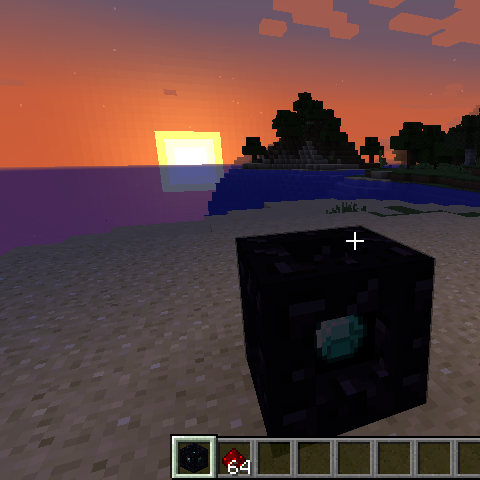
CurseForge · Minecraft mod
Transporter
A mod that enables the player to create transporters to rapidly move around the Overworld in Minecraft.
Choose a version Pick your version below, then grab the matching file.
Quick answer
Which Transporter release matches 1.11.2?
Best match for your filters transporter-V1.11.2-1.0.1.jar
Game version 1.11.2
Loader Not required
transporter-V1.11.2-1.0.1.jar targets 1.11.2. The project page does not say whether this file belongs on the client, dedicated server, or both. No extra mods listed for this file.
Where it goes
Is Transporter required on the client, server, or both?
The project page does not say whether this file belongs on the client, dedicated server, or both.
Client Source doesn’t say
Dedicated server Source doesn’t say
Loader for this release No loader listed
Required install it here Optional supported, not mandatory Not supported do not install here Source doesn’t say do not assume
The source does not explicitly classify this release as client-only or server-only.
What else does transporter-V1.11.2-1.0.1.jar need?
transporter-V1.11.2-1.0.1.jar on 1.11.2. Every mod below is checked against that same setup.
This file does not list any required mods. Do not add a library just because a different file uses it.
This file does not list any required or optional mods.
Before you install it
Add Transporter without breaking your instance.
Built for transporter-V1.11.2-1.0.1.jar on 1.11.2. Pick another file and the loader, install side or required mods may change.
- 01
Stick to this file
Use transporter-V1.11.2-1.0.1.jar. It targets 1.11.2; another release may have different loader, side or dependency requirements.
- 02
Bring the mods it needs
This file does not list any required mods. Do not add a library just because a different file uses it.
- 03
Put it on the correct side
The project page does not say whether this file belongs on the client, dedicated server, or both.
- 04
Pick the file you checked
Use the “Get this file” button beside transporter-V1.11.2-1.0.1.jar. It opens that exact file at the source.
About this project
What does Transporter add?
Version 2.0.0 released. Updated for Minecraft 1.12.2
To install:
- Install Forge for version 1.12.2.
- Download and copy the
.jarfile below to the mods directory for version 1.12.2, e.g. %appdata%.minecraft\mods\1.12.2. - Launch Minecraft and select the Forge version for version 1.12.2.
A few usage notes:
- The Transporter is found in Creative mode on the Redstone tab.
- In Survival mode, you can craft a Transporter by surrounding a diamond with 8 blocks of obsidian.
- To operate the transporter:
Right-click on a transporter to activate the control panel.
Any other transporters within range will be displayed. Note: the display is oriented with North at the top. Click one to select it as the destination; click again to deselect it.
Adjust the Distance slider as needed.
Drop at least one redstone item into the fuel slot for every 100 meters of travel. The Fly Away button will be grayed out until enough has been added.
Press the Fly Away button.
If you do not select another transporter, you will be transported in the direction you were facing when you activated the control panel. The transporter will attempt to land you safely, ensuring that you do not transport into the middle of a block or standing on air. However, be careful as you may transport onto water (or worse yet...lava)!
Enjoy, and please post any issues you find.
Note that the sources can be found at GitHub.
Project description from CurseForge.
Pick your setup
Transporter by Minecraft version and loader
Choose the version and loader you play, then open the matching release.
Minecraft version
1.11.2
1 loader buildMinecraft version
1.10.2
1 loader buildCheck the dependencies, then try the file in a copied instance before changing a world you care about.
Recent files
Transporter versions and loaders
transporter-V1.11.2-1.0.1.jar
26 Mar 2017
Client Source doesn’t say Server Source doesn’t say Dependencies No extras listed Listed on Release listing
Check the 1.11.2 setup 1.11.2 release
Looking for an older file? The official CurseForge project page is in Resources.
 mod
CurseForge · Minecraft
Reliquary Reincarnations
Many magical items to help you in your minecraft world
 mod
CurseForge · Minecraft
TONI's Core Lib
Shared library for TONI's mods: registration, events, networking, config and screens on every loader and version. Adds no content by itself.
 mod
CurseForge · Minecraft
Base Metals
Adds many common metals and alloys to Minecraft, such as copper, silver, and steel.