Minecraft version
Back to mods 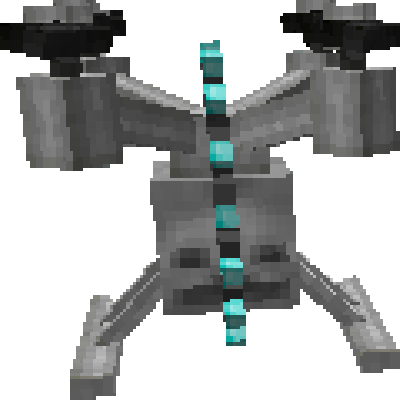
CurseForge · Minecraft mod
Drones
A Mod to add Drones Mobs to the world
Choose a version Pick your version below, then grab the matching file.
Quick answer
Which Drones release matches 1.12.1?
Best match for your filters Drones-0.3.0
Game version 1.12.1, 1.12, 1.12.2
Loader neoforge
Drones-0.3.0 targets 1.12.1, 1.12, 1.12.2. The project page does not say whether this file belongs on the client, dedicated server, or both. No extra mods listed for this file.
Where it goes
Is Drones required on the client, server, or both?
The project page does not say whether this file belongs on the client, dedicated server, or both.
Client Source doesn’t say
Dedicated server Source doesn’t say
Loader for this release No loader listed
Required install it here Optional supported, not mandatory Not supported do not install here Source doesn’t say do not assume
The source does not explicitly classify this release as client-only or server-only.
What else does Drones-0.3.0 need?
Drones-0.3.0 on 1.12.1. Every mod below is checked against that same setup.
This file does not list any required mods. Do not add a library just because a different file uses it.
This file does not list any required or optional mods.
Before you install it
Add Drones without breaking your instance.
Built for Drones-0.3.0 on 1.12.1. Pick another file and the loader, install side or required mods may change.
- 01
Stick to this file
Use Drones-0.3.0. It targets 1.12.1, 1.12, 1.12.2; another release may have different loader, side or dependency requirements.
- 02
Bring the mods it needs
This file does not list any required mods. Do not add a library just because a different file uses it.
- 03
Put it on the correct side
The project page does not say whether this file belongs on the client, dedicated server, or both.
- 04
Pick the file you checked
Use the “Get this file” button beside Drones-0.3.0. It opens that exact file at the source.
About this project
What does Drones add?
Drones is a small mod with mobs originally Made for the Invasion Mod-pack by Darkosto available on the Curse Launcher.
Drones adds Just 2 Mobs and 2 items to your world, an aggressive drone that flies and shoots a saw blade at you and a player made drone that will protect you and attack hostile mobs with built in lasers. The player drone will display the owner's head.
Hostile Drone
{width=615 height=422}
Player Drone
{width=615 height=422}
Items
Drone Disruptor.
The Drone Disruptor is a craftable item that will send out an 'EMP' signal which will destroy any non player drones within range.
This is a 1 use item and crafted as below.
{width=300 height=139}
Drone Constructor.
The Drone Constructor is a craftable item that will spawn a player owned drone. The drone will display the player's head as a way of showing it's owner. Player drones have a ranged attack laser that will shoot 2 beams, on a small cool down, that will harm hostile mobs but not other player drones or players. Player drones will follow their owners and also melee attack hostile targets.
This is a 1 use item and crafted as below.
{width=300 height=140}
There are several configuration options available to change how the mod works including mob damage, health and spawning rules.
The in game config menu available from the 'mods' tab on the main menu allows you to customise many aspects.
Drones will not spawn in The Nether, The End, and any Biome that has an Ore Dictionary type of WATER or OCEAN.
Any settings in the config file based on 'days' are set as in game days from when you 1st started your world.
Project description from CurseForge.
Pick your setup
Drones by Minecraft version and loader
Choose the version and loader you play, then open the matching release.
Minecraft version
1.20.1
2 loader buildsMinecraft version
1.12.2
1 loader buildMinecraft version
1.12.1
1 loader buildMinecraft version
1.12
1 loader buildMinecraft version
1.11.2
1 loader buildMinecraft version
1.10.2
1 loader buildCheck the dependencies, then try the file in a copied instance before changing a world you care about.
Recent files
Drones versions and loaders
Drones-0.3.0
Drones-0.3.0.jar
8 Oct 2017
Client Source doesn’t say Server Source doesn’t say Dependencies No extras listed Listed on Release listing
Check the 1.12.1 setup 1.12.11.121.12.2 release
Looking for an older file? The official CurseForge project page is in Resources.