Minecraft version
Back to mods 
CurseForge · Minecraft mod
Corail Scanner
This mod adds a scanner able to find any kind of blocks, with a playfulness to find them - server friendly
Choose a version Pick your version below, then grab the matching file.
Quick answer
Which Corail Scanner release matches 1.12.2?
Best match for your filters Corail Scanner 1.1.4 for 1.12+
Game version 1.12.1, 1.12, 1.12.2
Loader Not required
Corail Scanner 1.1.4 for 1.12+ targets 1.12.1, 1.12, 1.12.2. The project page does not say whether this file belongs on the client, dedicated server, or both. No extra mods listed for this file.
Where it goes
Is Corail Scanner required on the client, server, or both?
The project page does not say whether this file belongs on the client, dedicated server, or both.
Client Source doesn’t say
Dedicated server Source doesn’t say
Loader for this release No loader listed
Required install it here Optional supported, not mandatory Not supported do not install here Source doesn’t say do not assume
The source does not explicitly classify this release as client-only or server-only.
What else does Corail Scanner 1.1.4 for 1.12+ need?
Corail Scanner 1.1.4 for 1.12+ on 1.12.2. Every mod below is checked against that same setup.
This file does not list any required mods. Do not add a library just because a different file uses it.
This file does not list any required or optional mods.
Before you install it
Add Corail Scanner without breaking your instance.
Built for Corail Scanner 1.1.4 for 1.12+ on 1.12.2. Pick another file and the loader, install side or required mods may change.
- 01
Stick to this file
Use Corail Scanner 1.1.4 for 1.12+. It targets 1.12.1, 1.12, 1.12.2; another release may have different loader, side or dependency requirements.
- 02
Bring the mods it needs
This file does not list any required mods. Do not add a library just because a different file uses it.
- 03
Put it on the correct side
The project page does not say whether this file belongs on the client, dedicated server, or both.
- 04
Pick the file you checked
Use the “Get this file” button beside Corail Scanner 1.1.4 for 1.12+. It opens that exact file at the source.
About this project
What does Corail Scanner add?
"This mod add a scanner able to find any kind of blocks, with a playfulness to find them."
The mod has translations for english and french, works on dedicated server and supports minecraft version 1.10.2 to 1.12+
The scan is done in a conic shape (config max : 50 squares range).
You can customize the scanner with server config options and a blacklist file(in the config folder) & some client options in game. For details, you can look at how to start. Feel free to contact me to correct any problems. ***
 *Hint : highlighted blocks required to be enabled in your config in-game. (this option could be server side in the future but not for now ;) )
The license of this mod is all Rights Reserved
You can use it for your personal/server use, or for modpackbut this doesn't allow you to share the files**
News
It's possible in the future that i'll introduce a second way to scan with wide ranges (requiring a casting time to be able to test the blocks during this time ;) )
The first release is out, and bring lots of improvements :
- about the scanner :
- no more damaged, it's replaced with an energy value (corresponding to the max duration of use) & doesn't loose energy in creative
- only scan while holding right click
- select a block for scan is done while sneaking
- scan is done with oredictionary (target similar "modded" blocks)
- improve the scanned area based on the player looking direction, conic shape (Robijn Vogel)
- improve performance for scan
- about config :
- remove options about tick/damage, and radius of scan
- option for max energy of battery
- client option to highlight founded blocks (disabled by default)
- client option to disable the sound of scanner
- sync config (server -> client)
- about sound :
- the config in-game lets you choose between some vanilla sounds (instrumental)
- the pitch of the chosen sound varies, depending on the number of blocks found
Some funny screens while making the release(to have a visual of the scanned area and search results)


How to start
with the crafting table : (you can use similar ingredients from others mods for the recipes)
- craft a battery : - craft a scanner :
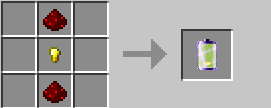

- the scanner only work in right hand
- you can change the target to search, by right-clicking a block while "sneaking"
- you need to hold right-click to scan the area in front of you (the angle of scan is 40 degrees)
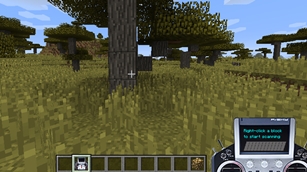
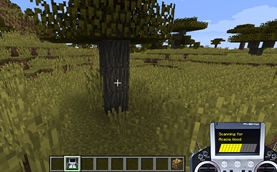
- slowly the scanner is discharged but can recharge it with a battery in the crafting table :

Special thanks
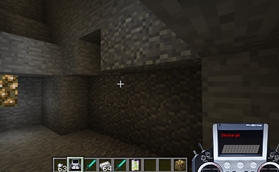
@ruminecraft : the animated gif picture how the mod works
Project description from CurseForge.
Pick your setup
Corail Scanner by Minecraft version and loader
Choose the version and loader you play, then open the matching release.
Minecraft version
1.12.1
1 loader buildMinecraft version
1.12
1 loader buildMinecraft version
1.11.2
1 loader buildMinecraft version
1.10.2
1 loader buildCheck the dependencies, then try the file in a copied instance before changing a world you care about.
Recent files
Corail Scanner versions and loaders
Corail Scanner 1.1.4 for 1.12+
scanner-1.1.4-1.12.jar
2 Mar 2018
Client Source doesn’t say Server Source doesn’t say Dependencies No extras listed Listed on Release listing
Check the 1.12.2 setup 1.12.11.121.12.2 release
Corail Scanner 1.1.3 for 1.12+
scanner-1.1.3-1.12.jar
29 Dec 2017
Client Source doesn’t say Server Source doesn’t say Dependencies No extras listed Listed on Release listing
Check the 1.12.2 setup 1.12.11.121.12.2 release
Looking for an older file? The official CurseForge project page is in Resources.