Minecraft version
Back to mods 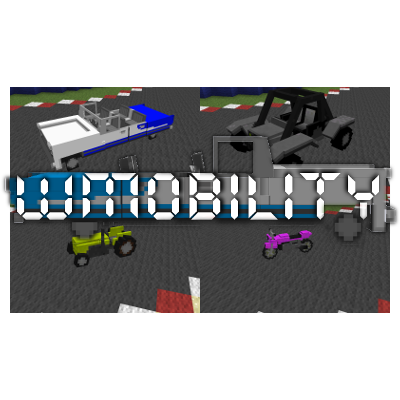
CurseForge · Minecraft mod
WMobility
Adding cars to minecraft!
Choose a version Pick your version below, then grab the matching file.
Quick answer
Which WMobility release matches 1.7.10?
beta file WMobility 0.1 for 1.7.10
Game version 1.7.10
Loader Not required
WMobility 0.1 for 1.7.10 targets 1.7.10. The project page does not say whether this file belongs on the client, dedicated server, or both. No extra mods listed for this file.
Where it goes
Is WMobility required on the client, server, or both?
The project page does not say whether this file belongs on the client, dedicated server, or both.
Client Source doesn’t say
Dedicated server Source doesn’t say
Loader for this release No loader listed
Required install it here Optional supported, not mandatory Not supported do not install here Source doesn’t say do not assume
The source does not explicitly classify this release as client-only or server-only.
What else does WMobility 0.1 for 1.7.10 need?
WMobility 0.1 for 1.7.10 on 1.7.10. Every mod below is checked against that same setup.
This file does not list any required mods. Do not add a library just because a different file uses it.
This file does not list any required or optional mods.
Before you install it
Add WMobility without breaking your instance.
Built for WMobility 0.1 for 1.7.10 on 1.7.10. Pick another file and the loader, install side or required mods may change.
- 01
Stick to this file
Use WMobility 0.1 for 1.7.10. It targets 1.7.10; another release may have different loader, side or dependency requirements.
- 02
Bring the mods it needs
This file does not list any required mods. Do not add a library just because a different file uses it.
- 03
Put it on the correct side
The project page does not say whether this file belongs on the client, dedicated server, or both.
- 04
Pick the file you checked
Use the “Get this file” button beside WMobility 0.1 for 1.7.10. It opens that exact file at the source.
About this project
What does WMobility add?
The current version has a couple of things for you in store.
It currently features 4 vehicles, an Oldsmobile style car, a tractor, a dunebuggy styled car and a motorcycle.
All 4 vehicles can be crafted with a car platform, which in turn can be crafted by building a 3x3 grid of iron pressure plates, but leaving the middle one empty.
Then you craft the car platform itself with 6 stone pressure plates on the sides and 1 iron pressure plate in the middle and put that down in the circle of iron pressure plates, it will turn into a 3x3 car platform.
After you've crafted the car platform you can right click it to bring up the car crafting window, which will allow you to choose which car to craft and show you the materials needed to craft it.
Each car features 5 stages of crafting, Chassis, Wheels, Engine, Electronics and Dye.
The crafting progress will be visible on the bottom of the car crafting window, and the items needed to finish the current stage will also be visible.
When a car is created one can right click it and take it for a spin, every car handles differently and every car has a different hitbox.
Cars also have names that will be temporarily visible (Yes, like GTA, that's also where the names came from by the way)
When a car is broken, it will drop a receipt, this could be seen as your insurance and will allow you to respawn the car at any car platform.
(In the future there will be a setting in which a penalty can be set)
In creative mode cars can be spawned by right clicking with a receipt.
Vehicles have a handbrake (Default Left ALT) and a Horn (Default H) and they make sounds when driving.
As a last note, the mod does currently allow you to actually create your own vehicles, but since the mod is in Beta I've yet to make a tutorial on that.
Custom content will be the future for this mod though.
More information, including tutorials and pictures, can be found HERE.
Project description from CurseForge.
Pick your setup
WMobility by Minecraft version and loader
Choose the version and loader you play, then open the matching release.
Check the dependencies, then try the file in a copied instance before changing a world you care about.
Recent files
WMobility versions and loaders
WMobility 0.1 for 1.7.10
EXTRACTTHIS-WMobility-0.1-Minecraft_1.7.10.zip
16 May 2017
Client Source doesn’t say Server Source doesn’t say Dependencies No extras listed Listed on Release listing
Check the 1.7.10 setup 1.7.10 beta
Looking for an older file? The official CurseForge project page is in Resources.