Create: Diesel Generators Optional for Pollution of the Realms AdPother-1.20.1-8.1.49.0-build.2294.jar
optionalMatching file found Matched file: createdieselgenerators-1.20.1-1.3.12.jar
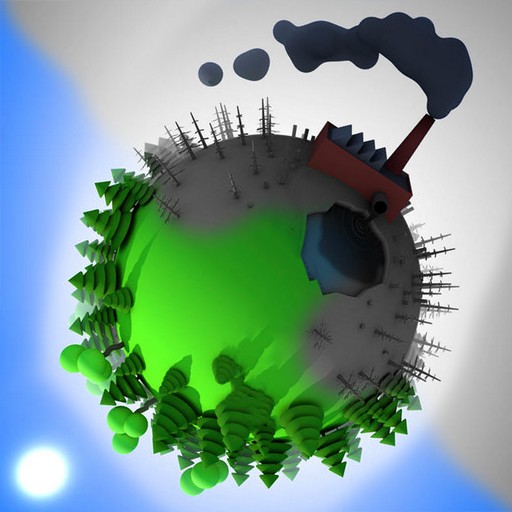
CurseForge · Minecraft mod
Adds environmental pollution mechanics with real consequences for the world around you
This page is having a moment, so a few details may be a little behind.
Quick answer
Pollution of the Realms AdPother-1.20.1-8.1.49.0-build.2294.jar targets 1.20.1 with Forge, NeoForge. The project page does not say whether it belongs on the client. The project page does not say whether it belongs on the dedicated server. All 1 required mods have matching files.
Where it goes
The project page does not say whether it belongs on the client. The project page does not say whether it belongs on the dedicated server.
The source does not explicitly classify this release as client-only or server-only.
AdPother-1.20.1-8.1.49.0-build.2294.jar. Change the file and its required mods may change too.
Install ForgeEndertech first. We found matching files for this game-version and loader setup. 8 come through another mod in the chain.
8 extra mods were pulled in by other dependencies. Indented rows show who needs each one. We only count dependency files that match this setup. A file for another loader does not fill the gap.
Before you install it
Built for Pollution of the Realms AdPother-1.20.1-8.1.49.0-build.2294.jar. Pick another file and the loader, install side or required mods may change.
Use AdPother-1.20.1-8.1.49.0-build.2294.jar. It targets 1.20.1 with Forge, NeoForge; another release may have different loader, side or dependency requirements.
Install ForgeEndertech first. We found matching files for this game-version and loader setup. 8 come through another mod in the chain.
The project page does not say whether it belongs on the client. The project page does not say whether it belongs on the dedicated server.
Use the “Get this file” button beside AdPother-1.20.1-8.1.49.0-build.2294.jar. It opens that exact file at the source.
About this project
"Pollution of the Realms" is a mod that introduces blocks of carbon and sulfur emissions from the combustion of various fuels.
These blocks are created around fuel burning sources, rise into the air and accumulate in the clouds. If unchecked, they will affect plants, animals and players in several ways (see "Negative effects" below).
This mod introduces the problem of environmental pollution and encourages modpack makers and players to seek various paths to mitigate the consequences. There are methods provided within the mod itself to do this, but the intent in designing the mod was to encourage flexible solutions when combined with other mods.
REQUIRES ForgeEndertech library
For best results, use with Advanced Chimneys
Carbon:
Sulfur:
..more about harmful effects
To prevent harmful emissions from entering the atmosphere or greenhouse, place filters on top or in the middle of the chimney pipe.
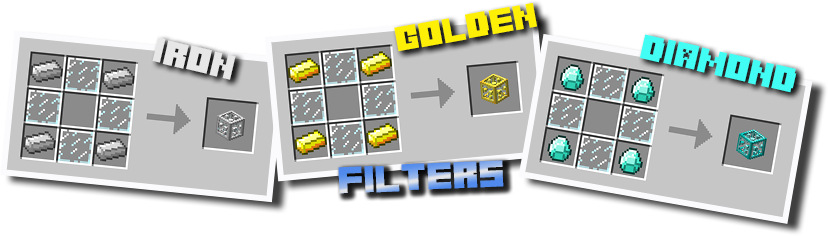
Each filter can protect against one pollutant and requires filling with filter material, as well as cleaning from byproducts to operate. You can fully automate this process with the help of hoppers.
The hopper on any side-face of the filter loads it up with materials. The hopper attached to the bottom extracts all byproducts.
Note that you can use one single hopper attached to the bottom of the entire chimney/filter/pump pipe to collect byproducts from all the filters above.
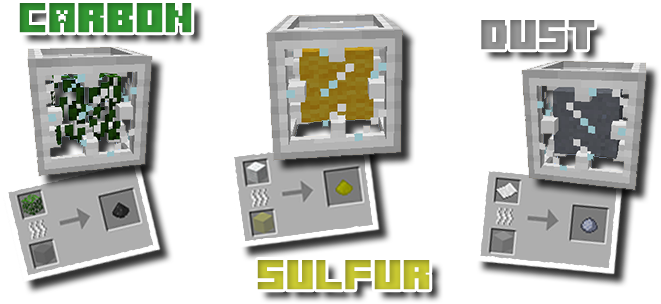
Each filter also generates a descending redstone signal from 15 (when empty) to 0 (when full). This can be used to control the connected pumps or to activate an alarm, when the filter is full.
You can clean up the pollution with a special tool - the vacuum tube.
There's three types of vacuum tubes: iron, golden and diamond, that perform better as one would expect.
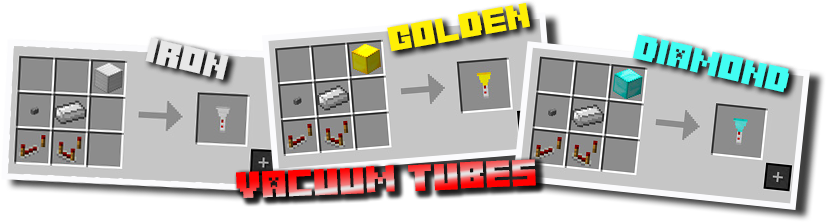
Note that emissions can't be stored in the inventory (you wouldn't want to get all your stuff smoky and gunky, would you?), so a vacuum bag will be required, with similar capacity upgrades per material.
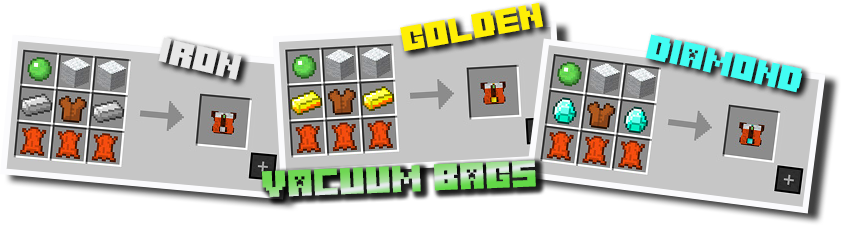
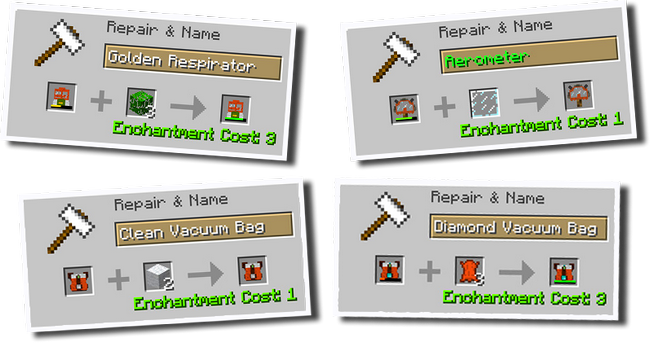
Crafted vacuum bags are equipped with a sulfur filter that can be refreshed on an anvil using wool (2 pieces). Additional filters for carbon or dust can be installed using leaves or paper (2 pieces).
As pollution levels increase, harmful effects will grow as well. To protect yourself, you may need to craft a respirator (each type has a different durability).
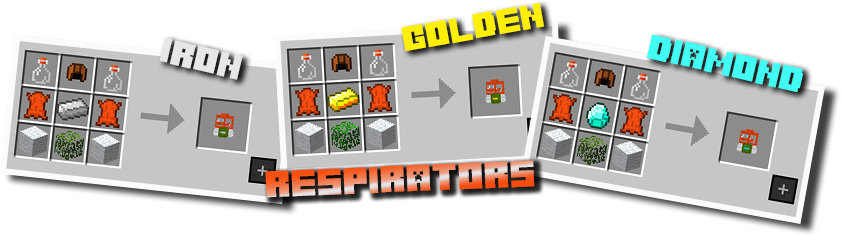
Crafted respirators are equipped with carbon and sulfur filters. Dust filter can be installed on an anvil using paper.
Note that a vacuum bag or respirator picked from the creative inventory provides no filters, so you have to install them manually. The same goes for respirators from compatible mods.
Protecting yourself with a respirator is a good thing when you're at work, but wearing it all the time, especially at home, is not the best idea.
If you want to breathe freely without the need to wear protective equipment, you can surround your place with air purifiers to provide a constant supply of clean air to your lungs.
The air purifier consists of two blocks: a filter and a pump. To operate, it must have access to air from both sides and the filter must be loaded. White particles above the filter indicate that it is functioning.
Each working purifier generates pollutant free air around it within specified radius (by default - 8, 16 and 32 blocks for - iron, golden and diamond filter, respectively). The effect decreases from 100% (next to the purifier) to 0% (at a distance >= filter radius). The effects of several air purifiers are summarized.
So if you want to create a safe zone with 100% clean air, you need to cover it with purifies with a distance less than or equal to the filter radius between them.
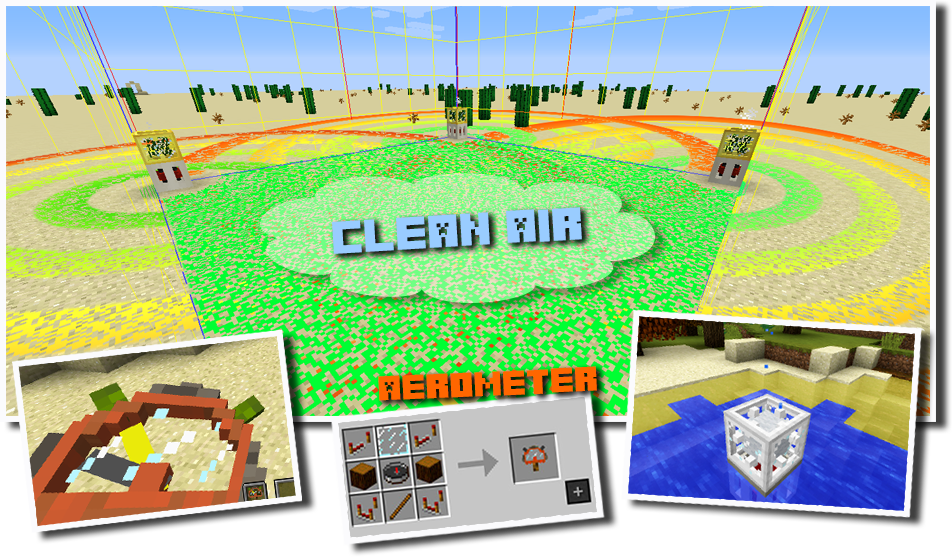
Aerometer could be a good supplement in finding weak spots in your protected area.
The purifier can also be used for cleaning polluted water bodies. In that case, the pump must be submerged under water, and the filter must be one block above the water surface, filled with filter material and not covered by any block. Splashing water particles above the filter indicate that the purifier is working.
Special care should be taken if you place the source of emissions within a confined space, as this can lead to suffocation or even an explosion.
To prevent fatal consequences make sure of providing a good ventilation, using chimneys, vents and pumps.
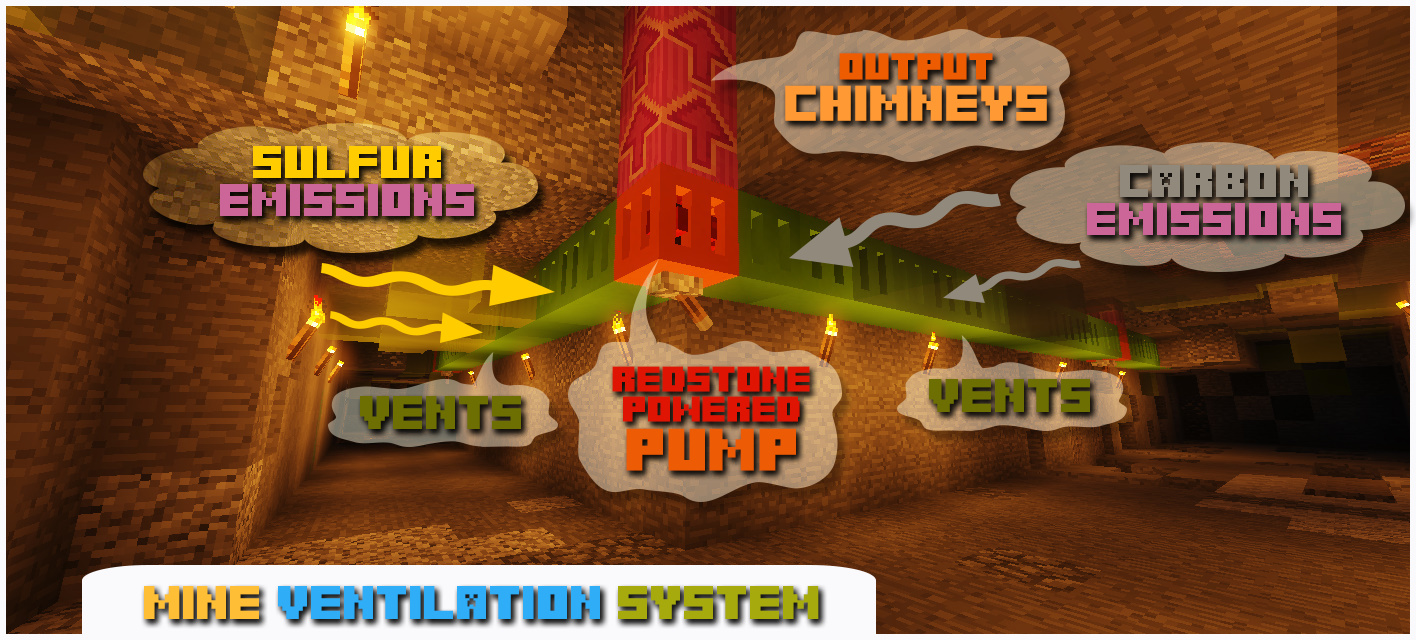
Every pump could maintain 4 independent ventilation lines up to 16 blocks in length each (connected from the side) and one chimney pipe (connected to the top).
Despite the fact that carbon emissions are poisonous for animals and players, they are vital for plants, as they absorb carbon during photosynthesis to take energy for growth.
You can benefit from that by planting crops in areas contaminated with carbon, or by building greenhouses and pumping carbon into them.
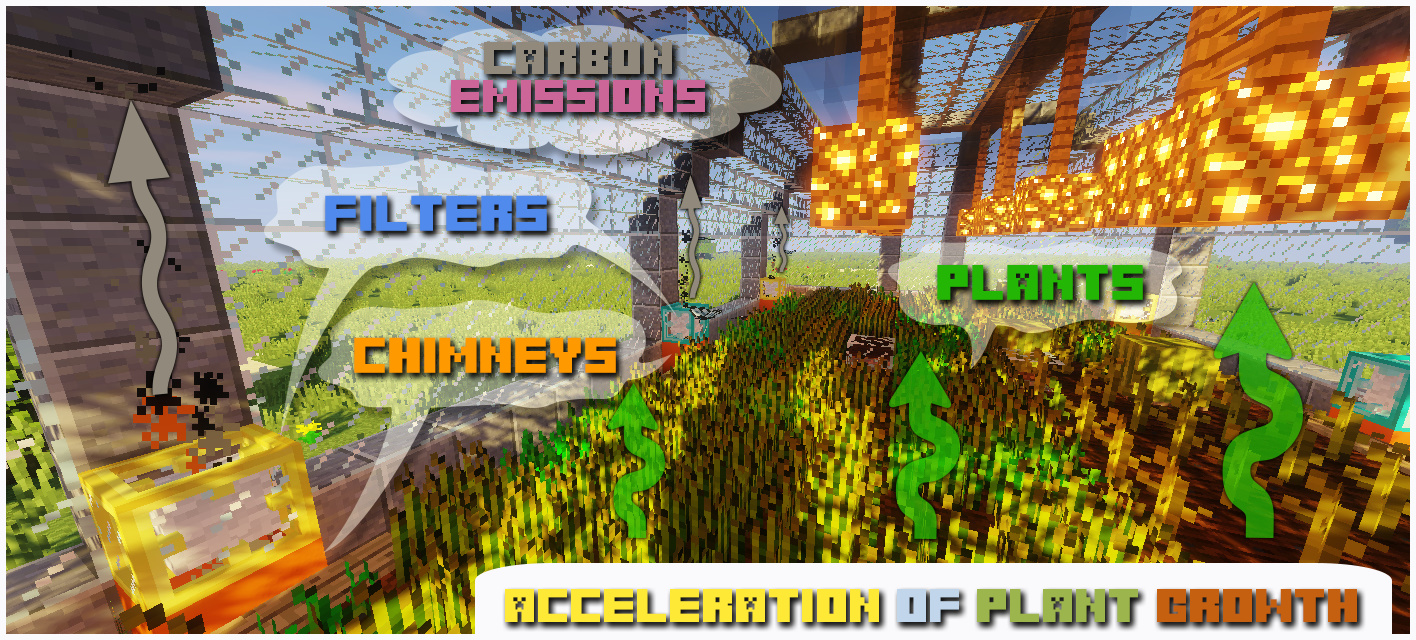
To prevent spread of emissions around the furnace, you can place chimneys next to it.
You may need to place additional chimney pipes if your furnace generates too much emissions.
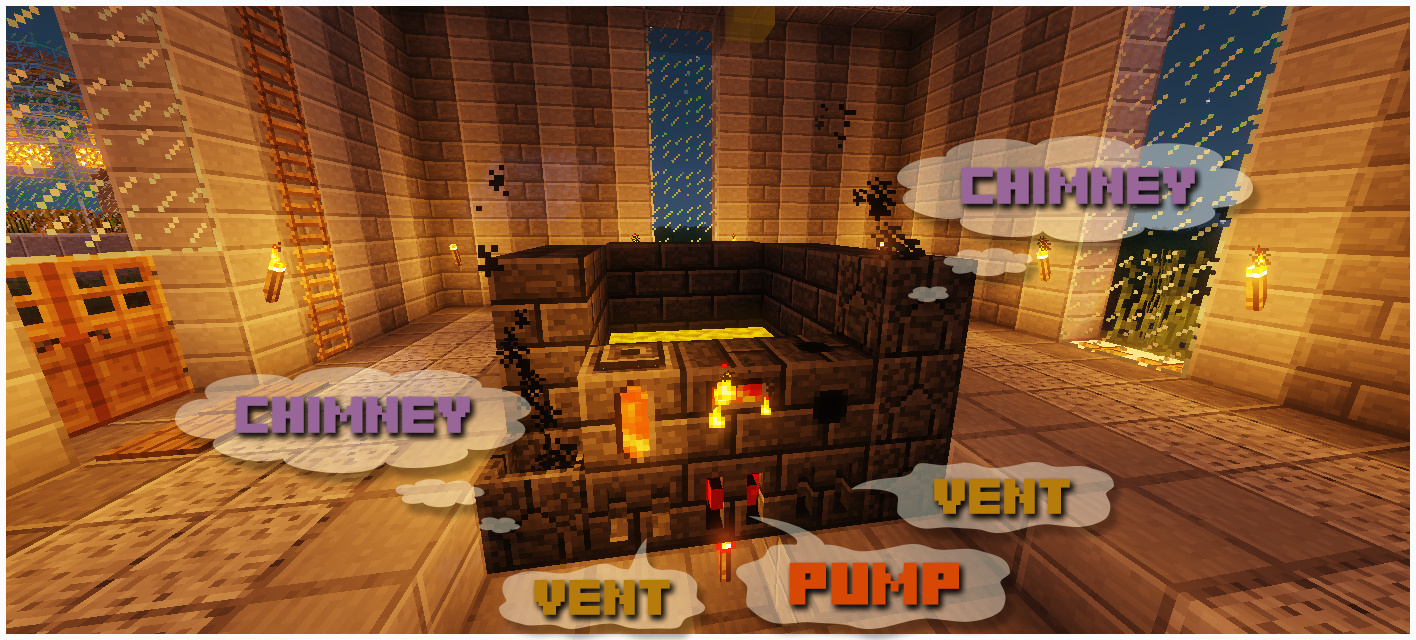
If the chimney is covered by solid block and emissions have no way to go, they will accumulate and subsequently explode.
Project description from CurseForge.
Pick your setup
Choose the version and loader you play, then open the matching release.
Check the dependencies, then try the file in a copied instance before changing a world you care about.
Recent files
1 Aug 2026
26 Jul 2026
19 Jul 2026
12 Jul 2026
26 Jun 2026
21 Jun 2026
20 Jun 2026
20 Jun 2026
30 May 2026
9 May 2026
3 May 2026
3 May 2026
Looking for an older file? The official CurseForge project page is in Resources.
 mod
modA minecraft mod that adds ores that regenerate over time
 mod
modCreative Ascension is a progression-focused Minecraft mod centered on exploration, meaningful advancement, and hidden discoveries. Earn your rewards through perseverance as you forge powerful equipment and uncover long-forgotten secrets.
 mod
modAutomatically places torches in selected areas or near the player, with a client-side light level overlay for identifying mob-spawnable blocks.