Minecraft version
Back to mods 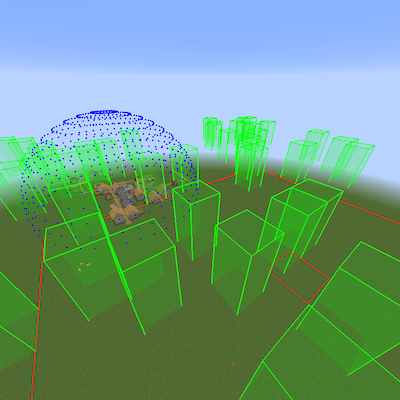
CurseForge · Minecraft mod
Bounding Box Outline Reloaded
Highlights vanilla structures and features such as Fortresses, Spawn Chunks etc
Choose a version Pick your version below, then grab the matching file.
Quick answer
Which Bounding Box Outline Reloaded release should I use?
Latest stable file 2.6 for 1.18.2 fabric
Game version 1.18.2
Loader Fabric
Bounding Box Outline Reloaded 2.6 for 1.18.2 fabric targets 1.18.2 with Fabric. The project page does not say whether it belongs on the client. The project page does not say whether it belongs on the dedicated server. No extra mods listed for this file.
Where it goes
Is Bounding Box Outline Reloaded required on the client, server, or both?
The project page does not say whether it belongs on the client. The project page does not say whether it belongs on the dedicated server.
Client Source doesn’t say
Dedicated server Source doesn’t say
Loader for this release Fabric
Required install it here Optional supported, not mandatory Not supported do not install here Source doesn’t say do not assume
The source does not explicitly classify this release as client-only or server-only.
What else does Bounding Box Outline Reloaded 2.6 for 1.18.2 fabric need?
2.6 for 1.18.2 fabric. Change the file and its required mods may change too.
This file does not list any required mods. Do not add a library just because a different file uses it.
This file does not list any required or optional mods.
Before you install it
Add Bounding Box Outline Reloaded without breaking your instance.
Built for Bounding Box Outline Reloaded 2.6 for 1.18.2 fabric. Pick another file and the loader, install side or required mods may change.
- 01
Stick to this file
Use 2.6 for 1.18.2 fabric. It targets 1.18.2 with Fabric; another release may have different loader, side or dependency requirements.
- 02
Bring the mods it needs
This file does not list any required mods. Do not add a library just because a different file uses it.
- 03
Put it on the correct side
The project page does not say whether it belongs on the client. The project page does not say whether it belongs on the dedicated server.
- 04
Pick the file you checked
Use the “Get this file” button beside 2.6 for 1.18.2 fabric. It opens that exact file at the source.
About this project
What does Bounding Box Outline Reloaded add?
Join our discord for support, announcements & much more: https://discord.gg/4ZJpJvh
Grab the CraftBukkit/Spigot/Paper server plugin on CurseForge Bukkit here
This mod highlights in a variety of colours and styles the different structures & features of the game:-
- Nether Fortresses; red boxes bound each individual area where Blaze, Wither Skeletons & normal Skeletons will spawn. Time for a beacon methinks!
- Witch Huts; blue boxes reveal everywhere only witches spawn. Witch farm anyone?
- Desert Temples; orange boxes envelop the pyramid and towers. Go grab some loot but beware TNT boobie traps!
- Jungle Temples; dark green boxes surround the temple. Indianna Jones would've love these!
- Ocean Monuments; cyan boxes indicate where guardians spawn. Sea lantern and prismarine block types FTW.
- End Cities; magenta boxes show the rooms, corridors and air ships in the End. Time to fall with style!
- Strongholds; yellow boxes show each room in the stronghold. Does anyone make anything with silverfish spawners?
- Woodland Mansions; brown boxes show each room in the woodland mansion. Here's Johnny!
- Mine Shafts; light gray boxes illustrate each of the mine shafts. Cobwebs... grrr!
- Villages (*); gray boxes designate each building in the generated village. Check out the blacksmith loot chest!
- Slime chunks; dark green boxes highlight where slimes will spawn, with a dynamic box that rises to where the players feet are to help find them from the surface. Bouncy... bouncy...
- World Spawn & spawn chunks; red boxes outline the world spawn and the spawn chunks (active & lazy).
- Igloos (*); white boxes show where igloos are. Maybe you can convert the zombie villager back?
- Shipwrecks (*); cyan boxes are like a lighthouse those wary sailors wish they'd had. Time to find some buried treasure?
- Ocean ruins (*); cyan boxes show the different ocean ruin structures. Watch out for those pesky drowns tho!
- Buried treasure (*); cyan boxes highlight where the heart of the sea can be found. Conduit anyone?
- Mob Spawners; bright green boxes show where mob spawners are, where mobs will be spawned, and red/orange/green lines help the player see if a spawner is nearby and activated.
- Pillager Outposts; dark gray boxes outline where crossbow wielding pillagers will spawn. Beware of bad omens tho!
- Village Spheres (+); multicoloured spheres encircle the village, with boxes marking if and where iron golems will spawn. You should see the iron titan... CRAZY!
(*) Prior to 1.14.4, due to how Minecraft generates these structures they will initially float above where they should be, however upon re-loading the world they should drop down to the correct height. Unfortunately (or fortunately?) buried treasure will always appear at y-90. This works as expected in 1.14.4.
(+) In 1.14 and above the concept of a village based on doors being involved in iron golem spawning has gone away, so this feature goes away too.
For more detail see the readme
Project description from CurseForge.
Pick your setup
Bounding Box Outline Reloaded by Minecraft version and loader
Choose the version and loader you play, then open the matching release.
Minecraft version
1.20.1
1 loader buildMinecraft version
1.20-Snapshot
1 loader buildMinecraft version
1.20
1 loader buildMinecraft version
1.19.4
1 loader buildMinecraft version
1.19.3
2 loader buildsMinecraft version
1.19.2
2 loader buildsMinecraft version
1.18.2
2 loader buildsMinecraft version
1.17.1
1 loader buildMinecraft version
1.16.5
1 loader buildMinecraft version
1.16.3
2 loader buildsMinecraft version
1.15.2
3 loader buildsShowing the newest 12 of 16 game versions. Older files are in the list below.
Check the dependencies, then try the file in a copied instance before changing a world you care about.
Recent files
Bounding Box Outline Reloaded versions and loaders
2.6 for 1.21 devbuild
BBOutlineReloaded-2.6-1.21-fabric.jar
13 Jul 2024
Client Source doesn’t say Server Source doesn’t say Dependencies No extras listed Listed on Release listing
Check the 1.21 · Fabric setup 1.21Fabric alpha
2.6 for 1.20.1 debuild
BBOutlineReloaded-2.6-1.20.1-fabric.jar
14 Jul 2023
Client Source doesn’t say Server Source doesn’t say Dependencies No extras listed Listed on Release listing
Check the 1.20.1 · Fabric setup Fabric1.20.1 alpha
2.6 for 1.20.0 devbuild
BBOutlineReloaded-2.6-1.20-rc1-fabric.jar
7 Jun 2023
Client Source doesn’t say Server Source doesn’t say Dependencies No extras listed Listed on Release listing
Check the 1.20-Snapshot · Fabric setup Fabric1.201.20-Snapshot alpha
2.6 for 1.19.4 devbuild
BBOutlineReloaded-2.6-1.19.4-fabric.jar
17 May 2023
Client Source doesn’t say Server Source doesn’t say Dependencies No extras listed Listed on Release listing
Check the 1.19.4 · Fabric setup 1.19.4Fabric alpha
2.6 for 1.18.2 forge
BBOutlineReloaded-2.6-1.18.2-forge.jar
25 Dec 2022
Client Source doesn’t say Server Source doesn’t say Dependencies No extras listed Listed on Release listing
Check the 1.18.2 · Forge setup 1.18.2Forge beta
2.6 for 1.18.2 fabric
BBOutlineReloaded-2.6-1.18.2-fabric.jar
25 Dec 2022
Client Source doesn’t say Server Source doesn’t say Dependencies No extras listed Listed on Release listing
Check the 1.18.2 · Fabric setup Fabric1.18.2 release
2.6 for 1.19.2 forge
BBOutlineReloaded-2.6-1.19.2-forge.jar
25 Dec 2022
Client Source doesn’t say Server Source doesn’t say Dependencies No extras listed Listed on Release listing
Check the 1.19.2 · Forge setup 1.19.2Forge beta
2.6 for 1.19.2 fabric
BBOutlineReloaded-2.6-1.19.2-fabric.jar
25 Dec 2022
Client Source doesn’t say Server Source doesn’t say Dependencies No extras listed Listed on Release listing
Check the 1.19.2 · Fabric setup Fabric1.19.2 release
2.6 for 1.19.3 forge
BBOutlineReloaded-2.6-1.19.3-forge.jar
25 Dec 2022
Client Source doesn’t say Server Source doesn’t say Dependencies No extras listed Listed on Release listing
Check the 1.19.3 · Forge setup 1.19.3Forge beta
2.6 for 1.19.3 fabric
BBOutlineReloaded-2.6-1.19.3-fabric.jar
25 Dec 2022
Client Source doesn’t say Server Source doesn’t say Dependencies No extras listed Listed on Release listing
Check the 1.19.3 · Fabric setup 1.19.3Fabric release
2.5.1 for 1.18.2 forge
BBOutlineReloaded-2.5.1-1.18.2-forge.jar
4 Dec 2022
Client Source doesn’t say Server Source doesn’t say Dependencies No extras listed Listed on Release listing
Check the 1.18.2 · Forge setup 1.18.2Forge beta
2.5.1 for 1.19.2 forge
BBOutlineReloaded-2.5.1-1.19.2-forge.jar
4 Dec 2022
Client Source doesn’t say Server Source doesn’t say Dependencies No extras listed Listed on Release listing
Check the 1.19.2 · Forge setup 1.19.2Forge beta
Looking for an older file? The official CurseForge project page is in Resources.
 mod
mod CurseForge + Modrinth · Minecraft
WorldWeaver
A Fabric utility mod that aims to streamline common modding tasks, particularly those related to world creation. As a successor to BCLib, WoVer is intended to eventually take its place.
 mod
mod CurseForge · Minecraft
General Threading and Misc Fixes + Kitchen Sink
Implements all multithreading fixes and compatability changes and mixins to run mods with the au naturel modpack and au naturel edit of c2me
 mod
mod CurseForge · Minecraft
Hell Awaits
A Dimension worse than the nether....