TschippLib Needed by Extra Ambiance MC1.12 v1.0.1
requiredMatching file found Matched file: TschippLib MC1.12 v1.1

CurseForge · Minecraft mod
Extra Ambiance adds Particle Emitters, Sound Emitters, Dimmable Lights & more!
Quick answer
Extra Ambiance MC1.12 v1.0.1 targets 1.12.1, 1.12, 1.12.2. The project page does not say whether this file belongs on the client, dedicated server, or both. All 1 required mods have matching files.
Where it goes
The project page does not say whether this file belongs on the client, dedicated server, or both.
The source does not explicitly classify this release as client-only or server-only.
Extra Ambiance MC1.12 v1.0.1 on 1.12. Every mod below is checked against that same setup.
Install TschippLib first. We found matching files for this game-version and loader setup.
We only count dependency files that match this setup. A file for another loader does not fill the gap.
Before you install it
Built for Extra Ambiance MC1.12 v1.0.1 on 1.12. Pick another file and the loader, install side or required mods may change.
Use Extra Ambiance MC1.12 v1.0.1. It targets 1.12.1, 1.12, 1.12.2; another release may have different loader, side or dependency requirements.
Install TschippLib first. We found matching files for this game-version and loader setup.
The project page does not say whether this file belongs on the client, dedicated server, or both.
Use the “Get this file” button beside Extra Ambiance MC1.12 v1.0.1. It opens that exact file at the source.
About this project
{width=151 height=151}
Extra Ambiance adds ways of improving the ambiance of a scene
THIS MOD REQUIRES TSCHIPPLIB v1.1 and up
All blocks added by this mod do are not collideable, meaning you can walk right through them.
They are also INVISIBLE. All blocks emit a tiny colored particle, when you're holding one of the Blocks or the Light Editer. If you're not holding any of these items, the blocks also won't show a Hitbox.
Demonstration:
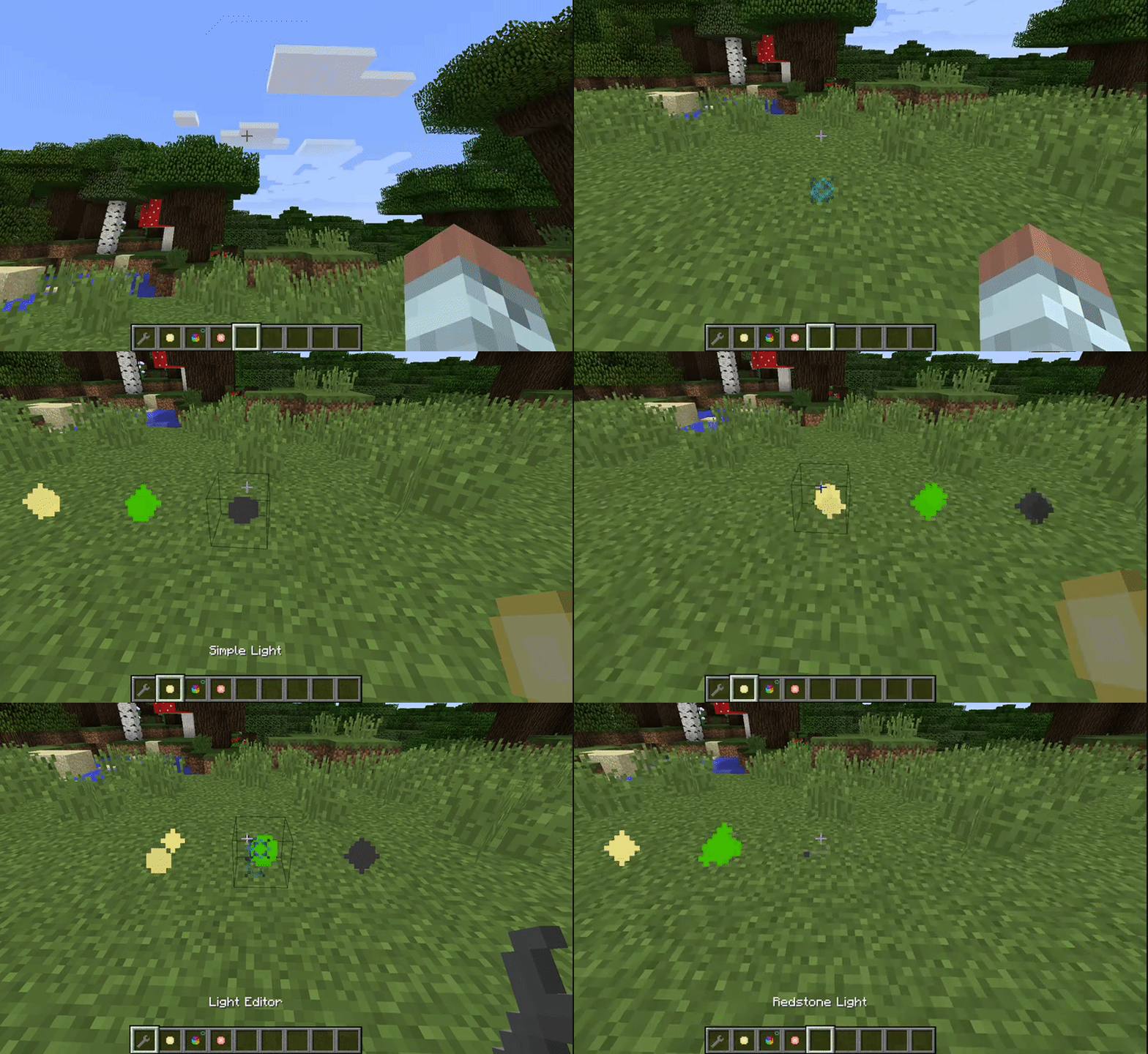
Different Lights have Different Particles.
Lights:
Particle Emitters:
Sound Emitters:
Here is a Preview of some of the things you can do:
For Crafting Recipes, I highly suggest you use JustEnoughItems (JEI)
Feel free to use this mod in a modpack, as long as it's hosted on curse.
THIS MOD REQUIRES TSCHIPPLIB v1.1 and up
Copyright
© Tschipp 2017 This mod (plugin, patch to Minecraft source, henceforth "Mod" or "The Mod"), by the terms of http://minecraft.net/terms is sole property of the Mod author (Tschipp henceforth "Owner" or "The Owner"). By default it may only be distributed on minecraftforum.net, planetminecraft.com and curseforge.com by the Owner. They may not be mirrored or reposted with advance written permission of the Owner. URL shorteners or other attempts to make money off The Owners' Mods are strictly forbidden without advance written permission.
Project description from CurseForge.
Pick your setup
Choose the version and loader you play, then open the matching release.
Check the dependencies, then try the file in a copied instance before changing a world you care about.
Recent files
ExtraAmbiance MC1.12 v1.0.1.jar
5 Aug 2017
Looking for an older file? The official CurseForge project page is in Resources.
 mod
A car mod that runs almost everywhere: Fabric, NeoForge and Forge, Minecraft 1.7.10 to 26.3. Drive cars, bikes, trucks, helicopters and trains with AI traffic and deep customization
 mod
Saves your items on a lootable corpse when you die.
 mod
Instant co-op world hosting, friends & invites hub, custom profile switcher, 3D wardrobe studio (wings, capes, emotes, Mojang & .PNG skin importer), and weak-PC performance booster for Minecraft 1.20.1 (Forge & Fabric).