Minecraft version
Back to mods 
CurseForge · Minecraft mod
No Op Spawn Protection
Much Better Spawn Protection
Choose a version Pick your version below, then grab the matching file.
Quick answer
Which No Op Spawn Protection release should I use?
Latest stable file No-Op-Spawn-Protection-3.0.24-MC26.3-NeoForge.jar
Game version 26.3
Loader NeoForge
No Op Spawn Protection No-Op-Spawn-Protection-3.0.24-MC26.3-NeoForge.jar targets 26.3 with NeoForge. The project page does not say whether this file belongs on the client, dedicated server, or both. No extra mods listed for this file.
Where it goes
Is No Op Spawn Protection required on the client, server, or both?
The project page does not say whether this file belongs on the client, dedicated server, or both.
Client Source doesn’t say
Dedicated server Source doesn’t say
Loader for this release NeoForge
Required install it here Optional supported, not mandatory Not supported do not install here Source doesn’t say do not assume
The source does not explicitly classify this release as client-only or server-only.
What else does No Op Spawn Protection No-Op-Spawn-Protection-3.0.24-MC26.3-NeoForge.jar need?
No-Op-Spawn-Protection-3.0.24-MC26.3-NeoForge.jar. Change the file and its required mods may change too.
This file does not list any required mods. Do not add a library just because a different file uses it.
This file does not list any required or optional mods.
Before you install it
Add No Op Spawn Protection without breaking your instance.
Built for No Op Spawn Protection No-Op-Spawn-Protection-3.0.24-MC26.3-NeoForge.jar. Pick another file and the loader, install side or required mods may change.
- 01
Stick to this file
Use No-Op-Spawn-Protection-3.0.24-MC26.3-NeoForge.jar. It targets 26.3 with NeoForge; another release may have different loader, side or dependency requirements.
- 02
Bring the mods it needs
This file does not list any required mods. Do not add a library just because a different file uses it.
- 03
Put it on the correct side
The project page does not say whether this file belongs on the client, dedicated server, or both.
- 04
Pick the file you checked
Use the “Get this file” button beside No-Op-Spawn-Protection-3.0.24-MC26.3-NeoForge.jar. It opens that exact file at the source.
About this project
What does No Op Spawn Protection add?


If you want a server setup for the No Op Spawn Protection mod with zero effort, get a server with BisectHosting and receive 25% off your first month as a new customer using the code kreezxil
Logo Credit: Pixabay CC0 Public Domain Src: http://bit.ly/2uDEIMM
In 1.8 Mojang changed how the spawn_protection setting in server.properties functions. If there is no op at the time of world creation the setting is ignored and disabled. Creating an op later does not enable it. This mod protects the area around the world spawn on its own, whether or not the server has an op.
This mod gives you a default spawn protection of 16 blocks. It can be set anywhere in the range of 0 to 10000 with optional granular level controls for what can be done at spawn. The protected area is a square centred on the world spawn point; only X and Z count, the height does not.
For Minecraft 26.3 on NeoForge. Install it on the server. The rules run on the server side, so a dedicated server, singleplayer and LAN worlds are all protected. Players who join a server do not need the mod, and it adds no network packets. A game that has the mod installed gets a config screen in the Mods menu.
Features
Protect and configure spawn properties for the 3 main dimensions: Overworld, Nether, and The End. Each has its own switch (Overworld on, Nether and The End off by default) and they share the one radius and the Overworld spawn coordinates. Other dimensions are never protected.
Only players are restricted. Inside the protected area, a player who is not let through:
- cannot break blocks (always on)
- cannot place blocks, if you turn that on (Block Placing)
- cannot push buttons or flip levers, if you turn that on (circuits)
- cannot open or close doors, gates and trap doors, if you turn that on (doors)
- cannot open chests, furnaces and machines, if you turn that on (anything that is a container)
- cannot right click other blocks, if you turn that on (Right Clicking Blocks)
- cannot right click items, if you turn that on (Right Clicking Items)
Every one of these except block breaking is allowed by default. Blocks placed or broken by anything other than a player (mobs, explosions, pistons, fire) are not affected.
Operators and creative players: by default nobody is let through, ops and creative players are blocked at spawn like everyone else (blockOpsToo is true). Set blockOpsToo to false and players in creative mode are let through, and so are operators on the ops list of a dedicated server (in singleplayer and LAN only creative mode lets a player through).
Everything is configurable in the config file, in the config screen in the Mods menu (Mods, No Op Spawn Protection, Config), or with in-game commands that change the config without needing to restart the server.
Commands
commands change the behavior of the mod in the game on the server side
when commands are executed the server config is updated thus removing the requirement to reboot the server.
/sp-allow <circuits|containers|doors|place|block|item> <true|false>
/sp-debug <true|false>
/sp-dimension <end|nether|overworld> <true|false>
/sp-display [all|worlds|protection|interaction|commands]
/sp-blockOpsToo <true|false>
/sp-radius <range>
Other names: /spawnprotection and /sp-diameter for /sp-radius, /sp-permit for /sp-allow, /sp-debugmode for /sp-debug, /sp-dim for /sp-dimension, and /sp-show and /sp-view for /sp-display.
The commands need operator level 1 by default (anyone on the ops list), and the server console can use them. The level is the commandPermissionLevel option (1 to 4), set in the config file or the config screen. /sp-display only shows the config and anyone can use it.
/sp-radius takes a range of 0 to 10000 and affects the spawn radius for the 3 worlds.
/sp-blockOpsToo true means ops are blocked too, and false means they aren't. With the default of true you can fully test the power of the commands from your own op or creative account, without a survival player near you. /sp-blockOpsToo false lets ops and creative players through.
While present, the debug mode is something I might tell you to use to help me in the future. With it on, a player inside the protected area is told what the mod decided, and if they are let through, why.
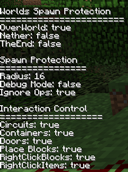
The /sp-display command, with no argument or with all, shows every setting so that you can tweak things as you desire. It also shows where the world spawn is and the X and Z range that is protected, and when a player runs it, whether the protection applies to that player where they stand. The readout looks like this:
Worlds Spawn Protection
=======================
OverWorld: true
Nether: false
TheEnd: false

Spawn Protection
================
Radius: 16
Debug Mode: false
Block Ops Too: true
World spawn: 144, 65, 720 (protected: X 128 to 160, Z 704 to 736)

Interaction Control
===================
Circuits: true
Containers: true
Doors: true
Place Blocks: true
RightClickBlocks: true
RightClickItems: true

Commands
========
Create /spawn if none exists: true
Operator level to change the config: 1
The /spawn command
When the createSpawnCommand option is on (the default), the mod adds /spawn, which any player can use to go back to the world spawn point, moved to a safe spot nearby. It works from other dimensions too, because it takes you to the spawn point in the dimension the world spawn is in (usually the Overworld). If another mod or vanilla already has a command named spawn, this mod does not add one, and the server log says what happened. The option is read when commands are registered, so a change applies at the next server or world start, or after /reload.
Config
The config file is config/spawnprotection-common.toml, and the same options are in the config screen in the Mods menu. Besides the options above it has the radius (spawn_protection, 0 to 10000), debugMode, the three dimension switches and the six interaction switches.
On every launch the mod puts spawnprotection.example.cf into the config folder if it is not there. It lists every option with its default value and comments. The mod never reads it, so do not rename it to spawnprotection-common.toml.
Coming from an older version: the old ignoreOp option is now called blockOpsToo, and its value is carried over when the config is upgraded. The old /sp-ignore, /sp-ignore_op and /sp-ignoreop commands no longer exist, use /sp-blockOpsToo.
Notes
If you notice that others seem to be utterly blocked despite how you set the mod. Edit your server.properties and change spawn-protection to 0. That is the vanilla setting, it is separate from this mod, and vanilla does not apply it to ops.
You can change the size of the protection and the protection controls by changing the config or by using the in-game commands. There is no need to reload your server or reset your world.
It currently does not block pressure plates as they do not fire an event and I'm using events to make this mod happen.
Interacting with Villagers and other entities is permanently allowed. If you want this to be configurable let me know.
Todo
- Different spawn radii for the dimensions
- Support Custom dimensions
- prevent mob griefing
- prevent explosions
- prevent other preventables
Modpacks
Go for it. No need to ask. A link back would be awesome but not required.
This project is proudly powered by NeoForge, without whom it would not be possible. Learn more at https://neoforged.net.
Instructions for versions prior to 26.3 NeoForge are contained below.
If you want a server setup for the No Op Spawn Protection mod with zero effort, get a server with BisectHosting and receive 25% off your first month as a new customer using the code kreezxil
Logo Credit: Pixabay CC0 Public Domain Src: http://bit.ly/2uDEIMM
In 1.8 Mojang changed how the spawn_protection setting in server.properties functions. If there is no op at the time of world creation the setting is ignored and disabled. Creating an op later does not enable it.
This mod gives you a default spawn protection of 16 blocks. It can be set anywhere in the range of 0 to 10000 with optional granular level controls for what can be done at spawn. The mod must be installed on the dedicated server. It has no effect on the client and is also not required on the client.
Features
Protect and configure spawn properties for the 3 main dimensions: Overworld, Nether, and The End.
Specifically control any of the following player actions.
- Button pushing and lever flipping (circuits)
- Door, gate, trap door (doors) opening and closing
- Chests, furnace, machines (anything that is a container)
- Block Placing
- Right Clicking Items
- Right Clicking Blocks
- In-game commands for modifying the config without needing to restart the server
Commands
commands change the behavior of the mod in the game on the server side
when commands are executed the server config is updated thus removing the requirement to reboot the server.
/sp-allow <circuits|containers|doors|place|block|item> <true|false>
/sp-debug <true|false>
/sp-dimension <end|nether|overworld> <true|false>
/sp-display <all|worlds|protection|interaction>
/sp-ignore_op <true|false>
/sp-radius <range>
Using /sp-ignore true you can fully test the power of the commands without having a survival player near you or having to be in survival mode.
While present, the debug mode is something I might tell you to use to help me in the future.
Currently the /sp-radius affects spawn radius for the 3 worlds. I'll add more granularity to this in an upcoming release.
The /sp-display command will show a readout similar to the following so that you can tweak things as you desire.
Notes
If you notice that others seem to be utterly blocked despite how you set the mod. Edit your server.properties and change spawn-protection to 0.
You can change the size of the protection and the protection controls by changing the config or by using the in-game commands. There is no need to reload your server or reset your world.
It currently does not block pressure plates as they do not fire an event and I'm using events to make this mod happen.
Interacting with Villagers is permanently allowed. If you want this to be configurable let me know.
Todo
- Different spawn radii for the dimensions
- Support Custom dimensions
- prevent mob griefing
- prevent explosions
- prevent other preventables
Modpacks
Go for it. No need to ask. A link back would be awesome but not required.
This project is proudly powered by FORGE, without whom it would not be possible. Help FORGE get rid of Adfocus at https://www.patreon.com/LexManos.
Project description from CurseForge.
Pick your setup
No Op Spawn Protection by Minecraft version and loader
Choose the version and loader you play, then open the matching release.
Minecraft version
1.12.2
1 loader buildMinecraft version
1.11.2
1 loader buildCheck the dependencies, then try the file in a copied instance before changing a world you care about.
Recent files
No Op Spawn Protection versions and loaders
No-Op-Spawn-Protection-3.0.24-MC26.3-NeoForge.jar
16 Nov 2026
Client Source doesn’t say Server Source doesn’t say Dependencies No extras listed Listed on Release listing
Check the 26.3 · NeoForge setup NeoForge26.3 release
NoOpSpawnProtection-1.12.2-2.3.23.jar
19 Feb 2018
Client Source doesn’t say Server Source doesn’t say Dependencies No extras listed Listed on Release listing
Check the 1.12.2 · Forge setup 1.12.2Forge release
NoOpSpawnProtection-1.11.2-2.3.23.jar
19 Feb 2018
Client Source doesn’t say Server Source doesn’t say Dependencies No extras listed Listed on Release listing
Check the 1.11.2 · Forge setup 1.11.2Forge release
Looking for an older file? The official CurseForge project page is in Resources.
 mod
CurseForge + Modrinth · Minecraft
Sophisticated Inventory Interactions
Adds Sophisticated-style search, sort, and transfer controls to vanilla and compatible modded container GUIs, including player-inventory sorting.
 mod
CurseForge + Modrinth · Minecraft
Sophisticated Storage
Storage mod with multiple tiers and functional upgrades
 mod
CurseForge + Modrinth · Minecraft
Sophisticated Core
Library mod for Sophisticated mods