Minecraft version
Back to mods 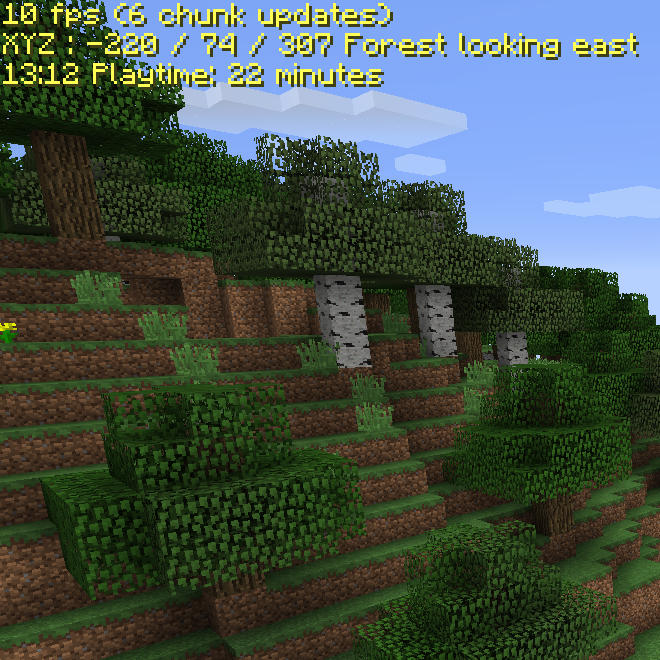
CurseForge · Minecraft mod
Zevac's Coordinates
Where am I? What time is it?
Choose a version Pick your version below, then grab the matching file.
Quick answer
Which Zevac's Coordinates release matches 1.11.2?
beta file Zevac.Coordinates_1.11.x-0.1.0.jar
Game version 1.11, 1.11.2
Loader Not required
Zevac's Coordinates Zevac.Coordinates_1.11.x-0.1.0.jar targets 1.11, 1.11.2. The project page does not say whether this file belongs on the client, dedicated server, or both. No extra mods listed for this file.
Where it goes
Is Zevac's Coordinates required on the client, server, or both?
The project page does not say whether this file belongs on the client, dedicated server, or both.
Client Source doesn’t say
Dedicated server Source doesn’t say
Loader for this release No loader listed
Required install it here Optional supported, not mandatory Not supported do not install here Source doesn’t say do not assume
The source does not explicitly classify this release as client-only or server-only.
What else does Zevac's Coordinates Zevac.Coordinates_1.11.x-0.1.0.jar need?
Zevac.Coordinates_1.11.x-0.1.0.jar on 1.11.2. Every mod below is checked against that same setup.
This file does not list any required mods. Do not add a library just because a different file uses it.
This file does not list any required or optional mods.
Before you install it
Add Zevac's Coordinates without breaking your instance.
Built for Zevac's Coordinates Zevac.Coordinates_1.11.x-0.1.0.jar on 1.11.2. Pick another file and the loader, install side or required mods may change.
- 01
Stick to this file
Use Zevac.Coordinates_1.11.x-0.1.0.jar. It targets 1.11, 1.11.2; another release may have different loader, side or dependency requirements.
- 02
Bring the mods it needs
This file does not list any required mods. Do not add a library just because a different file uses it.
- 03
Put it on the correct side
The project page does not say whether this file belongs on the client, dedicated server, or both.
- 04
Pick the file you checked
Use the “Get this file” button beside Zevac.Coordinates_1.11.x-0.1.0.jar. It opens that exact file at the source.
About this project
What does Zevac's Coordinates add?
This mods will not be maintained anymore, after 1.13 I switched to Fabric and found existing alternative mods, if you want a copy of the code to tinker yourself, just let me know in the comments
Inspired on AmbientOcclusion's Coordinates part of his Xray mod, A simple mod that shows a couple of stats on screen, things like coordinates, current biome, fps, time of day.
Within the config file you can set things like:
turning text on/of
auto-hide when using debug screen
position and color of text
Works in Minecraft 1.11 - 1.12.2, needs forge.
Enjoy and let me know what you think of it.
Z.
PS Check out my version of Survival Flight or my ToolSaver mod
Project description from CurseForge.
Pick your setup
Zevac's Coordinates by Minecraft version and loader
Choose the version and loader you play, then open the matching release.
Minecraft version
1.12.1
1 loader buildMinecraft version
1.12
1 loader buildMinecraft version
1.11.2
1 loader buildMinecraft version
1.11
1 loader buildCheck the dependencies, then try the file in a copied instance before changing a world you care about.
Recent files
Zevac's Coordinates versions and loaders
Zevac.Coordinates_1.11.x-0.1.0.jar
25 Nov 2017
Client Source doesn’t say Server Source doesn’t say Dependencies No extras listed Listed on Release listing
Check the 1.11.2 setup 1.111.11.2 beta
Looking for an older file? The official CurseForge project page is in Resources.
 mod
CurseForge · Minecraft
GearDiff
Compare armor, weapons and tools with your equipped gear right in the tooltip: stat changes, damage per second, durability and enchantments.
 mod
CurseForge · Minecraft
Village Names
Generate names for villages and villagers, as well as for other entities and structures.
 mod
Modrinth · Minecraft
Pylon (Raw Input)
LWJGL3 for legacy Minecraft