Minecraft version
Back to mods 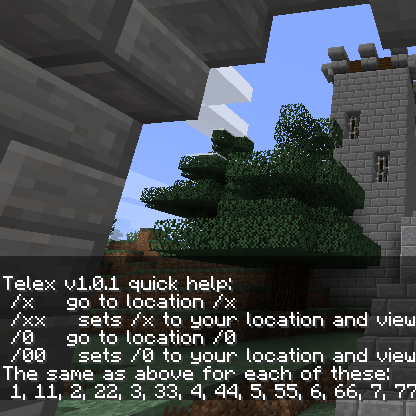
CurseForge · Minecraft mod
Telex / Teleport X
Very fast teleports for multiple views and work location or multiple work sites. Good for creative builds and survival navigation.
Choose a version Pick your version below, then grab the matching file.
Quick answer
Which Telex / Teleport X release should I use?
Latest stable file Telex-1.0.2-mc1.12.1to1.12.2-forge.jar
Game version 1.12.1, 1.12.2
Loader Not required
Telex / Teleport X Telex-1.0.2-mc1.12.1to1.12.2-forge.jar targets 1.12.1, 1.12.2. The project page does not say whether this file belongs on the client, dedicated server, or both. No extra mods listed for this file.
Where it goes
Is Telex / Teleport X required on the client, server, or both?
The project page does not say whether this file belongs on the client, dedicated server, or both.
Client Source doesn’t say
Dedicated server Source doesn’t say
Loader for this release No loader listed
Required install it here Optional supported, not mandatory Not supported do not install here Source doesn’t say do not assume
The source does not explicitly classify this release as client-only or server-only.
What else does Telex / Teleport X Telex-1.0.2-mc1.12.1to1.12.2-forge.jar need?
Telex-1.0.2-mc1.12.1to1.12.2-forge.jar. Change the file and its required mods may change too.
This file does not list any required mods. Do not add a library just because a different file uses it.
This file does not list any required or optional mods.
Before you install it
Add Telex / Teleport X without breaking your instance.
Built for Telex / Teleport X Telex-1.0.2-mc1.12.1to1.12.2-forge.jar. Pick another file and the loader, install side or required mods may change.
- 01
Stick to this file
Use Telex-1.0.2-mc1.12.1to1.12.2-forge.jar. It targets 1.12.1, 1.12.2; another release may have different loader, side or dependency requirements.
- 02
Bring the mods it needs
This file does not list any required mods. Do not add a library just because a different file uses it.
- 03
Put it on the correct side
The project page does not say whether this file belongs on the client, dedicated server, or both.
- 04
Pick the file you checked
Use the “Get this file” button beside Telex-1.0.2-mc1.12.1to1.12.2-forge.jar. It opens that exact file at the source.
About this project
What does Telex / Teleport X add?
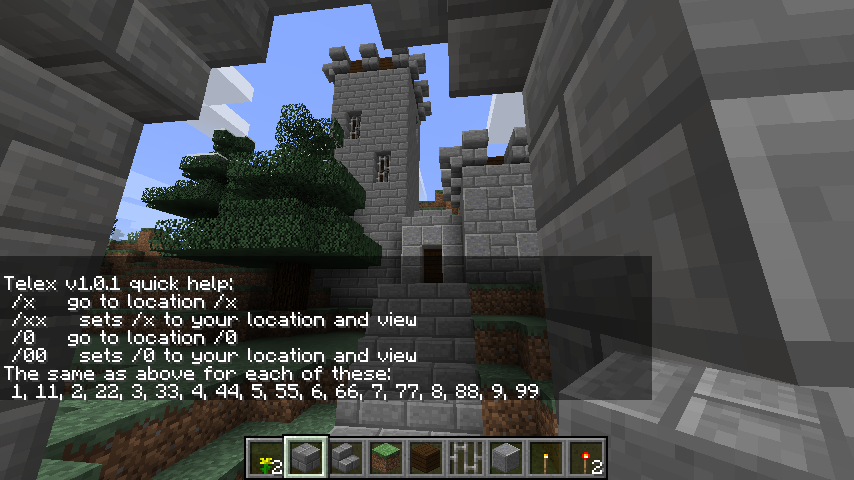
Type /telex for this quick help.
Teleport X allows very fast chat commands to teleport to 11 different positions. Intended to jump between a work location(x) and up to 10 other locations(0-9). They are user specific teleport points that also preserve your view angles. /x to go and /xx to set location.
Creative Example: I am building a small castle but I want to adjust its architecture to look good from the road coming up to it and from the river nearby. I also want the entrance gate to have a great impressive view. Where I am working now I just type /xx to mark my work spot. At each of the views I stand looking at my project then type /11 at the first spot and /22 at the second spot and finally /33 down by the gate. Now i can hop between these views to see how its coming along just by typing /1 /2 or /3 and then /x to go back to work. Its very fast.
Survival Example: I am in survival mode and I found a great ravine and cave system to go mine in. I can mark the entrance to it with /11 and the latest work area there with /22. I can hop back with just /1 or /2 at any time. oh and I marked my base with /xx so to go home after a full pack from mining, I just type /x
USAGE:
There are 11 locations: x 0 1 2 3 4 5 6 7 8 9
Type the double digit to set the location. example /55
Type the single digit to go there instantly. example /5
Thats it.
The locations are private for each player.
Your angle of view is kept from when the location was set.
There is a quick help in-game if you type /telex
Very fast to type and instant teleport.
DOWNLOAD and INSTALL
Click herefor the best and official download page to select the download for your version of Minecraft.
Put the jar file in the /mods folder for your game and restart the game just like most forge mods.
NOTES:
Works in minecraft 1.9.4 through 1.12.2 at this time.
This is compatible with the mod SpawnCommands Teleport but does not require it.
It can cross dimensions.
Source code is included in the jar file.
Works in single player and in multiplayer servers.
This is a forge mod. No bukkit is needed.
Config: the digits/commands can be renamed, disabled, or even set to operator use only.
This only needs to be on the server side for multiplayer servers.
This mod may be added or removed at any time without any problem for your server.
.
When crossing to the nether for the first time after you started the game: it may crash the client side due to a Minecraft bug. Going to the Nether after using a Nether portal once clears the problem and feel free to teleport all you like after that. All other dimensions work smoothly. Give your new location a moment to load. This is not a bug in this mod but a bug in Minecraft code.
PERMISSIONS:
Yes.
You may use and or redistribute this any way you like.
Yes that includes modpacks.
REQUIREMENTS:
have fun =)
.
Project description from CurseForge.
Pick your setup
Telex / Teleport X by Minecraft version and loader
Choose the version and loader you play, then open the matching release.
Minecraft version
1.12.1
1 loader buildMinecraft version
1.12
1 loader buildMinecraft version
1.11.2
1 loader buildMinecraft version
1.11.1
1 loader buildMinecraft version
1.11
1 loader buildMinecraft version
1.10.2
1 loader buildMinecraft version
1.10.1
1 loader buildMinecraft version
1.10-Snapshot
1 loader buildMinecraft version
1.10
1 loader buildMinecraft version
1.9.4
1 loader buildCheck the dependencies, then try the file in a copied instance before changing a world you care about.
Recent files
Telex / Teleport X versions and loaders
Telex-1.0.2-mc1.12.1to1.12.2-forge.jar
10 Jun 2018
Client Source doesn’t say Server Source doesn’t say Dependencies No extras listed Listed on Release listing
Check the 1.12.2 setup 1.12.11.12.2 release
Telex-1.0.2-mc1.12-forge.jar
10 Jun 2018
Client Source doesn’t say Server Source doesn’t say Dependencies No extras listed Listed on Release listing
Check the 1.12 setup 1.12 release
Telex-1.0.2-mc1.11to1.11.2-forge.jar
10 Jun 2018
Client Source doesn’t say Server Source doesn’t say Dependencies No extras listed Listed on Release listing
Check the 1.11.2 setup 1.111.11.11.11.2 release
Telex-1.0.2-mc1.9.4to1.10.2-forge.jar
10 Jun 2018
Client Source doesn’t say Server Source doesn’t say Dependencies No extras listed Listed on Release listing
Check the 1.10.2 setup 1.10-Snapshot1.9.41.10.21.10 release
Looking for an older file? The official CurseForge project page is in Resources.
 mod
CurseForge + Modrinth · Minecraft
Velorise Simple Map
An exploration-focused world map and minimap with cave mapping, waypoints and extensive customization.
 mod
CurseForge · Minecraft
Ancient Warfare 2 - M&B
Ancient Warfare 2: M&B. A Mount & Blade style fork of Ancient Warfare 2 for Minecraft 1.12.2: dynamic faction wars, cities, sieges, military service, and your own kingdom with a governor.