Minecraft version
Back to mods 
CurseForge · Minecraft mod
RC Roads
Signs, road marking and other cool stuff.
Choose a version Pick your version below, then grab the matching file.
Quick answer
Which RC Roads release should I use?
beta file RC Roads 0.3.0 [1.12]
Game version 1.12.1, 1.12, 1.12.2
Loader Not required
RC Roads 0.3.0 [1.12] targets 1.12.1, 1.12, 1.12.2. The project page does not say whether this file belongs on the client, dedicated server, or both. No extra mods listed for this file.
Where it goes
Is RC Roads required on the client, server, or both?
The project page does not say whether this file belongs on the client, dedicated server, or both.
Client Source doesn’t say
Dedicated server Source doesn’t say
Loader for this release No loader listed
Required install it here Optional supported, not mandatory Not supported do not install here Source doesn’t say do not assume
The source does not explicitly classify this release as client-only or server-only.
What else does RC Roads 0.3.0 [1.12] need?
RC Roads 0.3.0 [1.12]. Change the file and its required mods may change too.
This file does not list any required mods. Do not add a library just because a different file uses it.
This file does not list any required or optional mods.
Before you install it
Add RC Roads without breaking your instance.
Built for RC Roads 0.3.0 [1.12]. Pick another file and the loader, install side or required mods may change.
- 01
Stick to this file
Use RC Roads 0.3.0 [1.12]. It targets 1.12.1, 1.12, 1.12.2; another release may have different loader, side or dependency requirements.
- 02
Bring the mods it needs
This file does not list any required mods. Do not add a library just because a different file uses it.
- 03
Put it on the correct side
The project page does not say whether this file belongs on the client, dedicated server, or both.
- 04
Pick the file you checked
Use the “Get this file” button beside RC Roads 0.3.0 [1.12]. It opens that exact file at the source.
About this project
What does RC Roads add?
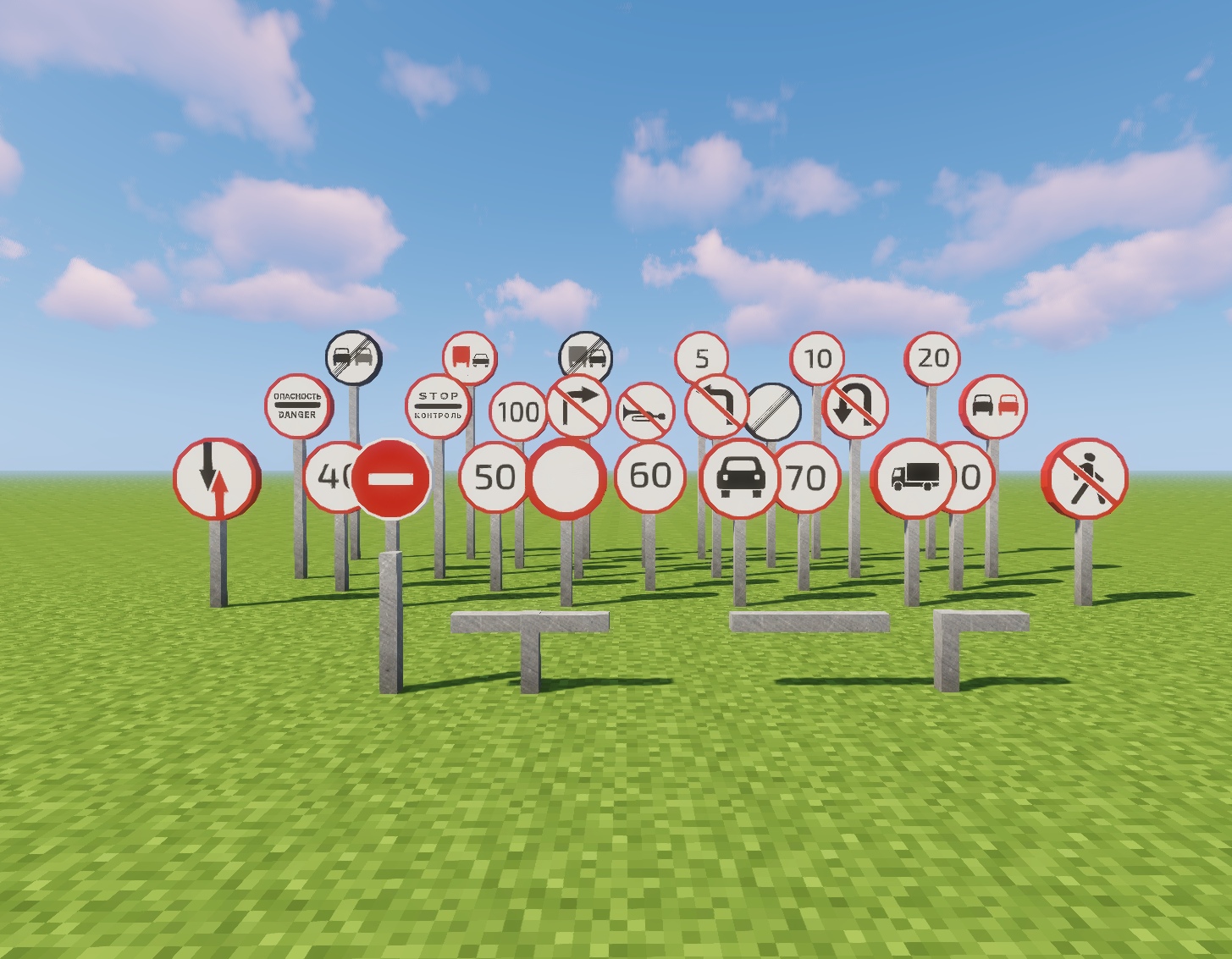
With RC Roads modification you will be able to create realistic roads with signs, road marking and other cool stuff!
This modification is in development, so lots of stuff is going to be added.
If you have any idea/report/suggestion, please comment.
==========================================================
Feel free to make any language video rewiev and i'll insert it here :)

Creative Tab


Example


Items

Changelog
V 0.2.0 WIP
Changed road marking color (Yellow color will be returned soon)
Now road marking can be placed anywhere (An independed overlay)
More lines signs and textures are in development!
V 0.2.1 WIP
Yellow lines are availible again
V 0.3.0 WIP
Added prohibiting signs (much more signs is going to be added)
Project description from CurseForge.
Pick your setup
RC Roads by Minecraft version and loader
Choose the version and loader you play, then open the matching release.
Minecraft version
1.12.1
1 loader buildMinecraft version
1.12
1 loader buildMinecraft version
1.11.2
1 loader buildCheck the dependencies, then try the file in a copied instance before changing a world you care about.
Recent files
RC Roads versions and loaders
RC Roads 0.3.0 [1.12]
RC Roads 0.3.0.jar
28 Aug 2018
Client Source doesn’t say Server Source doesn’t say Dependencies No extras listed Listed on Release listing
Check the 1.12.2 setup 1.12.11.121.12.2 beta
RC Roads (0.2.1 WIP) [MC 1.11.2]
RC Roads 0.2.1 1.11.2.jar
1 Feb 2018
Client Source doesn’t say Server Source doesn’t say Dependencies No extras listed Listed on Release listing
Check the 1.11.2 setup 1.11.2 beta
RC Roads (0.2.1 WIP) [MC 1.12.2]
RC Roads 0.2.1.jar
30 Jan 2018
Client Source doesn’t say Server Source doesn’t say Dependencies No extras listed Listed on Release listing
Check the 1.12.2 setup 1.12.2 beta
Looking for an older file? The official CurseForge project page is in Resources.
 mod
CurseForge · Minecraft
Optimized Block Entities
A client-side optimization mod to make block entities render faster
 mod
CurseForge · Minecraft
OG'S Backpacks
Backpack mod on all versions
 mod
CurseForge · Minecraft
Guhs
Chubby pink plush mice to tame, dress up and cuddle, and a whole pink Guhmension!