Minecraft version
Back to mods 
CurseForge · Minecraft mod
WorldGen Block Replacer
Replace blocks with other blocks during worldgen.
Choose a version Pick your version below, then grab the matching file.
Quick answer
Which WorldGen Block Replacer release matches 1.12?
Best match for your filters WorldgenBlockReplacer-1.12.2-2.3.0
Game version 1.12.1, 1.12, 1.12.2
Loader Forge
WorldGen Block Replacer WorldgenBlockReplacer-1.12.2-2.3.0 targets 1.12.1, 1.12, 1.12.2 with Forge. The project page does not say whether this file belongs on the client, dedicated server, or both. No extra mods listed for this file.
Where it goes
Is WorldGen Block Replacer required on the client, server, or both?
The project page does not say whether this file belongs on the client, dedicated server, or both.
Client Source doesn’t say
Dedicated server Source doesn’t say
Loader for this release Forge
Required install it here Optional supported, not mandatory Not supported do not install here Source doesn’t say do not assume
The source does not explicitly classify this release as client-only or server-only.
What else does WorldGen Block Replacer WorldgenBlockReplacer-1.12.2-2.3.0 need?
WorldgenBlockReplacer-1.12.2-2.3.0 on 1.12. Every mod below is checked against that same setup.
This file does not list any required mods. Do not add a library just because a different file uses it.
This file does not list any required or optional mods.
Before you install it
Add WorldGen Block Replacer without breaking your instance.
Built for WorldGen Block Replacer WorldgenBlockReplacer-1.12.2-2.3.0 on 1.12. Pick another file and the loader, install side or required mods may change.
- 01
Stick to this file
Use WorldgenBlockReplacer-1.12.2-2.3.0. It targets 1.12.1, 1.12, 1.12.2 with Forge; another release may have different loader, side or dependency requirements.
- 02
Bring the mods it needs
This file does not list any required mods. Do not add a library just because a different file uses it.
- 03
Put it on the correct side
The project page does not say whether this file belongs on the client, dedicated server, or both.
- 04
Pick the file you checked
Use the “Get this file” button beside WorldgenBlockReplacer-1.12.2-2.3.0. It opens that exact file at the source.
About this project
What does WorldGen Block Replacer add?
WorldGen Block Replacer is a mod that replaces blocks in your world with other blocks, which you can choose in the config. This happens when new chunks of the world are generated, and also works on preexisting worlds. By default, it does nothing. It also works with blocks added by mods.
I suggest that you do not replace any block with a block with a tile entity(furnace, piston, etc). If you do, your world will most likely become a lot slower. I am not responsible for broken worlds.
This mod can be run on a server without being installed on the client.
Configuration (1.12.2):
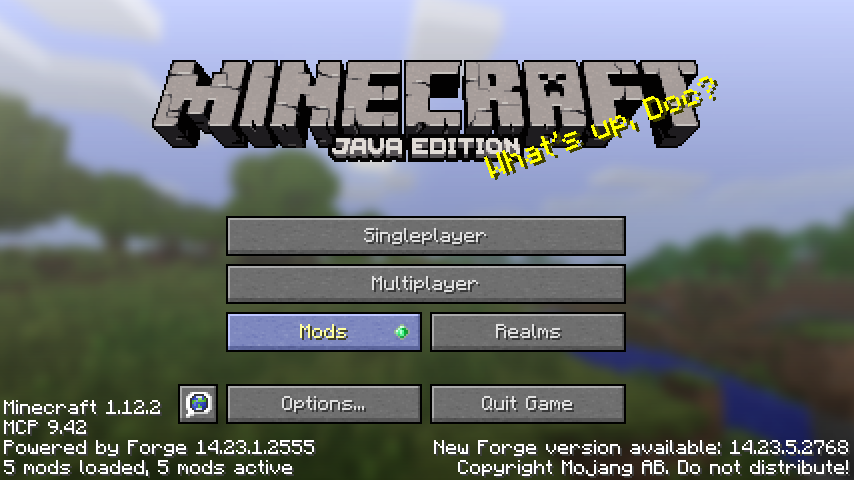
By default, the mod does nothing, and needs to be configured. To start off, from Minecraft's main menu, click Mods.
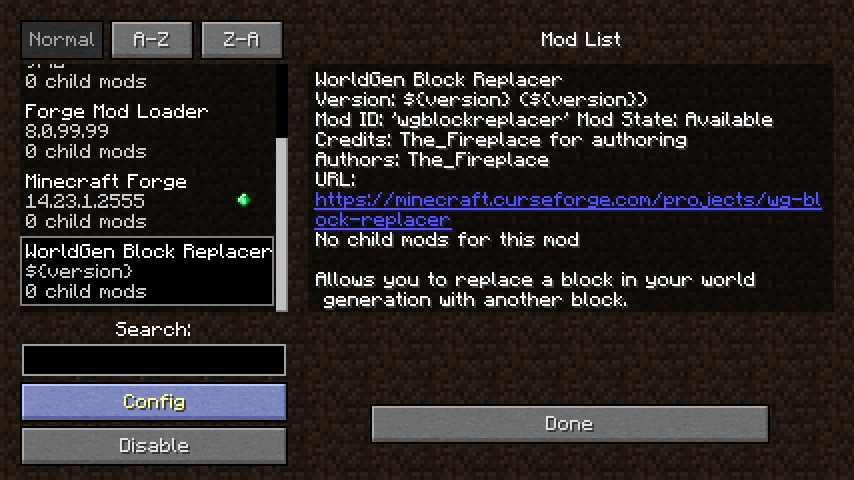
Next, find and click WorldGen Block Replacer, then click Config.
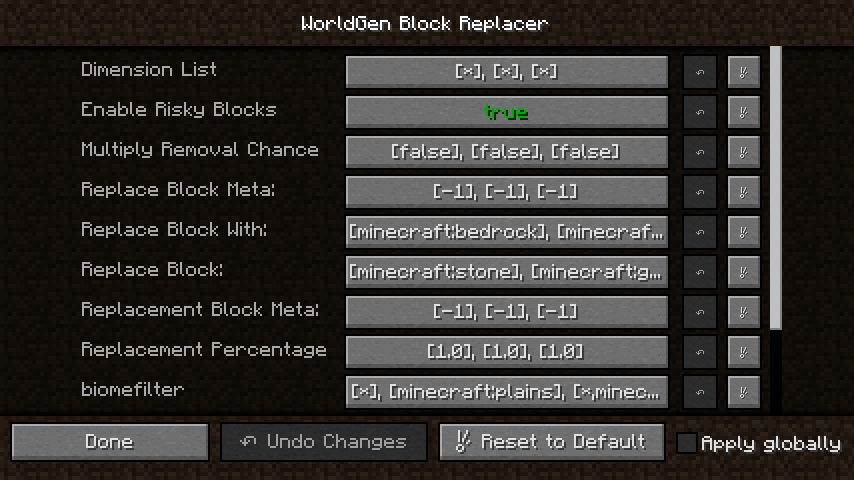
This brings you to the Config screen. By default, it has configuration to replace stone with stone (which does nothing). To change this, you can click any of these options to change the settings.
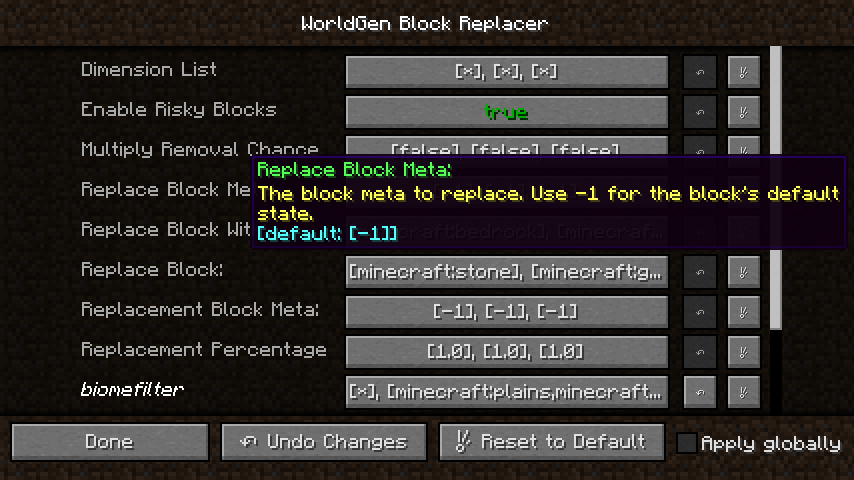
To read more about what an option is, mouse over the option's name.
Inside most of these options, you can set multiple options. This is because it can be configured for multiple blocks. Note that all of the options that accept multiple values must have the same number of options set, or the mod will not work.
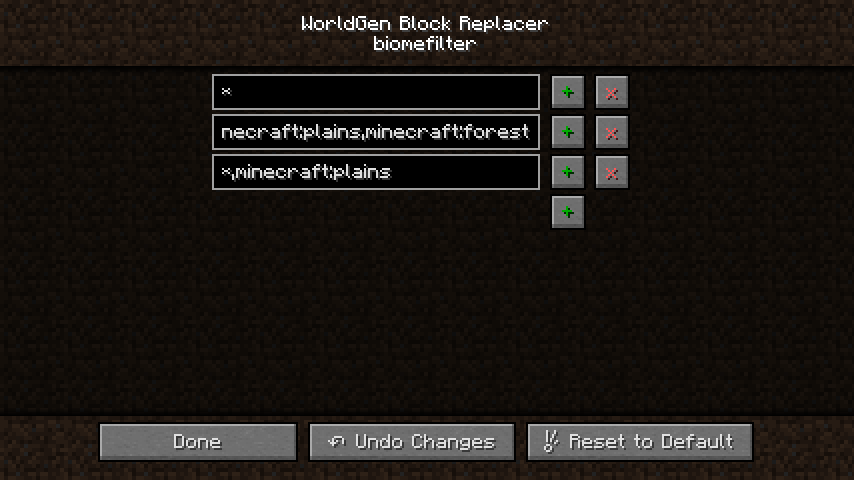
In the above screenshot, there are 3 options set, because I am replacing 3 blocks.
On the Biome Filter and Dimension List options, each text box is a comma separated list. Do not include spaces before or after the comma. Both these options can act as a blacklist or a whitelist. If the list contains an asterisk (*), it is a blacklist. Without the asterisk, it is a whitelist. In the above example, the first replacement is set to allow all biomes (it is a blacklist with nothing blacklisted), the second replacement is set to only work in plains and forest (The start is cut off, but there is no asterisk in that option, and it only has those two biomes listed), and the third replacement will replace in all biomes except for plains.
The two options that are universal, regardless of how many blocks you are replacing, are Enable Risky Blocks and Biome Precision. Enable Risky Blocks allows the block replacer to use blocks that may cause an excessive amount of lag in the world. Biome Precision has to do with precisely detecting the edges of biomes. Enabled by default, disabling it might improve performance when loading new chunks, but the edges will be chunk-based, which is less accurate and typically looks bad if done on commonly generated blocks such as dirt, grass, or stone. This option only has an effect if your replacement is biome-restricted.
Contact
If you have a bug or crash to report, please use the issue tracker. For feature requests, I also encourage using the issue tracker, so others can easily see what has already been requested, and more importantly, because it makes it easier to keep track of the features that have been requested. That said, if you have questions about the mod or would like to ask me about a feature request before posting it, feel free to reach out on Discord or Twitter.
Check out my other mods:
Server-Side Mods:
Client-Side Mods:
Other Mods:
Project description from CurseForge.
Pick your setup
WorldGen Block Replacer by Minecraft version and loader
Choose the version and loader you play, then open the matching release.
Minecraft version
1.12.2
2 loader buildsMinecraft version
1.12.1
2 loader buildsMinecraft version
1.12
2 loader buildsCheck the dependencies, then try the file in a copied instance before changing a world you care about.
Recent files
WorldGen Block Replacer versions and loaders
WorldgenBlockReplacer-1.12.2-2.3.0
WorldgenBlockReplacer-1.12.2-2.3.0.jar
18 Apr 2021
Client Source doesn’t say Server Source doesn’t say Dependencies No extras listed Listed on Release listing
Check the 1.12 · Forge setup 1.12.11.12Forge1.12.2 release
WorldgenBlockReplacer-1.12.2-2.2.0
WorldgenBlockReplacer-1.12.2-2.2.0.jar
18 Feb 2020
Client Source doesn’t say Server Source doesn’t say Dependencies No extras listed Listed on Release listing
Check the 1.12 · Forge setup 1.12.11.12Forge1.12.2 release
WorldgenBlockReplacer-1.12.2-2.1.2
WorldgenBlockReplacer-1.12.2-2.1.2.jar
15 Aug 2019
Client Source doesn’t say Server Source doesn’t say Dependencies No extras listed Listed on Release listing
Check the 1.12 · Forge setup 1.12.11.12Forge1.12.2 release
WorldgenBlockReplacer-1.12.2-2.0.3
WorldgenBlockReplacer-1.12.2-2.0.3.jar
10 Jul 2019
Client Source doesn’t say Server Source doesn’t say Dependencies No extras listed Listed on Release listing
Check the 1.12 setup 1.12.11.121.12.2 release
WGBlockReplacer-1.12.2-2.0.1
WGBlockReplacer-1.12.2-2.0.1.jar
11 Mar 2019
Client Source doesn’t say Server Source doesn’t say Dependencies No extras listed Listed on Release listing
Check the 1.12 setup 1.12.11.121.12.2 release
WGBlockReplacer-2.0.0
WGBlockReplacer-2.0.0.jar
28 Oct 2018
Client Source doesn’t say Server Source doesn’t say Dependencies No extras listed Listed on Release listing
Check the 1.12 setup 1.12.11.121.12.2 release
WGBlockReplacer-1.0.1
WGBlockReplacer-1.0.1.jar
3 May 2018
Client Source doesn’t say Server Source doesn’t say Dependencies No extras listed Listed on Release listing
Check the 1.12 setup 1.12.11.121.12.2 release
WGBlockReplacer-1.0.0
WGBlockReplacer-1.0.0.jar
12 Feb 2018
Client Source doesn’t say Server Source doesn’t say Dependencies No extras listed Listed on Release listing
Check the 1.12 setup 1.12.11.121.12.2 release
Looking for an older file? The official CurseForge project page is in Resources.
 mod
mod CurseForge · Minecraft
HideName (Nick), Nickname & Player Health - Minecraft Mod
Hide player names, add custom nicknames and prefixes, and display player health.
 mod
mod CurseForge · Minecraft
Chronos Backups
A multi-loader Minecraft backup utility. Designed to save the most important parts of your world, keeping backups smaller.
 mod
mod CurseForge · Minecraft
Recurrent Complex Volts
Continuation of Recurrent Complex - tons of structures, fully customizable