Minecraft version
Back to mods 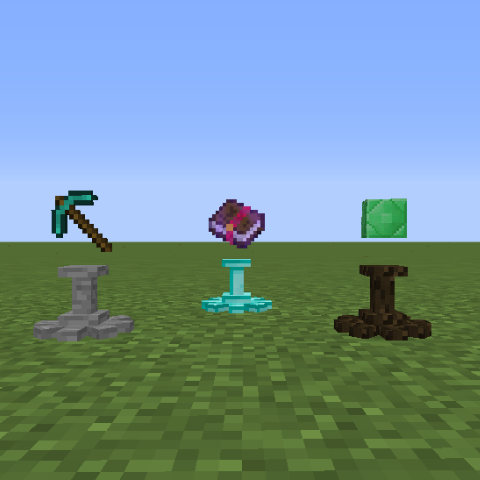
CurseForge · Minecraft mod
Display
Display all your items!
Choose a version Pick your version below, then grab the matching file.
Quick answer
Which Display release should I use?
Latest stable file Display-1.2.4
Game version 1.12.2
Loader Not required
Display-1.2.4 targets 1.12.2. The project page does not say whether this file belongs on the client, dedicated server, or both. No extra mods listed for this file.
Where it goes
Is Display required on the client, server, or both?
The project page does not say whether this file belongs on the client, dedicated server, or both.
Client Source doesn’t say
Dedicated server Source doesn’t say
Loader for this release No loader listed
Required install it here Optional supported, not mandatory Not supported do not install here Source doesn’t say do not assume
The source does not explicitly classify this release as client-only or server-only.
What else does Display-1.2.4 need?
Display-1.2.4. Change the file and its required mods may change too.
This file does not list any required mods. Do not add a library just because a different file uses it.
This file does not list any required or optional mods.
Before you install it
Add Display without breaking your instance.
Built for Display-1.2.4. Pick another file and the loader, install side or required mods may change.
- 01
Stick to this file
Use Display-1.2.4. It targets 1.12.2; another release may have different loader, side or dependency requirements.
- 02
Bring the mods it needs
This file does not list any required mods. Do not add a library just because a different file uses it.
- 03
Put it on the correct side
The project page does not say whether this file belongs on the client, dedicated server, or both.
- 04
Pick the file you checked
Use the “Get this file” button beside Display-1.2.4. It opens that exact file at the source.
About this project
What does Display add?
Display is an mod that lets you make a Display block to display your items on.
All items work, even items from other mods.
Multiple types of Displays for decoration purposes as well.
Features:
- Right click the Display to place and retrieve items.
- Shift right click to stop the item from rotating. Depending on what side of the display you click the item will be positioned towards you.
- Items don't lose any data so all items are safe for usage. Unless the mod item specifically does not want things like this to happen.
- Craft the Display Configurator to change the position of the items on the display
- Shift+Right click with the Display Configurator and change the Axis mode.
Crafting recipe:
Normal Display recipe

Every display type that derives from a block uses that block

Every display type that derives from an ore derives from its processed ore. So quartz & iron ingot etc

The Item Configurator:

Picture:


Current Displays:
- Normal Display (Stone)
- Obsidian
- Dirt
- Sand
- Gravel
- Wood
- Gold
- Iron
- Diamond
- Quartz
Modpack use:
You can place this mod in all your modpacks, private or public.
Discord:
Project description from CurseForge.
Pick your setup
Display by Minecraft version and loader
Choose the version and loader you play, then open the matching release.
Check the dependencies, then try the file in a copied instance before changing a world you care about.
Recent files
Display versions and loaders
Display-1.2.4
Display-1.2.4.jar
24 Feb 2018
Client Source doesn’t say Server Source doesn’t say Dependencies No extras listed Listed on Release listing
Check the 1.12.2 setup 1.12.2 release
Display-1.2.3
Display-1.2.3.jar
22 Feb 2018
Client Source doesn’t say Server Source doesn’t say Dependencies No extras listed Listed on Release listing
Check the 1.12.2 setup 1.12.2 release
Display-1.2.2
Display-1.2.2.jar
16 Feb 2018
Client Source doesn’t say Server Source doesn’t say Dependencies No extras listed Listed on Release listing
Check the 1.12.2 setup 1.12.2 release
Display-1.2.1
Display-1.2.1.jar
15 Feb 2018
Client Source doesn’t say Server Source doesn’t say Dependencies No extras listed Listed on Release listing
Check the 1.12.2 setup 1.12.2 release
Display-1.2
Display-1.2.jar
14 Feb 2018
Client Source doesn’t say Server Source doesn’t say Dependencies No extras listed Listed on Release listing
Check the 1.12.2 setup 1.12.2 release
Display-1.1.1
Display-1.1.1.jar
14 Feb 2018
Client Source doesn’t say Server Source doesn’t say Dependencies No extras listed Listed on Release listing
Check the 1.12.2 setup 1.12.2 release
Display-1.1-1.12.2
Display-1.1.jar
13 Feb 2018
Client Source doesn’t say Server Source doesn’t say Dependencies No extras listed Listed on Release listing
Check the 1.12.2 setup 1.12.2 release
Display-1.0-1.12.2
Display-1.0.jar
13 Feb 2018
Client Source doesn’t say Server Source doesn’t say Dependencies No extras listed Listed on Release listing
Check the 1.12.2 setup 1.12.2 release
Looking for an older file? The official CurseForge project page is in Resources.
 mod
CurseForge · Minecraft
Smooth Loading Screen
A transition between the world select screen and in-game
 mod
CurseForge · Minecraft
Tokyo Revengers Gang Addon
An immersive Tokyo Revengers addon featuring gang territories, custom uniforms and created gang, combat skills, boss challenges, territory raids, passive skills and interactive NPC allies.
 mod
CurseForge · Minecraft
BlxckoutFX
Let darkness fall everywhere for your eyes.