Minecraft version
Back to mods 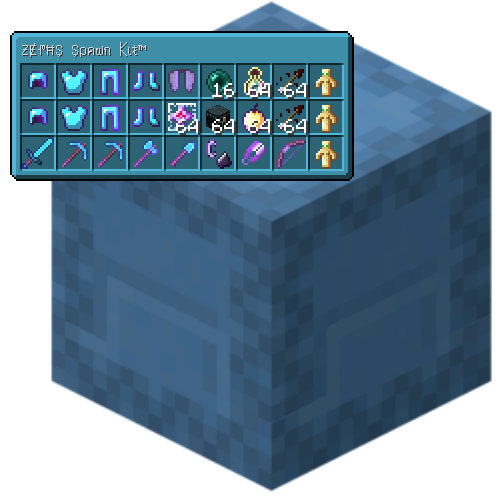
CurseForge · Minecraft mod
Shulker Tooltip
Move your mouse cursor over a shulker box to see what's inside.
Choose a version Pick your version below, then grab the matching file.
Quick answer
Which Shulker Tooltip release should I use?
Latest stable file ShulkerTooltip-1.13.1.jar
Game version 1.21.6
Loader NeoForge
Shulker Tooltip ShulkerTooltip-1.13.1.jar targets 1.21.6 with NeoForge. The project page does not say whether it belongs on the client. The project page does not say whether it belongs on the dedicated server. No extra mods listed for this file.
Where it goes
Is Shulker Tooltip required on the client, server, or both?
The project page does not say whether it belongs on the client. The project page does not say whether it belongs on the dedicated server.
Client Source doesn’t say
Dedicated server Source doesn’t say
Loader for this release NeoForge
Required install it here Optional supported, not mandatory Not supported do not install here Source doesn’t say do not assume
The source does not explicitly classify this release as client-only or server-only.
What else does Shulker Tooltip ShulkerTooltip-1.13.1.jar need?
ShulkerTooltip-1.13.1.jar. Change the file and its required mods may change too.
This file does not list any required mods. Do not add a library just because a different file uses it.
This file does not list any required or optional mods.
Before you install it
Add Shulker Tooltip without breaking your instance.
Built for Shulker Tooltip ShulkerTooltip-1.13.1.jar. Pick another file and the loader, install side or required mods may change.
- 01
Stick to this file
Use ShulkerTooltip-1.13.1.jar. It targets 1.21.6 with NeoForge; another release may have different loader, side or dependency requirements.
- 02
Bring the mods it needs
This file does not list any required mods. Do not add a library just because a different file uses it.
- 03
Put it on the correct side
The project page does not say whether it belongs on the client. The project page does not say whether it belongs on the dedicated server.
- 04
Pick the file you checked
Use the “Get this file” button beside ShulkerTooltip-1.13.1.jar. It opens that exact file at the source.
About this project
What does Shulker Tooltip add?
Have you ever wanted to see what's in a shulkerbox without placing it to open it? With Shulker Tooltip you can! Move your cursor over a shulkerbox to see what's inside.
If you find any bugs please let me know.
Keys (configurable):
Left Alt - Show Tooltip. Press and hold this key to change the tooltip.
V - Toggle View. Press this key to toggle the Shulker Tooltip on or off.
N - Show Contents. A key for an experimental GUI that opens the shulkerbox.
This mod is client side only. Do not install it on servers.
I have not made a fabric version. And I likely never will.
You are free to use this mod in any modpack.
Project description from CurseForge.
Pick your setup
Shulker Tooltip by Minecraft version and loader
Choose the version and loader you play, then open the matching release.
Minecraft version
1.21.4
1 loader buildMinecraft version
1.21.2
1 loader buildMinecraft version
1.21.1
1 loader buildMinecraft version
1.21
1 loader buildMinecraft version
1.20.6
1 loader buildMinecraft version
1.20.4
1 loader buildMinecraft version
1.20.3
1 loader buildMinecraft version
1.20.2
2 loader buildsMinecraft version
1.20.1
2 loader buildsMinecraft version
1.19.4
1 loader buildMinecraft version
1.19
1 loader buildShowing the newest 12 of 26 game versions. Older files are in the list below.
Check the dependencies, then try the file in a copied instance before changing a world you care about.
Recent files
Shulker Tooltip versions and loaders
ShulkerTooltip-1.13.1.jar
17 Jul 2025
Client Source doesn’t say Server Source doesn’t say Dependencies No extras listed Listed on Release listing
Check the 1.21.6 · NeoForge setup NeoForge1.21.6 release
ShulkerTooltip-1.13.1.jar
31 Mar 2025
Client Source doesn’t say Server Source doesn’t say Dependencies No extras listed Listed on Release listing
Check the 1.21.4 · NeoForge setup 1.21.4NeoForge release
ShulkerTooltip-1.13.1.jar
31 Mar 2025
Client Source doesn’t say Server Source doesn’t say Dependencies No extras listed Listed on Release listing
Check the 1.21.2 · Forge setup 1.21Forge1.21.11.21.2 release
ShulkerTooltip-1.13.1.jar
31 Mar 2025
Client Source doesn’t say Server Source doesn’t say Dependencies No extras listed Listed on Release listing
Check the 1.20.6 · Forge setup Forge1.20.6 release
ShulkerTooltip-1.13.1.jar
31 Mar 2025
Client Source doesn’t say Server Source doesn’t say Dependencies No extras listed Listed on Release listing
Check the 1.20.4 · Forge setup 1.20.3Forge1.20.4 release
ShulkerTooltip-1.13.1.jar
31 Mar 2025
Client Source doesn’t say Server Source doesn’t say Dependencies No extras listed Listed on Release listing
Check the 1.20.2 · NeoForge setup 1.20.2NeoForge1.20.1Forge release
ShulkerTooltip-1.13.jar
25 Jun 2024
Client Source doesn’t say Server Source doesn’t say Dependencies No extras listed Listed on Release listing
Check the 1.21.1 · Forge setup 1.21Forge1.21.1 release
ShulkerTooltip-1.13.jar
26 May 2024
Client Source doesn’t say Server Source doesn’t say Dependencies No extras listed Listed on Release listing
Check the 1.20.6 · Forge setup Forge1.20.6 release
ShulkerTooltip-1.13.jar
26 May 2024
Client Source doesn’t say Server Source doesn’t say Dependencies No extras listed Listed on Release listing
Check the 1.20.4 · Forge setup 1.20.3Forge1.20.4 release
ShulkerTooltip-1.13.jar
29 Jun 2023
Client Source doesn’t say Server Source doesn’t say Dependencies No extras listed Listed on Release listing
Check the 1.20.1 · Forge setup 1.20.1Forge release
ShulkerTooltip-1.11.2.jar
28 Jun 2023
Client Source doesn’t say Server Source doesn’t say Dependencies No extras listed Listed on Release listing
Check the 1.20.1 · Forge setup 1.20.1Forge release
ShulkerTooltip-1.11.2.jar
12 Apr 2023
Client Source doesn’t say Server Source doesn’t say Dependencies No extras listed Listed on Release listing
Check the 1.19.4 · Forge setup 1.19.4Forge release
Looking for an older file? The official CurseForge project page is in Resources.
 mod
mod CurseForge · Minecraft
Exile Overlay
An add-on for Mine and Slash that replaces the default HUD with an ARPG-style interface inspired by Diablo and Path of Exile (PoE).
 mod
mod CurseForge · Minecraft
TESTIFICATE (TBS) HORROR
something with villagers seems a bit off...
 mod
mod CurseForge · Minecraft
Barista - Window Title Editor
Appends useful game information to the window title bar using modular json objects and sets custom icon