Minecraft version
Back to mods 
CurseForge · Minecraft mod
Equipment Tooltips
Stat icons for quickly comparing tools, weapons, and armor
Choose a version Pick your version below, then grab the matching file.
Quick answer
Which Equipment Tooltips release matches 1.14.2?
Best match for your filters EquipmentTooltips-1.14.2-1.2.0+7.jar
Game version 1.14.2
Loader Not required
Equipment Tooltips EquipmentTooltips-1.14.2-1.2.0+7.jar targets 1.14.2. The project page does not say whether this file belongs on the client, dedicated server, or both. No extra mods listed for this file.
Where it goes
Is Equipment Tooltips required on the client, server, or both?
The project page does not say whether this file belongs on the client, dedicated server, or both.
Client Source doesn’t say
Dedicated server Source doesn’t say
Loader for this release No loader listed
Required install it here Optional supported, not mandatory Not supported do not install here Source doesn’t say do not assume
The source does not explicitly classify this release as client-only or server-only.
What else does Equipment Tooltips EquipmentTooltips-1.14.2-1.2.0+7.jar need?
EquipmentTooltips-1.14.2-1.2.0+7.jar on 1.14.2. Every mod below is checked against that same setup.
This file does not list any required mods. Do not add a library just because a different file uses it.
This file does not list any required or optional mods.
Before you install it
Add Equipment Tooltips without breaking your instance.
Built for Equipment Tooltips EquipmentTooltips-1.14.2-1.2.0+7.jar on 1.14.2. Pick another file and the loader, install side or required mods may change.
- 01
Stick to this file
Use EquipmentTooltips-1.14.2-1.2.0+7.jar. It targets 1.14.2; another release may have different loader, side or dependency requirements.
- 02
Bring the mods it needs
This file does not list any required mods. Do not add a library just because a different file uses it.
- 03
Put it on the correct side
The project page does not say whether this file belongs on the client, dedicated server, or both.
- 04
Pick the file you checked
Use the “Get this file” button beside EquipmentTooltips-1.14.2-1.2.0+7.jar. It opens that exact file at the source.
About this project
What does Equipment Tooltips add?
Introduction
Equipment Tooltips does one thing: adds a row of icons and numbers above the tooltip for tools, swords, bows, armor, and other damageable items. Support for swords, bows, pickaxes, shovels, axes, hoes, shears, fishing rods, and more. This was previously a feature of Silent's Gems.
If possible, the mod also compares the item you are looking at to your currently equipped one (the appropriate armor slot for armor, or your main hand for everything else). A green up arrow means the stat is higher than what you have, a red down arrow means lower, and a yellow dash mean equal.
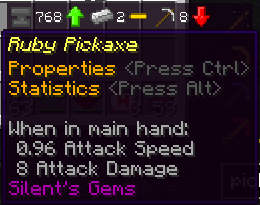
No item will display all possible stats, only the most important ones for the item type. For example, pickaxes typically are not used as weapons. Not judging if you do, but...
Compatibility
The mod should work with most items that extend vanilla classes, with special support for Silent Gear (1.13.2) and Tinkers Construct (1.12.2). Tools can be funky, as every mod implements them a little differently. So you may see values that do not make sense for some items.
Known compatibility (and issues)
- Silent Gear (1.13.2+) - Silent Gear's tools and armor replaced Silent's Gems' in Minecraft 1.13.2, so naturally the mod supports them. Main parts will also display some common stats, to make finding the ideal material for whatever you are crafting a little easier.
- Silent's Gems (1.12.2 only) - This mod was originally a part of SGems, so it still supports the magic and bow stats that are unique to the mod.
- Tinkers Construct (currently just 1.12.2) - Not supported by 1.13.2 at time of writing, since TiC has not updated. Support may be a little hit-or-miss, since TiC does not extend vanilla classes. Currently, all harvest tools will display the same stats as pickaxes. Ranged weapon stats probably will not be correct. If you notice anything else that seems off, let me know.
Icons
These are the icons used. Most of them are items in vanilla Minecraft.

- Anvil (custom icon) - Durability. Should display for all damageable items.
- Iron Ingot - Harvest (mining) level. That determines which ores you can mine. Compare to vanilla pickaxes if you do not know harvest levels.
- Pickaxe - Harvest (mining) speed. How quickly the tool mines blocks it is effective on. Shows for pickaxes, shovels, axes, and shears.
- Sword - Attack damage. Shows for swords and axes.
- Scepter - Magic damage (Silent's Gems or Silent Gear)
- Feather - Attack speed or bow draw speed (Silent's Gems or Silent Gear bows only)
- Arrow - Ranged (arrow) damage. Currently only works with Silent's Gems or Silent Gear bows, everything else just shows vanilla values.
- Iron Helmet - Armor value
- Diamond Helmet - Armor toughness
- Splash Potion - Magic protection (Silent's Gems shields only)
Project description from CurseForge.
Pick your setup
Equipment Tooltips by Minecraft version and loader
Choose the version and loader you play, then open the matching release.
Minecraft version
1.14.4
1 loader buildMinecraft version
1.14.3
1 loader buildMinecraft version
1.14.2
1 loader buildMinecraft version
1.13.2
1 loader buildMinecraft version
1.12.2
1 loader buildCheck the dependencies, then try the file in a copied instance before changing a world you care about.
Recent files
Equipment Tooltips versions and loaders
EquipmentTooltips-1.14.2-1.2.0+7.jar
29 Jun 2019
Client Source doesn’t say Server Source doesn’t say Dependencies No extras listed Listed on Release listing
Check the 1.14.2 setup 1.14.2 release
Looking for an older file? The official CurseForge project page is in Resources.