Domum Ornamentum Needed by structurize-1.0.832-1.21.1.jar
requiredMatching file found Matched file: domum-ornamentum - 1.0.231 - release
CurseForge · Minecraft mod
Copy structures, paste structures, manipulate structures (100% GUI)
Quick answer
structurize-1.0.832-1.21.1.jar targets 1.21, 1.21.1 with NeoForge. The project page does not say whether this file belongs on the client, dedicated server, or both. All 2 required mods have matching files.
Where it goes
The project page does not say whether this file belongs on the client, dedicated server, or both.
The source does not explicitly classify this release as client-only or server-only.
structurize-1.0.832-1.21.1.jar. Change the file and its required mods may change too.
Install Domum Ornamentum, BlockUI first. We found matching files for this game-version and loader setup.
We only count dependency files that match this setup. A file for another loader does not fill the gap.
Before you install it
Built for structurize-1.0.832-1.21.1.jar. Pick another file and the loader, install side or required mods may change.
Use structurize-1.0.832-1.21.1.jar. It targets 1.21, 1.21.1 with NeoForge; another release may have different loader, side or dependency requirements.
Install Domum Ornamentum, BlockUI first. We found matching files for this game-version and loader setup.
The project page does not say whether this file belongs on the client, dedicated server, or both.
Use the “Get this file” button beside structurize-1.0.832-1.21.1.jar. It opens that exact file at the source.
About this project
Structurize is a server utility mod brought to you by the LDT Team. It aims to bring a new way to edit large portions of the Minecraft world. This mod is required for our main mod MineColonies!
Structurize has many core features, including:
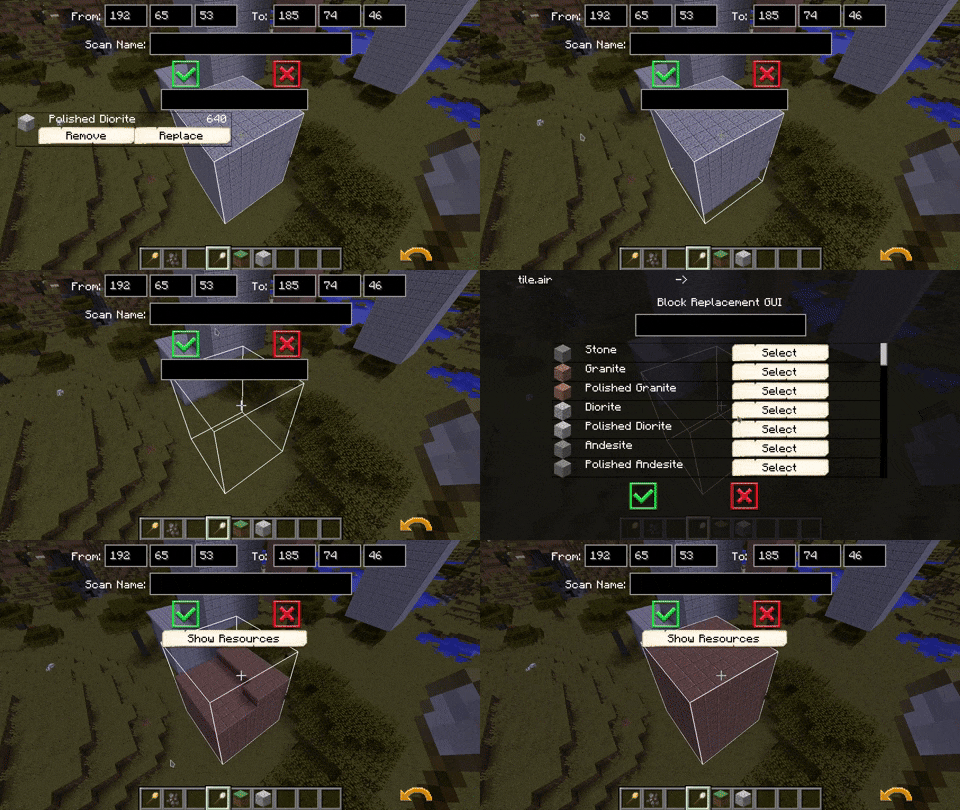
The Scan Tool
Allowing you to change the blocks in an area or scan in an area.

The finished scans will go to a custom directory (structurize/scans/new).Anything in this folder (with the right file extension) can be placed with the build tool.
The Build Tool:
This allows you to place, name, and delete these custom-made scans with an easy and usable GUI.

Client-Server Synchronisation:
Structurize offers synchronization between the client and the server. This enables players to
a) Scan things on servers and download them to their local PC.
b) Paste things from their PC to the server (if enabled in the config).
Load Balancing:
What sets Structurize apart from other mods is the way structures are loaded in buffers into the game. This greatly reduces lag!
The batch size can be defined in the configuration file, which the player or server owner can change as they wish.
#Max world operations per tick (max blocks to place, remove, or replace).
#Range: 0 ~ 100000
maxOperationsPerTick = 1000
Support us on Patreon:
https://www.patreon.com/Minecolonies
Get support on Discord:
https://discord.minecolonies.com
Website:

Click on the picture above, select a plan(at least 4GB) and use our code ldtteam to get 25% off your first month and Minecolonies with your friends.
Project description from CurseForge.
Pick your setup
Choose the version and loader you play, then open the matching release.
Check the dependencies, then try the file in a copied instance before changing a world you care about.
Recent files
9 Aug 2026
9 Aug 2026
9 Jul 2026
30 May 2026
24 May 2026
24 May 2026
23 May 2026
23 May 2026
19 May 2026
19 May 2026
19 May 2026
19 May 2026
Looking for an older file? The official CurseForge project page is in Resources.
 mod
modAdds fully configurable battle music. By default, gives music to elder guardians, wardens, the wither, and the ender dragon.
 mod
modBotW style Paraglider
 mod
modInvisible triggers for packs — datapack/KubeJS commands, shared IDs, creative-only visibility.