Minecraft version
Back to mods 
CurseForge · Minecraft mod
Debug Block Collision
A client-side mod that allows debug rendering of block collision boxes.
Choose a version Pick your version below, then grab the matching file.
Quick answer
Which Debug Block Collision release matches 1.12.2?
Best match for your filters DebugBlockCollision-1.12.2-1.0.3.jar
Game version 1.12.2
Loader Not required
Debug Block Collision DebugBlockCollision-1.12.2-1.0.3.jar targets 1.12.2. The project page does not say whether this file belongs on the client, dedicated server, or both. No extra mods listed for this file.
Where it goes
Is Debug Block Collision required on the client, server, or both?
The project page does not say whether this file belongs on the client, dedicated server, or both.
Client Source doesn’t say
Dedicated server Source doesn’t say
Loader for this release No loader listed
Required install it here Optional supported, not mandatory Not supported do not install here Source doesn’t say do not assume
The source does not explicitly classify this release as client-only or server-only.
What else does Debug Block Collision DebugBlockCollision-1.12.2-1.0.3.jar need?
DebugBlockCollision-1.12.2-1.0.3.jar on 1.12.2. Every mod below is checked against that same setup.
This file does not list any required mods. Do not add a library just because a different file uses it.
This file does not list any required or optional mods.
Before you install it
Add Debug Block Collision without breaking your instance.
Built for Debug Block Collision DebugBlockCollision-1.12.2-1.0.3.jar on 1.12.2. Pick another file and the loader, install side or required mods may change.
- 01
Stick to this file
Use DebugBlockCollision-1.12.2-1.0.3.jar. It targets 1.12.2; another release may have different loader, side or dependency requirements.
- 02
Bring the mods it needs
This file does not list any required mods. Do not add a library just because a different file uses it.
- 03
Put it on the correct side
The project page does not say whether this file belongs on the client, dedicated server, or both.
- 04
Pick the file you checked
Use the “Get this file” button beside DebugBlockCollision-1.12.2-1.0.3.jar. It opens that exact file at the source.
About this project
What does Debug Block Collision add?
It can be difficult to ensure that complex sets of block collision boxes are positioned properly.
This client-side mod makes this easier by rendering the collision/bounding boxes of blocks**.**
Issues should be submitted via GitHub (here), if possible, but can be submitted internally, if need be.
This mod has been released into the public domain. Use it anywhere in any way.
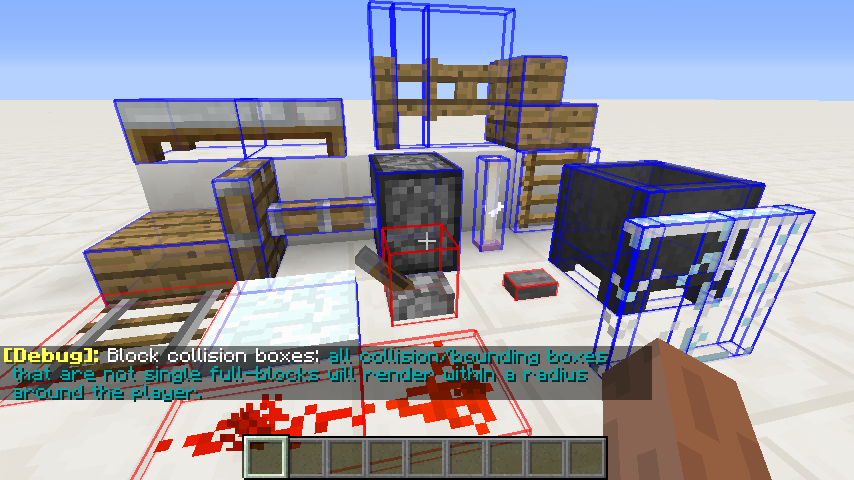
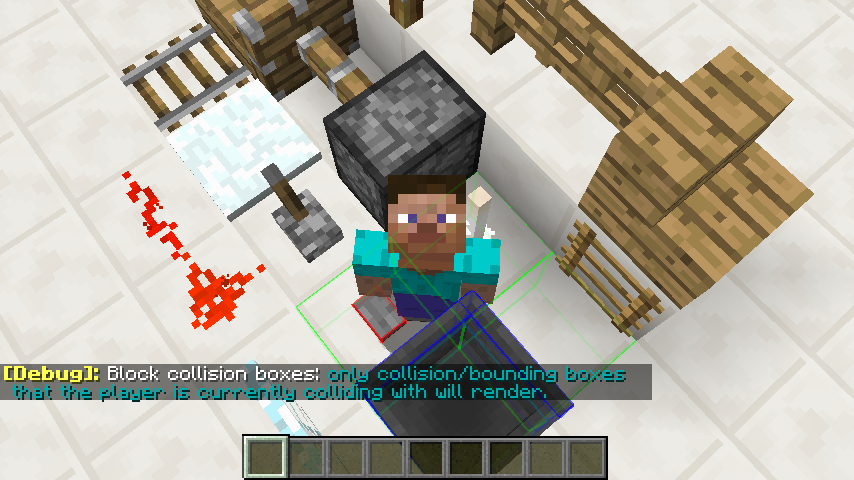
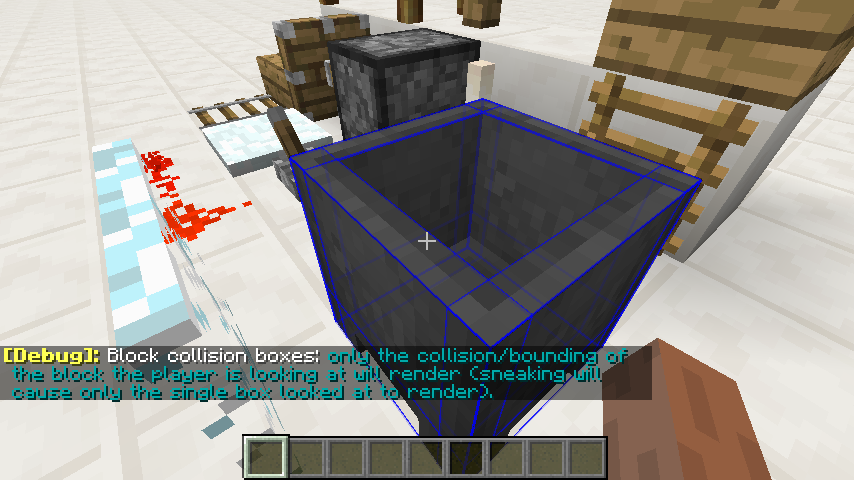
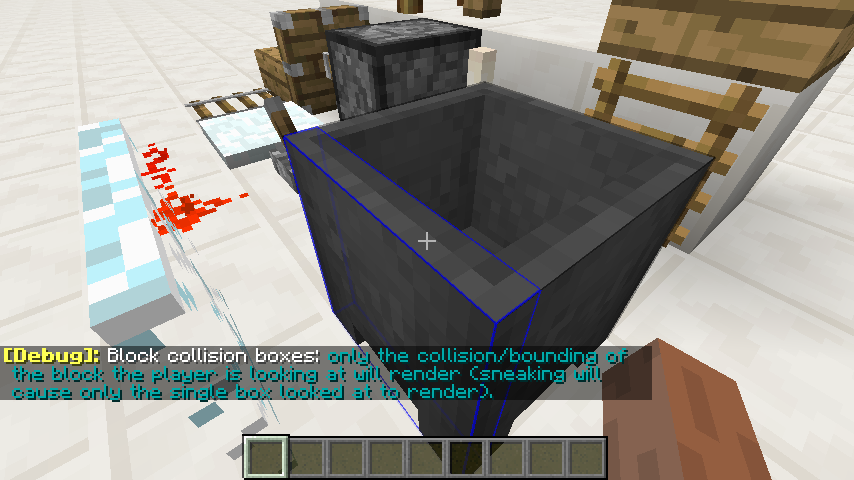
Color Key:
green = full collision boxes
blue = non-full collision boxes
red = bounding boxes (for blocks with no collision boxes)
Pressing F3 + the 'Mode' keybind (default = letter O) will toggle debug box rendering.
While rendering is enabled, pressing the 'Mode' keybind on its own will cycle the mode:
Radius
Collision
Hovered - Not Sneaking
Hovered - Sneaking
Project description from CurseForge.
Pick your setup
Debug Block Collision by Minecraft version and loader
Choose the version and loader you play, then open the matching release.
Check the dependencies, then try the file in a copied instance before changing a world you care about.
Recent files
Debug Block Collision versions and loaders
DebugBlockCollision-1.12.2-1.0.3.jar
5 Sept 2018
Client Source doesn’t say Server Source doesn’t say Dependencies No extras listed Listed on Release listing
Check the 1.12.2 setup 1.12.2 release
DebugBlockCollision-1.12.2-1.0.2.jar
2 Sept 2018
Client Source doesn’t say Server Source doesn’t say Dependencies No extras listed Listed on Release listing
Check the 1.12.2 setup 1.12.2 release
DebugBlockCollision-1.12.2-1.0.1.jar
2 Sept 2018
Client Source doesn’t say Server Source doesn’t say Dependencies No extras listed Listed on Release listing
Check the 1.12.2 setup 1.12.2 release
DebugBlockCollision-1.12.2-1.0.0.jar
1 Sept 2018
Client Source doesn’t say Server Source doesn’t say Dependencies No extras listed Listed on Release listing
Check the 1.12.2 setup 1.12.2 release
Looking for an older file? The official CurseForge project page is in Resources.
 mod
CurseForge · Minecraft
AppleStats :timmer+ AppleSkin+ Jade +GUI Clock+Coordinates+Horse Stat
HUD:A lightweight Jade alternative ,effect timmer ,Target Info,Saturation and Coordinates Monitor ,Waila,HWYLA,show Horse speed and jump stats,death location,Death Finder
 mod
CurseForge · Minecraft
Range Sight
See invisible ranges: beacons, conduits, spawners, raids, sculk sensors and shriekers, and spawn chunks, each with its own color and toggle key.
 mod
CurseForge · Minecraft
Natural Disaster Mod By Phnhh_8's
Natural Disater Mods for Fabric and Forge. 100 download for neoforge