Minecraft version
Back to mods 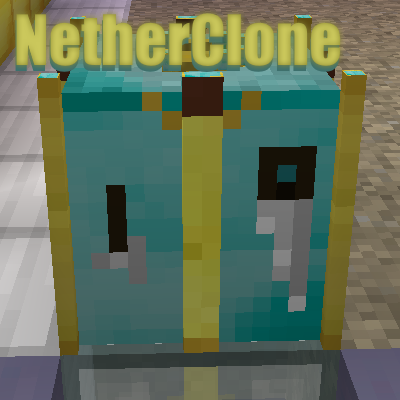
CurseForge · Minecraft mod
NetherClone
OP tool for cloning blocks & items
Choose a version Pick your version below, then grab the matching file.
Quick answer
Which NetherClone release should I use?
Latest stable file NetherClone 1 5 0 5
Game version 26.1.2
Loader NeoForge
NetherClone 1 5 0 5 targets 26.1.2 with NeoForge. The project page does not say whether this file belongs on the client, dedicated server, or both. No extra mods listed for this file.
Where it goes
Is NetherClone required on the client, server, or both?
The project page does not say whether this file belongs on the client, dedicated server, or both.
Client Source doesn’t say
Dedicated server Source doesn’t say
Loader for this release NeoForge
Required install it here Optional supported, not mandatory Not supported do not install here Source doesn’t say do not assume
The source does not explicitly classify this release as client-only or server-only.
What else does NetherClone 1 5 0 5 need?
NetherClone 1 5 0 5. Change the file and its required mods may change too.
This file does not list any required mods. Do not add a library just because a different file uses it.
This file does not list any required or optional mods.
Before you install it
Add NetherClone without breaking your instance.
Built for NetherClone 1 5 0 5. Pick another file and the loader, install side or required mods may change.
- 01
Stick to this file
Use NetherClone 1 5 0 5. It targets 26.1.2 with NeoForge; another release may have different loader, side or dependency requirements.
- 02
Bring the mods it needs
This file does not list any required mods. Do not add a library just because a different file uses it.
- 03
Put it on the correct side
The project page does not say whether this file belongs on the client, dedicated server, or both.
- 04
Pick the file you checked
Use the “Get this file” button beside NetherClone 1 5 0 5. It opens that exact file at the source.
About this project
What does NetherClone add?

The Gods will smite you if you upset them, they will bite you when you feed them so make sure your fingers are safe.
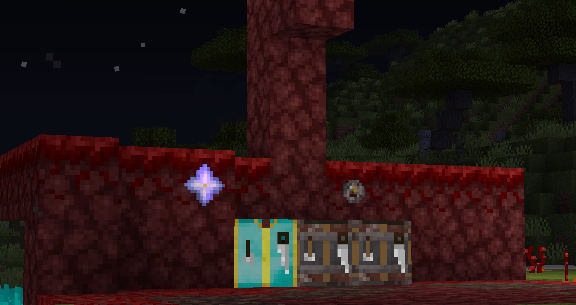
NetherClone for 1.16.4+ has changed it's recipe's please use JEI for now to get the updated changed.
How to use, Once you have created your tables and you have created your payment to that table
- NetherClone - Nether Stars
- NetherClone Netherite - NetherCoins

Hold the item you want to clone in your off hand and then use the food in your normal hand and give it to the block, DON'T do this when your low
health as the nether gods bite when been fed so they will take some health from you.
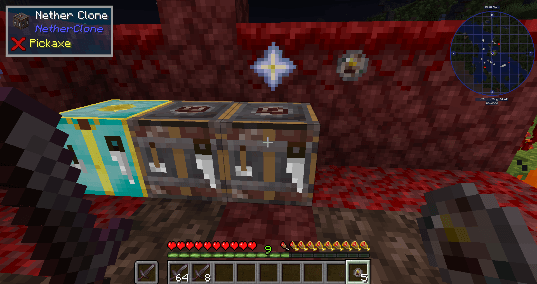
The updated Netherite Table takes NetherCoins and is able to clone 64, 32 and 8 stacks,
If you are willing to be struck by lightning and your Table sees the NIGHT sky you will be able to clone you
item for a stack of 64, in the day light it would give you 32.
If you put the table somewhere safe or underground you will only be able to clone a stack of 8.
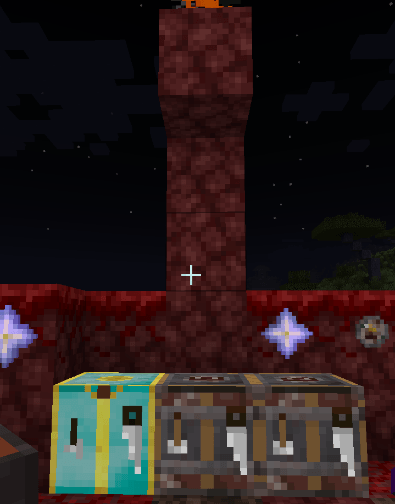
1.16 + and up recipes
- Please use JEI or REI for in game recipes at this time.
How to use 1.12.2:
You can use versions before 1.21.1 but I no longer support forge let along older versions of MC.
I have tested this on a server
I had a little fun making this and I am open to ideas so please leave your comments.
Project description from CurseForge.
Pick your setup
NetherClone by Minecraft version and loader
Choose the version and loader you play, then open the matching release.
Minecraft version
1.21.8
1 loader buildMinecraft version
1.21.4
1 loader buildMinecraft version
1.21.1
1 loader buildMinecraft version
1.20.1
1 loader buildMinecraft version
1.19.4
1 loader buildMinecraft version
1.19.2
1 loader buildMinecraft version
1.18.2
1 loader buildMinecraft version
1.18.1
1 loader buildMinecraft version
1.17.1
1 loader buildMinecraft version
1.16.5
1 loader buildMinecraft version
1.16.4
1 loader buildShowing the newest 12 of 13 game versions. Older files are in the list below.
Check the dependencies, then try the file in a copied instance before changing a world you care about.
Recent files
NetherClone versions and loaders
NetherClone 1 5 0 5
NetherClone_1_5_0_5_NeoForge_26_1_2.jar
2 Oct 2026
Client Source doesn’t say Server Source doesn’t say Dependencies No extras listed Listed on Release listing
Check the 26.1.2 · NeoForge setup NeoForge26.1.2 release
NetherClone 1 5 0 5
NetherClone_1_5_0_5_NeoForge_1_21_8.jar
2 Oct 2026
Client Source doesn’t say Server Source doesn’t say Dependencies No extras listed Listed on Release listing
Check the 1.21.8 · NeoForge setup 1.21.8NeoForge release
NetherClone 1 5 0 5
NetherClone_1_5_0_5_NeoForge_1_21_4.jar
2 Oct 2026
Client Source doesn’t say Server Source doesn’t say Dependencies No extras listed Listed on Release listing
Check the 1.21.4 · NeoForge setup 1.21.4NeoForge release
NetherClone 1 5 0 5
NetherClone_1_5_0_5_NeoForge_1_21_1.jar
2 Oct 2026
Client Source doesn’t say Server Source doesn’t say Dependencies No extras listed Listed on Release listing
Check the 1.21.1 · NeoForge setup 1.21.1NeoForge release
NetherClone 1.5.0.4
NetherClone_1_5_0_4_NeoForge_1_21_8.jar
6 Jun 2026
Client Source doesn’t say Server Source doesn’t say Dependencies No extras listed Listed on Release listing
Check the 1.21.8 · NeoForge setup 1.21.8NeoForge release
NetherClone 1.5.0.4
NetherClone_1_5_0_4_NeoForge_1_21_4.jar
3 Nov 2025
Client Source doesn’t say Server Source doesn’t say Dependencies No extras listed Listed on Release listing
Check the 1.21.4 · NeoForge setup 1.21.4NeoForge release
NetherClone 1.5.0.4
NetherClone_1_5_0_4_NeoForge_1_21_1.jar
16 Oct 2024
Client Source doesn’t say Server Source doesn’t say Dependencies No extras listed Listed on Release listing
Check the 1.21.1 · NeoForge setup NeoForge1.21.1 release
NetherClone - The Other Gods Update
NetherClone_1_5_0_3_Forge_1_20_1.jar
15 Sept 2023
Client Source doesn’t say Server Source doesn’t say Dependencies No extras listed Listed on Release listing
Check the 1.20.1 · Forge setup 1.20.1Forge release
NetherClone - The Other Gods Update
NetherClone_1_5_0_3_Forge_1_19_4.jar
15 Sept 2023
Client Source doesn’t say Server Source doesn’t say Dependencies No extras listed Listed on Release listing
Check the 1.19.4 · Forge setup 1.19.4Forge release
NetherClone - The Other Gods Update
NetherClone_1_5_0_3_Forge_1_19_2.jar
16 Dec 2022
Client Source doesn’t say Server Source doesn’t say Dependencies No extras listed Listed on Release listing
Check the 1.19.2 · Forge setup 1.19.2Forge release
NetherClone - The Other Gods Update
NetherClone_1_5_0_3_Forge_1_18_2.jar
22 Mar 2022
Client Source doesn’t say Server Source doesn’t say Dependencies No extras listed Listed on Release listing
Check the 1.18.2 · Forge setup 1.18.2Forge release
NetherClone - The Other Gods Update
NetherClone_1_5_0_3_Forge_1_18_1.jar
3 Mar 2022
Client Source doesn’t say Server Source doesn’t say Dependencies No extras listed Listed on Release listing
Check the 1.18.1 · Forge setup 1.18.1Forge release
Looking for an older file? The official CurseForge project page is in Resources.
 mod
mod CurseForge + Modrinth · Minecraft
Cloud Boots (Forge/Fabric)
Adds Cloud Boots, which grant speed and jump boost!
 mod
mod CurseForge · Minecraft
Better Combat Attributes
Adds simple melee attributes to Better Combat
 mod
mod CurseForge · Minecraft
Enhanced Enchanting & Enchantments
This mod adds more than 100 new enchantments that change the gameplay.