Minecraft version
Back to mods 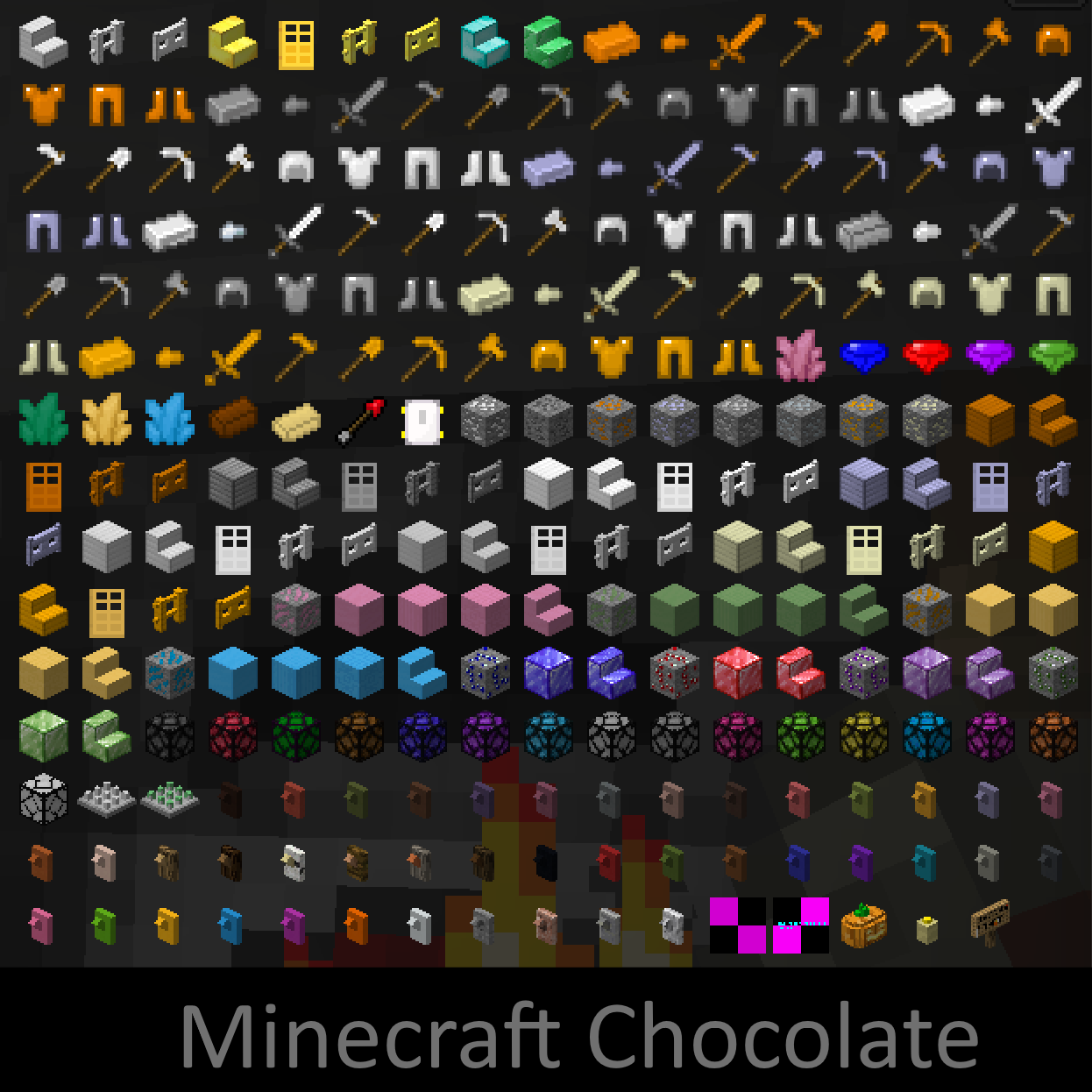
CurseForge · Minecraft mod
Cocoa Project
Minecraft Chocolate (a knockoff on the term Vanilla Minecraft) is a mod intended to add on to what is already in vanilla minecraft.
Choose a version Pick your version below, then grab the matching file.
Quick answer
Which Cocoa Project release matches 1.12.2?
beta file minecraft-chocolate-beta-1.0.3_1.12.2.jar
Game version 1.12.2
Loader Not required
Cocoa Project minecraft-chocolate-beta-1.0.3_1.12.2.jar targets 1.12.2. The project page does not say whether this file belongs on the client, dedicated server, or both. No extra mods listed for this file.
Where it goes
Is Cocoa Project required on the client, server, or both?
The project page does not say whether this file belongs on the client, dedicated server, or both.
Client Source doesn’t say
Dedicated server Source doesn’t say
Loader for this release No loader listed
Required install it here Optional supported, not mandatory Not supported do not install here Source doesn’t say do not assume
The source does not explicitly classify this release as client-only or server-only.
What else does Cocoa Project minecraft-chocolate-beta-1.0.3_1.12.2.jar need?
minecraft-chocolate-beta-1.0.3_1.12.2.jar on 1.12.2. Every mod below is checked against that same setup.
This file does not list any required mods. Do not add a library just because a different file uses it.
This file does not list any required or optional mods.
Before you install it
Add Cocoa Project without breaking your instance.
Built for Cocoa Project minecraft-chocolate-beta-1.0.3_1.12.2.jar on 1.12.2. Pick another file and the loader, install side or required mods may change.
- 01
Stick to this file
Use minecraft-chocolate-beta-1.0.3_1.12.2.jar. It targets 1.12.2; another release may have different loader, side or dependency requirements.
- 02
Bring the mods it needs
This file does not list any required mods. Do not add a library just because a different file uses it.
- 03
Put it on the correct side
The project page does not say whether this file belongs on the client, dedicated server, or both.
- 04
Pick the file you checked
Use the “Get this file” button beside minecraft-chocolate-beta-1.0.3_1.12.2.jar. It opens that exact file at the source.
About this project
What does Cocoa Project add?
Minecraft Chocolate is currently in beta 1.0, the Mineral Update. Here are some planned updates:
Combat Update-Adds new weapons and shields to the game.
Exploration Update-Adds new biomes and structures to the game.
Transportation Update-Adds new modes of transport.
Redstone Update(Currently in development)-Adds alloying and some new redstone blocks.
You are free to use this mod in any modpack so long as you give credit and make no changes to it.
Github: https://github.com/Esrome/minecraft-chocolate
Adds:
8 metals, each of which has an ore, a block, a stair block, a set of armor, and a set of tools: Copper, Aluminum, Titanium, Silver, Lead, Bronze, Steel, and Tungsten(Magnesium for 1.0.2 and lower).
4 decorative crystals, each of which has an ore, a block, and a stair block: Ruby, Amethyst, Sapphire, and Peridot.
4 decorative minerals, each of which has an ore, a block, a chiseled block, a pillar block, and a stair block: Rose Quartz, Malachite, Turquoise, and Carnelian.
Halloween Specials: A Custom Modeled Jack-O-Lantern, a Trick or Treat sign, and a Candle.
Project description from CurseForge.
Pick your setup
Cocoa Project by Minecraft version and loader
Choose the version and loader you play, then open the matching release.
Check the dependencies, then try the file in a copied instance before changing a world you care about.
Recent files
Cocoa Project versions and loaders
minecraft-chocolate-beta-1.0.3_1.12.2.jar
10 Feb 2019
Client Source doesn’t say Server Source doesn’t say Dependencies No extras listed Listed on Release listing
Check the 1.12.2 setup 1.12.2 beta
minecraft-chocolate-beta-1.0.2_1.12.2.jar
minecraft-chocolate-beta-1.0.0_1.12.2.jar
8 Feb 2019
Client Source doesn’t say Server Source doesn’t say Dependencies No extras listed Listed on Release listing
Check the 1.12.2 setup 1.12.2 beta
minecraft-chocolate-test_build_2.6.19.jar
7 Feb 2019
Client Source doesn’t say Server Source doesn’t say Dependencies No extras listed Listed on Release listing
Check the 1.12.2 setup 1.12.2 beta
minecraft-chocolate-beta-1.0.1_1.12.2
minecraft-chocolate-beta-1.0.1_1.12.2.jar
29 Oct 2018
Client Source doesn’t say Server Source doesn’t say Dependencies No extras listed Listed on Release listing
Check the 1.12.2 setup 1.12.2 beta
minecraft-chocolate-beta-1.0.0_1.12.2
minecraft-chocolate-beta-1.0.0_1.12.2.jar
28 Oct 2018
Client Source doesn’t say Server Source doesn’t say Dependencies No extras listed Listed on Release listing
Check the 1.12.2 setup 1.12.2 beta
Looking for an older file? The official CurseForge project page is in Resources.