MaLiLib Needed by litematica-fabric-26.2-0.28.3.jar
requiredMatching file found Matched file: malilib-fabric-26.2-0.29.3.jar
CurseForge · Minecraft mod
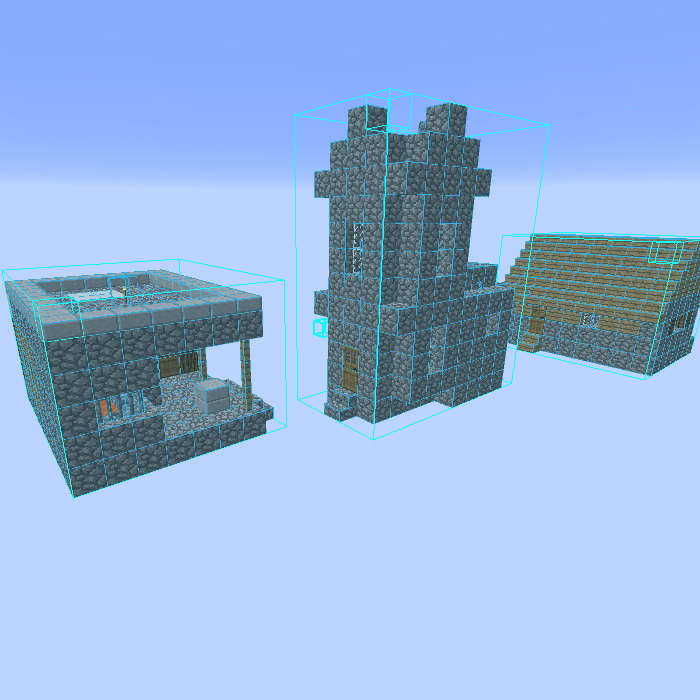
A modern schematic mod written for Fabric (and LiteLoader on 1.12.x), with extra features for Creative mode work
Quick answer
litematica-fabric-26.2-0.28.3.jar targets 26.2 with Fabric. The project page does not say whether this file belongs on the client, dedicated server, or both. All 1 required mods have matching files.
Where it goes
The project page does not say whether this file belongs on the client, dedicated server, or both.
The source does not explicitly classify this release as client-only or server-only.
litematica-fabric-26.2-0.28.3.jar. Change the file and its required mods may change too.
Install MaLiLib first. We found matching files for this game-version and loader setup.
We only count dependency files that match this setup. A file for another loader does not fill the gap.
Before you install it
Built for litematica-fabric-26.2-0.28.3.jar. Pick another file and the loader, install side or required mods may change.
Use litematica-fabric-26.2-0.28.3.jar. It targets 26.2 with Fabric; another release may have different loader, side or dependency requirements.
Install MaLiLib first. We found matching files for this game-version and loader setup.
The project page does not say whether this file belongs on the client, dedicated server, or both.
Use the “Get this file” button beside litematica-fabric-26.2-0.28.3.jar. It opens that exact file at the source.
About this project
See the announcement post here for details:
As a summary, everyone using MC 1.21+ versions of Litematica should update to the latest available mod versions immediately!!
The vulnerability does not exist in the 1.20.x and older mod versions. With the affected mod versions, connecting to potentially any server might transfer malware to your system. Single player is not at risk. But update the mod!
TL;DR; I won't maintain the 1.20.5+ versions myself anymore, at least for now. There are ports by Sakura-Ryoko. They will be here once they are more stable, see the post for the links and details before then.
Litematica is a new schematic mod written from scratch, and it is primarily targeting light mod loaders like LiteLoader on 1.12.x, Rift on 1.13.x and Fabric on 1.14+. There is also a Forge version for 1.12.2, but not yet for 1.14.4+ (but Forge ports for 1.14.4+ are also planned, see below).
It has all the features of the old Schematica mod except for the printer (which is not planned for Litematica itself, but instead is left to extension mods), plus a bunch more.
NOTE: Litematica also requires the MaLiLib library mod:
https://www.curseforge.com/minecraft/mc-mods/malilib
WARNING: The Easy Place mode feature may get you banned on some servers!
The Easy Place feature will always be clicking on the target position's air block, and this can easily be detected by anti-cheat systems. So this can result in at least two things: The block placement will just be rejected and you just get client-side ghost blocks, or some anti-cheat system flags that as cheating and auto-bans you from the server. So before using Easy Place, find out of it's allowed on the server!
About Forge ports for 1.14.4+
Forge versions for 1.14.4 and later are planned.
Still no ETA for the "official port", which will only be done from the still being worked on new development code. But ZacSharp already ported the current 1.16.4 Fabric version to 1.16.5 Forge. That port is available here: https://legacy.curseforge.com/minecraft/mc-mods/litematica-forge
Some more info and discussion about the Forge port/builds is here: https://github.com/maruohon/litematica/issues/234
There are also at least a couple of other 3rd party Forge ports on GitHub and at least one on Modrinth. I haven't tested those myself, so I can't say anything about how well they work.
The default hotkey to open the in-game config GUI is M + C. If you are for example on AZERTY keyboard layout instead, then the keys are different, and M + C becomes , + C instead, etc.
There are sometimes newer "development" or snapshot versions of my mods available here: https://masa.dy.fi/mcmods/client_mods/
Lately I've stopped making releases for MC snapshots, as it's mostly a waste of my limited modding time and energy. Snapshot releases maye start again at some point, if I ever get the elusive but often mentioned "new code versions" of the mods actually released to the public first. I geuss time will tell.
The mod is still under development, and some of the planned "extra" features (for example some of the "tool modes") haven't yet been implemented fully or at all.
Here is a Reddit post that explains the very basics of the mod:
https://old.reddit.com/r/Minecraft/comments/cqdmkk/anyone_can_help_me_how_do_i_make_schematics_with/exeug78/
A short, quick tutorial of the basics of the mod:
Another, a bit longer tutorial that also covers some other things like the Rebuild mode:
A couple of more tutorials:
If you have questions or need help with something, the best/fastest way to get answers is on my Discord server.
Project description from CurseForge.
Pick your setup
Choose the version and loader you play, then open the matching release.
Showing the newest 12 of 37 game versions. Older files are in the list below.
Check the dependencies, then try the file in a copied instance before changing a world you care about.
Recent files
6 Jul 2026
6 Jul 2026
6 Jul 2026
6 Jul 2026
6 Jul 2026
6 Jul 2026
6 Jul 2026
6 Jul 2026
6 Jul 2026
11 Jul 2024
20 Jun 2024
2 Jun 2024
Looking for an older file? The official CurseForge project page is in Resources.
 mod
modTired of static textures? Alive them!
 mod
modA complete inventory and survival overhaul featuring equipment slots, carry weight, backpacks, custom interfaces, thirst, stamina and exploration-focused gameplay.
 mod
modLook at any wild Pokemon or trainer to see their real stats - nature, IVs, moves, drops and more - in a scouter-style HUD, powered entirely by Pixelmon's own data.