Minecraft version
Back to mods 
CurseForge · Minecraft mod
Xlv's Locks
Locks for every blocks!
Choose a version Pick your version below, then grab the matching file.
Quick answer
Which Xlv's Locks release should I use?
Latest stable file Xlv's Locks 1.0.1
Game version 1.7.10
Loader Not required
Xlv's Locks 1.0.1 targets 1.7.10. The project page does not say whether this file belongs on the client, dedicated server, or both. No extra mods listed for this file.
Where it goes
Is Xlv's Locks required on the client, server, or both?
The project page does not say whether this file belongs on the client, dedicated server, or both.
Client Source doesn’t say
Dedicated server Source doesn’t say
Loader for this release No loader listed
Required install it here Optional supported, not mandatory Not supported do not install here Source doesn’t say do not assume
The source does not explicitly classify this release as client-only or server-only.
What else does Xlv's Locks 1.0.1 need?
Xlv's Locks 1.0.1. Change the file and its required mods may change too.
This file does not list any required mods. Do not add a library just because a different file uses it.
This file does not list any required or optional mods.
Before you install it
Add Xlv's Locks without breaking your instance.
Built for Xlv's Locks 1.0.1. Pick another file and the loader, install side or required mods may change.
- 01
Stick to this file
Use Xlv's Locks 1.0.1. It targets 1.7.10; another release may have different loader, side or dependency requirements.
- 02
Bring the mods it needs
This file does not list any required mods. Do not add a library just because a different file uses it.
- 03
Put it on the correct side
The project page does not say whether this file belongs on the client, dedicated server, or both.
- 04
Pick the file you checked
Use the “Get this file” button beside Xlv's Locks 1.0.1. It opens that exact file at the source.
About this project
What does Xlv's Locks add?

The mod adds locks to the game. So you can lock any block and entity you want. It realy is. Just try right click with a lock in the hand on any block or entity. The lock will appear on that block.
The lock has 6 levels of security. You can upgrade the lock by 1 level with special item - Pin. Just click on the lock with this item in the hand. 1 that level adds 1 pin to your lock.
The mod adds keys to the game. So you can unlock any lock that has the same UUID.
The mod adds lockpicks to the game. So you can unlock any lock, if you successfully lift all the pins in GUi up. WARNING! The lockpick will disappear before the interface appears!
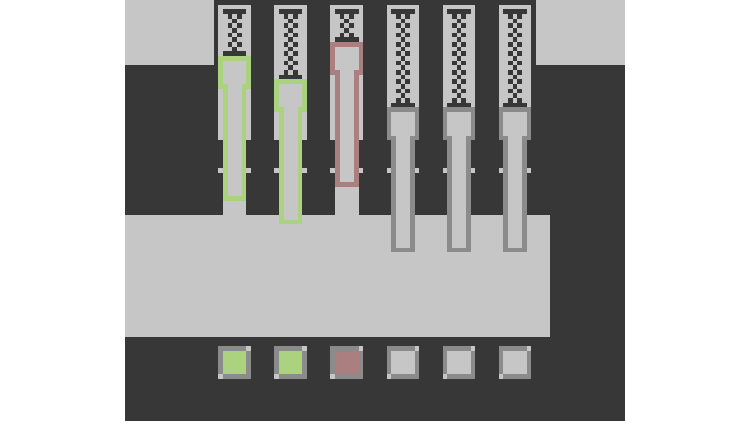
Lift the pins up until they light up in green. Press the space and notice the moving bar below. Now you need to press the space again when the white bar is in the central zone.
If you make a mistake, the lockpick will be damaged. The lockpick can be damaged only twice(configurable). In case you broke the lockpick, the interface will close.
If you have damaged the lockpick, all pins will stand on their starting positions.
Hard mode:
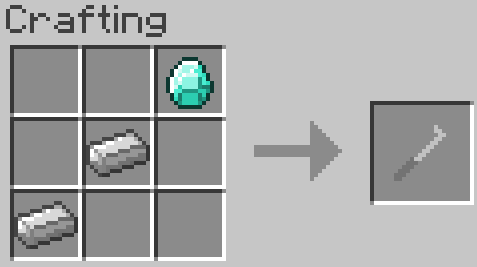
In hard mode the rules change. So you can't contact your lockpick with any side of lock in gui. Otherwise lockpick just breaks. But there the rasp can help you. Right click with the rasp in hand on the locked block and the lock will whetted a little. It means that in gui you will have more space for moving the lockpick. You can whet the lock 4 times.


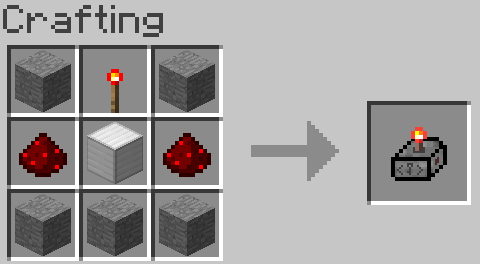
The pocket key machine uses for crafting key blanks or duplicating keys and locks. You can use the pocket key machine only 10 times.
More features:
- Languages: English, Russian
- Locks work with all mods(all entities and all blocks).
Changelog:
1.0.1:
- render fixes
- lockpicking logic fixes
- added a hard mode for lockpicking
- new settings in config
- gui doesn't pause the game
- gui was changed a little
- added new item - rasp. It uses for whetting the lock and simplifies lockpicking process only when hard mode is enabled.
- main config file no longer stores data about locks
- minor fixes
1.0.0:
- bug/crash fixes
1.0.0a:
- alpha
Project description from CurseForge.
Pick your setup
Xlv's Locks by Minecraft version and loader
Choose the version and loader you play, then open the matching release.
Check the dependencies, then try the file in a copied instance before changing a world you care about.
Recent files
Xlv's Locks versions and loaders
Xlv's Locks 1.0.1
Xlv'sLocks-1.0.1.jar
28 Feb 2019
Client Source doesn’t say Server Source doesn’t say Dependencies No extras listed Listed on Release listing
Check the 1.7.10 setup 1.7.10 release
Xlv's Locks 1.0.0
Xlv'sLocks-1.0.0.jar
12 Feb 2019
Client Source doesn’t say Server Source doesn’t say Dependencies No extras listed Listed on Release listing
Check the 1.7.10 setup 1.7.10 beta
Xlv's Locks 1.0.0 alpha
Xlv'sLocks-1.0.0a.jar
11 Feb 2019
Client Source doesn’t say Server Source doesn’t say Dependencies No extras listed Listed on Release listing
Check the 1.7.10 setup 1.7.10 alpha
Looking for an older file? The official CurseForge project page is in Resources.
 mod
mod CurseForge · Minecraft
Asgard Shield: Reloaded
Sword -N- Board -Action- ⚔️🛡️ A Hexxit combat mod remake with giant swords and shields
 mod
mod CurseForge · Minecraft
GroovyScript
A powerful scripting mod like CraftTweaker or KubeJS based on Groovy.
 mod
mod CurseForge · Minecraft
The Legend Of The Ten Rings: Shang Chi's Legacy
Wield the power of the Ten Rings! Unleash lightning whips, devastating slams, and powerful shields. Summon your rings through dimensional rifts, customize your energy, and command the battlefield.