Minecraft version
Back to mods 
CurseForge · Minecraft mod
Overloaded Armor Bar
Allows the armor bar to wrap and change color with better than diamond armor
Choose a version Pick your version below, then grab the matching file.
Quick answer
Which Overloaded Armor Bar release should I use?
Latest stable file overloadedarmorbar-neoforge-26.1-0.jar
Game version 26.1, 26.1.1, 26.1.2
Loader NeoForge
Overloaded Armor Bar overloadedarmorbar-neoforge-26.1-0.jar targets 26.1, 26.1.1, 26.1.2 with NeoForge. The project page does not say whether this file belongs on the client, dedicated server, or both. No extra mods listed for this file.
Where it goes
Is Overloaded Armor Bar required on the client, server, or both?
The project page does not say whether this file belongs on the client, dedicated server, or both.
Client Source doesn’t say
Dedicated server Source doesn’t say
Loader for this release NeoForge
Required install it here Optional supported, not mandatory Not supported do not install here Source doesn’t say do not assume
The source does not explicitly classify this release as client-only or server-only.
What else does Overloaded Armor Bar overloadedarmorbar-neoforge-26.1-0.jar need?
overloadedarmorbar-neoforge-26.1-0.jar. Change the file and its required mods may change too.
This file does not list any required mods. Do not add a library just because a different file uses it.
This file does not list any required or optional mods.
Before you install it
Add Overloaded Armor Bar without breaking your instance.
Built for Overloaded Armor Bar overloadedarmorbar-neoforge-26.1-0.jar. Pick another file and the loader, install side or required mods may change.
- 01
Stick to this file
Use overloadedarmorbar-neoforge-26.1-0.jar. It targets 26.1, 26.1.1, 26.1.2 with NeoForge; another release may have different loader, side or dependency requirements.
- 02
Bring the mods it needs
This file does not list any required mods. Do not add a library just because a different file uses it.
- 03
Put it on the correct side
The project page does not say whether this file belongs on the client, dedicated server, or both.
- 04
Pick the file you checked
Use the “Get this file” button beside overloadedarmorbar-neoforge-26.1-0.jar. It opens that exact file at the source.
About this project
What does Overloaded Armor Bar add?
Overloaded Armor Bar
The vanilla armor bar doesn't accurately show "better than diamond" level armor, as it simply maxes out when its full.
This mod allows armor values over 20 to be displayed as different colored (configurable) icons depending on how many times you fill the bar.
However, without AttributeFix, the armor display will cap out at 30 Armor, or 1.5x diamond armor due to the vanilla armor cap.
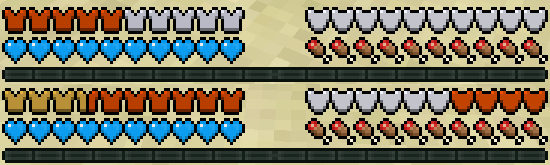
Other optional features:
* Show the armor bar when the player is not wearing any armor
* Hide empty armor icons
Notes
* The bar may need to be adjusted
* This mod is compatible with mods that add additional health bars or recolors them. Recommended for usage with Colorful Health Bar, a lightweight mod that recolors the health bars instead of stacking them.
* Does not need to be on servers
*This is a fork of Overpowered Armor Bar
Want to commission a mod? Just want to chat? Have a complex issue needing additional discussion? Join the Discord:
Want to help support this mod and others? Donate to my Patreon in the link below

Project description from CurseForge.
Pick your setup
Overloaded Armor Bar by Minecraft version and loader
Choose the version and loader you play, then open the matching release.
Minecraft version
26.1.1
1 loader buildMinecraft version
26.1
1 loader buildMinecraft version
1.21.1
1 loader buildMinecraft version
1.21
1 loader buildMinecraft version
1.20.1
2 loader buildsMinecraft version
1.19.4
1 loader buildMinecraft version
1.19.3
1 loader buildMinecraft version
1.19.2
1 loader buildMinecraft version
1.18.2
2 loader buildsMinecraft version
1.18.1
1 loader buildMinecraft version
1.16.5
1 loader buildShowing the newest 12 of 24 game versions. Older files are in the list below.
Check the dependencies, then try the file in a copied instance before changing a world you care about.
Recent files
Overloaded Armor Bar versions and loaders
overloadedarmorbar-neoforge-26.1-0.jar
28 Mar 2026
Client Source doesn’t say Server Source doesn’t say Dependencies No extras listed Listed on Release listing
Check the 26.1.2 · NeoForge setup NeoForge26.126.1.126.1.2 release
overloadedarmorbar-neoforge-1.21-2.jar
16 Jul 2024
Client Source doesn’t say Server Source doesn’t say Dependencies No extras listed Listed on Release listing
Check the 1.21.1 · NeoForge setup 1.211.21.1NeoForge release
overloadedarmorbar-neoforge-1.21-1.jar
19 Jun 2024
Client Source doesn’t say Server Source doesn’t say Dependencies No extras listed Listed on Release listing
Check the 1.21 · NeoForge setup 1.21NeoForge release
overloadedarmorbar-neoforge-1.21-0.jar
14 Jun 2024
Client Source doesn’t say Server Source doesn’t say Dependencies No extras listed Listed on Release listing
Check the 1.21 · NeoForge setup 1.21NeoForge release
overloadedarmorbar-fabric-1.20.1-2.jar
24 Mar 2024
Client Source doesn’t say Server Source doesn’t say Dependencies No extras listed Listed on Release listing
Check the 1.20.1 · Fabric setup Fabric1.20.1 release
overloadedarmorbar-1.20.1-1.jar
8 Jul 2023
Client Source doesn’t say Server Source doesn’t say Dependencies No extras listed Listed on Release listing
Check the 1.20.1 · Forge setup 1.20.1Forge release
overloadedarmorbar-1.19.3-7.2.jar
8 Jul 2023
Client Source doesn’t say Server Source doesn’t say Dependencies No extras listed Listed on Release listing
Check the 1.19.4 · Forge setup 1.19.31.19.41.19.2Forge release
overloadedarmorbar-1.18.2-6.1.jar
18 Feb 2023
Client Source doesn’t say Server Source doesn’t say Dependencies No extras listed Listed on Release listing
Check the 1.18.2 · Forge setup 1.18.2Forge release
overloadedarmorbar-1.19.3-7.1.jar
17 Jan 2023
Client Source doesn’t say Server Source doesn’t say Dependencies No extras listed Listed on Release listing
Check the 1.19.3 · Forge setup 1.19.31.19.2Forge release
overloadedarmorbar-1.19.2-7.jar
17 Oct 2022
Client Source doesn’t say Server Source doesn’t say Dependencies No extras listed Listed on Release listing
Check the 1.19.3 · Forge setup 1.19.31.19.2Forge release
overloadedarmorbar-1.18.2-6.jar
17 Oct 2022
Client Source doesn’t say Server Source doesn’t say Dependencies No extras listed Listed on Release listing
Check the 1.18.2 · Forge setup 1.18.2Forge release
overloadedarmorbar-fabric-1.18.1-6.1.1.jar
16 Oct 2022
Client Source doesn’t say Server Source doesn’t say Dependencies No extras listed Listed on Release listing
Check the 1.18.2 setup 1.18.11.18.2 release
Looking for an older file? The official CurseForge project page is in Resources.
 mod
mod CurseForge + Modrinth · Minecraft
Biology Dictionary
Discover, highlight, inspect, modify - your vanilla & modded mob encyclopedia
 mod
mod CurseForge + Modrinth · Minecraft
PowerCards
Adds a bunch of cards and a deckbuilding system, allowing players to make unique builds and play their way!
 mod
mod CurseForge · Minecraft
The Lord of the Rings Mod: Reworked
The Lotr Mod reworked for Minecraft 1.21.1 and future versions like 26.2 and 26.3.