Minecraft version
Back to mods 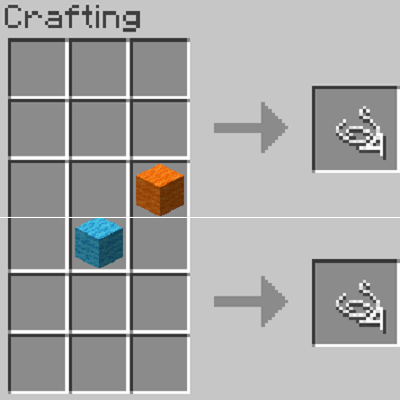
CurseForge · Minecraft mod
WoolToString
Convert Wool Into String
Choose a version Pick your version below, then grab the matching file.
Quick answer
Which WoolToString release should I use?
Latest stable file WoolToString-1.16.x-1.0.1.jar
Game version 1.16.3, 1.16.1, 1.16.5
Loader Forge
WoolToString-1.16.x-1.0.1.jar targets 1.16.3, 1.16.1, 1.16.5 with Forge. The project page does not say whether this file belongs on the client, dedicated server, or both. No extra mods listed for this file.
Where it goes
Is WoolToString required on the client, server, or both?
The project page does not say whether this file belongs on the client, dedicated server, or both.
Client Source doesn’t say
Dedicated server Source doesn’t say
Loader for this release Forge
Required install it here Optional supported, not mandatory Not supported do not install here Source doesn’t say do not assume
The source does not explicitly classify this release as client-only or server-only.
What else does WoolToString-1.16.x-1.0.1.jar need?
WoolToString-1.16.x-1.0.1.jar. Change the file and its required mods may change too.
This file does not list any required mods. Do not add a library just because a different file uses it.
This file does not list any required or optional mods.
Before you install it
Add WoolToString without breaking your instance.
Built for WoolToString-1.16.x-1.0.1.jar. Pick another file and the loader, install side or required mods may change.
- 01
Stick to this file
Use WoolToString-1.16.x-1.0.1.jar. It targets 1.16.3, 1.16.1, 1.16.5 with Forge; another release may have different loader, side or dependency requirements.
- 02
Bring the mods it needs
This file does not list any required mods. Do not add a library just because a different file uses it.
- 03
Put it on the correct side
The project page does not say whether this file belongs on the client, dedicated server, or both.
- 04
Pick the file you checked
Use the “Get this file” button beside WoolToString-1.16.x-1.0.1.jar. It opens that exact file at the source.
About this project
What does WoolToString add?
Wool To String
How to use Wool to String:
Take any color of wool, and go into a crafting table. You can put the wool anywhere inside of the crafting table and it will yield 4 string back.
How to install:
Download and install minecraft forge for a supported version of the mod.
Click the windows button in the bottom right corner.
Type in %appdata% and click enter.
Click on the .minecraft folder.
Download the mod and drag it into the mods folder inside of .minecraft.
Screenshots:
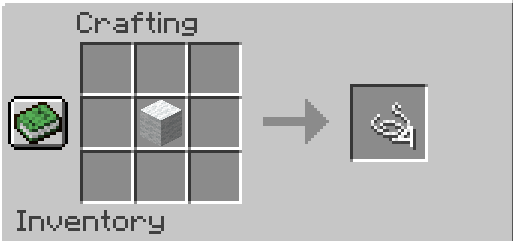
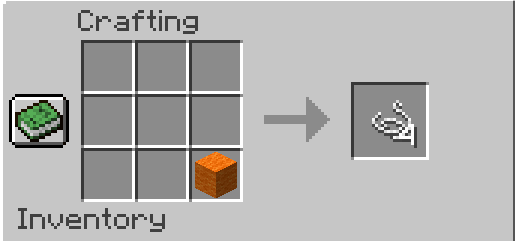
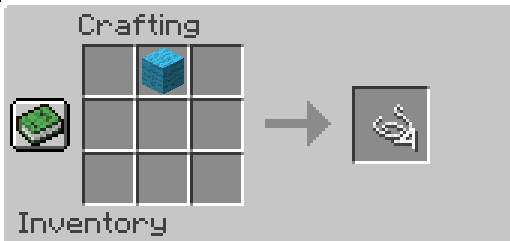
Modpack info:
You can use this mod in a modpack, just link this site. Feel free to also message me that you are using it in your modpack.
Project description from CurseForge.
Pick your setup
WoolToString by Minecraft version and loader
Choose the version and loader you play, then open the matching release.
Minecraft version
1.16.4
1 loader buildMinecraft version
1.16.3
1 loader buildMinecraft version
1.16.2
1 loader buildMinecraft version
1.16.1
2 loader buildsMinecraft version
1.16
1 loader buildMinecraft version
1.15.2
1 loader buildMinecraft version
1.15.1
1 loader buildMinecraft version
1.15
1 loader buildMinecraft version
1.14.4
1 loader buildMinecraft version
1.14.3
1 loader buildMinecraft version
1.14.2
1 loader buildShowing the newest 12 of 14 game versions. Older files are in the list below.
Check the dependencies, then try the file in a copied instance before changing a world you care about.
Recent files
WoolToString versions and loaders
WoolToString-1.16.x-1.0.1.jar
14 Apr 2021
Client Source doesn’t say Server Source doesn’t say Dependencies No extras listed Listed on Release listing
Check the 1.16.5 · Forge setup 1.16.31.16.11.16.5Forge release
WoolToString-1.14.2-1.0.0.jar
10 Jun 2019
Client Source doesn’t say Server Source doesn’t say Dependencies No extras listed Listed on Release listing
Check the 1.16.1 setup 1.16.11.14.41.14.31.15 release
WoolToString-1.12.2-1.0.0.jar
27 Feb 2019
Client Source doesn’t say Server Source doesn’t say Dependencies No extras listed Listed on Release listing
Check the 1.12.2 setup 1.12.2 release
WoolToString-1.13.2-1.0.0.jar
27 Feb 2019
Client Source doesn’t say Server Source doesn’t say Dependencies No extras listed Listed on Release listing
Check the 1.13.2 setup 1.13.2 release
Looking for an older file? The official CurseForge project page is in Resources.
 mod
mod CurseForge · Minecraft
ConfigSwitch
Synchronize your mod configs and options.txt between modpacks. Push your tuned settings to a global repository once, then fetch them into any other instance.
 mod
mod CurseForge · Minecraft
Ability Crafting
Ability Crafting overhaul your gathering and crafting experience by introducing engaging minigames. Master each station to earn powerful bonuses, higher quality yields, and special buffs!
 mod
mod CurseForge · Minecraft
Sleeplessness
Adds new mechanics to Minecraft's sleeping system for more complexity and to make phantoms feel rewarding.