Minecraft version
Back to mods 
CurseForge · Minecraft mod
Sonic Devices
Sonic Screwdrivers of all types and styles
Choose a version Pick your version below, then grab the matching file.
Quick answer
Which Sonic Devices release matches 1.14?
Best match for your filters sonicdevices-1.0.2.jar
Game version 1.14, 1.14-Snapshot
Loader fabric
Sonic Devices sonicdevices-1.0.2.jar targets 1.14, 1.14-Snapshot. The project page does not say whether this file belongs on the client, dedicated server, or both. No extra mods listed for this file.
Where it goes
Is Sonic Devices required on the client, server, or both?
The project page does not say whether this file belongs on the client, dedicated server, or both.
Client Source doesn’t say
Dedicated server Source doesn’t say
Loader for this release No loader listed
Required install it here Optional supported, not mandatory Not supported do not install here Source doesn’t say do not assume
The source does not explicitly classify this release as client-only or server-only.
What else does Sonic Devices sonicdevices-1.0.2.jar need?
sonicdevices-1.0.2.jar on 1.14. Every mod below is checked against that same setup.
This file does not list any required mods. Do not add a library just because a different file uses it.
This file does not list any required or optional mods.
Before you install it
Add Sonic Devices without breaking your instance.
Built for Sonic Devices sonicdevices-1.0.2.jar on 1.14. Pick another file and the loader, install side or required mods may change.
- 01
Stick to this file
Use sonicdevices-1.0.2.jar. It targets 1.14, 1.14-Snapshot; another release may have different loader, side or dependency requirements.
- 02
Bring the mods it needs
This file does not list any required mods. Do not add a library just because a different file uses it.
- 03
Put it on the correct side
The project page does not say whether this file belongs on the client, dedicated server, or both.
- 04
Pick the file you checked
Use the “Get this file” button beside sonicdevices-1.0.2.jar. It opens that exact file at the source.
About this project
What does Sonic Devices add?
The Sonic Screwdriver from Doctor Who, with many different models and functions.
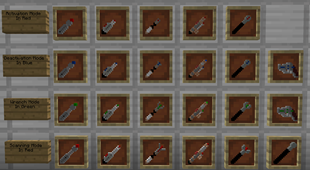
Each basic Sonic Screwdriver comes in green and blue, and has 3 modes:
- Activate Block
- Deactivate Block
- Wrench Mode
Upgrading to a red Advanced Sonic Screwdriver unlocks Scanning mode, and allows blocks to be activated through walls.
Scanning mode can tell you:
- What type of entity are you looking at?
- What is their health?
- What are the potion effects acting on them?
- It can also make a block invisible to look for secrets.
Right click on something to use the Screwdriver, and right click while sneaking or on the air to change modes. To activate a block that has it's own right click function, such as a dispenser or repeater, right click while sneaking.
Wrench mode can rotate many kinds of blocks, from dispensers and repeaters, to stairs, logs, and more. Hold alt while rotating to go the opposite direction. When rotating a block that can face any direction, it will rotate around the side that you click on, or if you click the front it will just do a 180. Thanks to the Wrenchable api, signs and banners can also be rotated while sneaking, and slabs can be flipped over.
Wrench mode can also be used on any other blocks compatible with Wrenchable
There is also a Sonic Blaster, that can open a 3x3 gap in a wall to walk through. The wall will be restored after a few seconds, or if any part of it is clicked.
Activate-able blocks include:
- Iron Door
- Iron Trapdoor
- Redstone Lamp
- Dropper
- Dispenser
- Piston (activate creates a 2 tick pulse, deactivate is 1 tick)
- Sticky Piston
- TNT
- Redstone Torch
- Redstone Repeater
- Daylight Sensor
- Observer
- Nether Portal
- Drawers from Simple Drawers(Screwdriver can lock/unlock drawers)
- Pullers from EZPaS (Screwdriver works as Pipe Probe)
Other future plans include:
- Showcase Video/Images
- Laser Screwdriver
- More Screwdriver variations
- Activating redstone dust properly
Hope you enjoy!
Project description from CurseForge.
Pick your setup
Sonic Devices by Minecraft version and loader
Choose the version and loader you play, then open the matching release.
Minecraft version
1.15.2
1 loader buildMinecraft version
1.15.1
1 loader buildMinecraft version
1.14-Snapshot
1 loader buildMinecraft version
1.14
1 loader buildCheck the dependencies, then try the file in a copied instance before changing a world you care about.
Recent files
Sonic Devices versions and loaders
sonicdevices-1.0.2.jar
19 Apr 2019
Client Source doesn’t say Server Source doesn’t say Dependencies No extras listed Listed on Release listing
Check the 1.14 setup 1.141.14-Snapshot release
Looking for an older file? The official CurseForge project page is in Resources.