Minecraft version
Back to mods 
CurseForge · Minecraft mod
ScalingGUIs
Decouples the scaling of individual GUIs, the HUD, and Tooltips.
Choose a version Pick your version below, then grab the matching file.
Quick answer
Which ScalingGUIs release should I use?
Latest stable file 1.12.2-1.0.3.1
Game version 1.12.2
Loader Forge
ScalingGUIs 1.12.2-1.0.3.1 targets 1.12.2 with Forge. It must be installed on the client. Do not install it on the dedicated server. No extra mods listed for this file.
Where it goes
Is ScalingGUIs required on the client, server, or both?
It must be installed on the client. Do not install it on the dedicated server.
Client Required
Dedicated server Not supported
Loader for this release Forge
Required install it here Optional supported, not mandatory Not supported do not install here Source doesn’t say do not assume
This file is marked client-only.
What else does ScalingGUIs 1.12.2-1.0.3.1 need?
1.12.2-1.0.3.1. Change the file and its required mods may change too.
This file does not list any required mods. Do not add a library just because a different file uses it.
This file does not list any required or optional mods.
Before you install it
Add ScalingGUIs without breaking your instance.
Built for ScalingGUIs 1.12.2-1.0.3.1. Pick another file and the loader, install side or required mods may change.
- 01
Stick to this file
Use 1.12.2-1.0.3.1. It targets 1.12.2 with Forge; another release may have different loader, side or dependency requirements.
- 02
Bring the mods it needs
This file does not list any required mods. Do not add a library just because a different file uses it.
- 03
Put it on the correct side
It must be installed on the client. Do not install it on the dedicated server.
- 04
Pick the file you checked
Use the “Get this file” button beside 1.12.2-1.0.3.1. It opens that exact file at the source.
About this project
What does ScalingGUIs add?
Decouples the scaling of individual GUIs, the HUD, and Tooltips.
NOT COMPATIBLE WITH OPTIFINE Compatible as of 1.0.2.0
ScalingGUIs replaces the GUI scale button in the Video Settings menu with a button to open a custom scale settings menu.
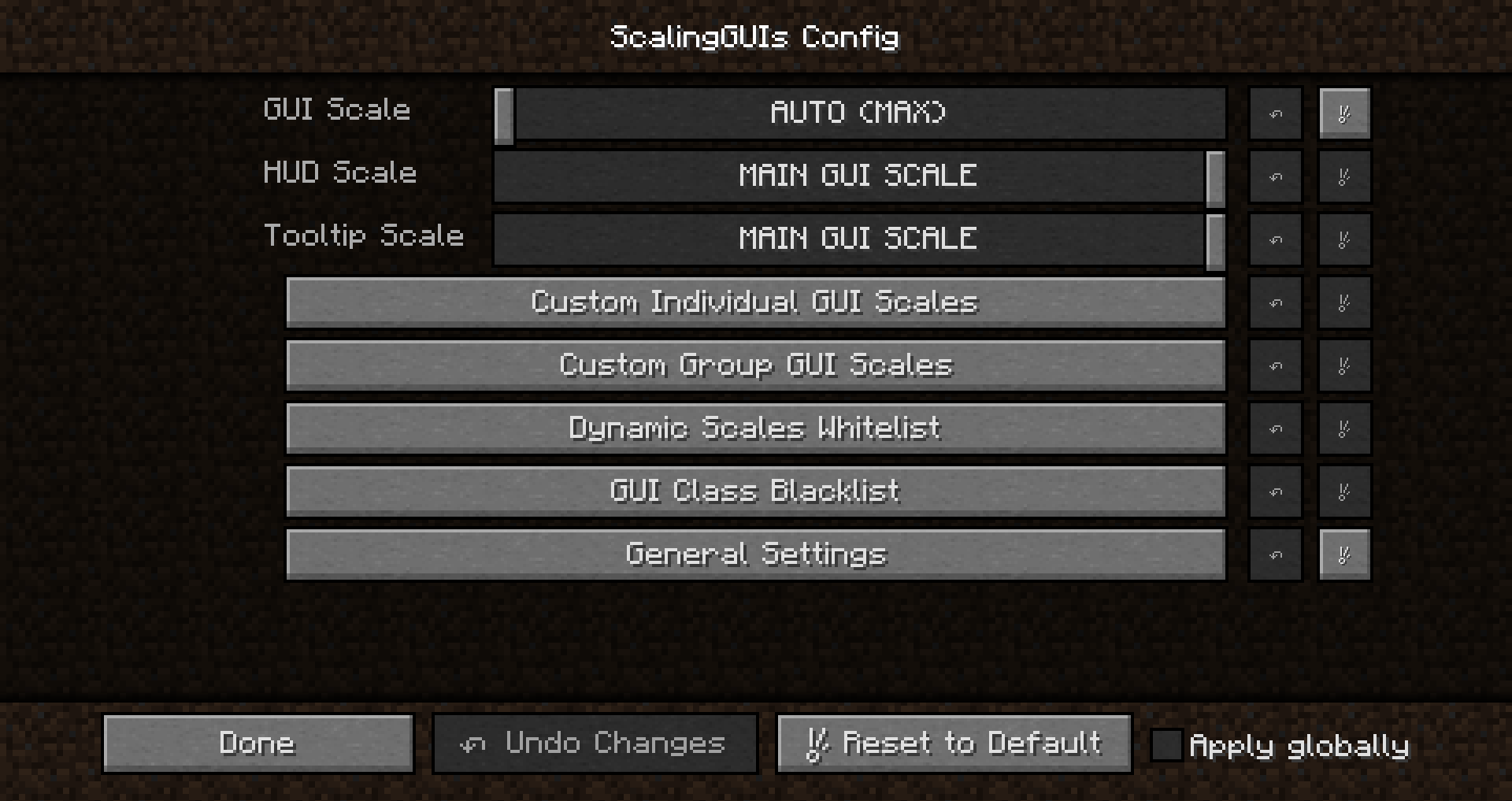
- GUI Scale is the main GUI scale setting. It controls the scale for any GUI without a custom setting.
- HUD Scale controls the scale of the in-game HUD.
- Tooltip Scale controls the scale of tooltips.
- Custom Individual GUI Scales provides a menu to set the scales for individual GUIs.
- Custom Group GUI Scales provides a menu to set the scales for GUIs with a common ancestor class.
- Dynamic Scales Whitelist provides a menu to whitelist GUI classes to dynamically scale based on the GUI's own dimensions.
- Only works for container GUIs (classes extending "GuiContainer").
- Added with max size chests from CompactStorage particularly in mind.
- GUI Class Blacklist provides a menu to blacklist GUI class names from changing the scale.
- Useful when a GUI should adopt the scale of the previously opened GUI. E.g. JEI Recipes GUI or Tinker's Construct GUI subcomponents
- General Settings provides config options for ScalingGUIs itself
Wiki
Sliders
Scale settings are presents as sliders with a greater range of options than in vanilla
- 0: AUTO (MAX): Scale to the largest possible scale. Like vanilla "Auto".
- 1: SMALL: Scale of 1x. Smallest possible scale. Like vanilla "Small".
- 2: NORMAL: Scale of 2x. Like vanilla "Normal".
- 3: LARGE: Scale of 3x. Like vanilla "Large".
- 4-8: 4x-8x
- 9: Match the scale of the main GUI scale entry
Example
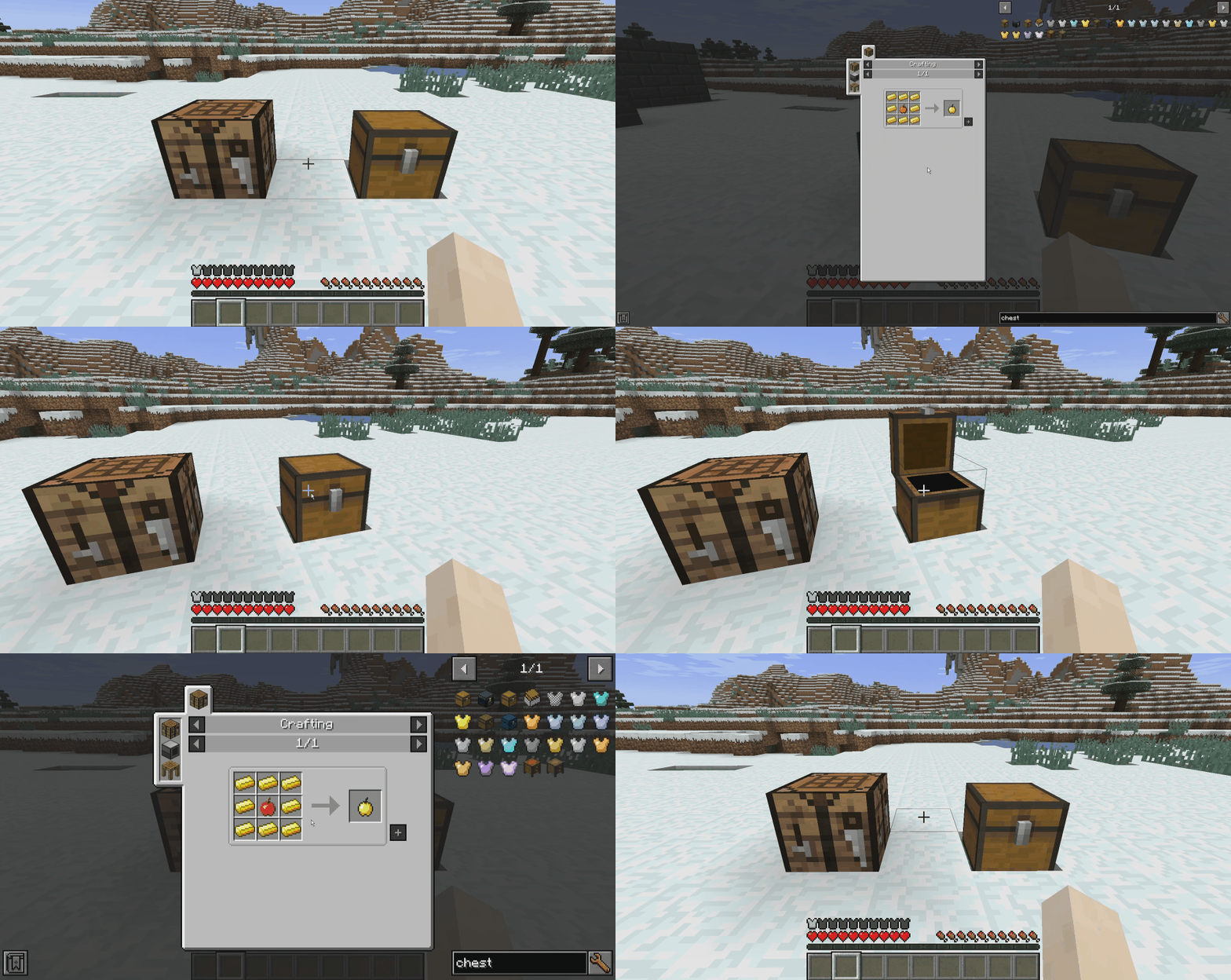
The crafting table GUI and chest GUI are both set to scale differently than other GUIs. The JEI Recipes GUI is added to the blacklist to scale with previous GUIs.
Setting changes are saved when the main ScalingGUIs menu is closed.
Conflicts
- TipTheScales - SG should still work from the mod config menu
Known Issues
- Video Settings scales odd* when different than the Options scale. Hit ESC if you run into this issue.
- Some GUIs scale odd* when they are actually composed of several GUIs behind the scenes.
- Notable cases are some Tinker's Construct GUIs (when certain GUIs are missing from the blacklist).
- SOLUTION: Enable logging to chat. Open the GUI that scales oddly. If multiple GUIs are logged to chat and the first GUI logged has a custom scale, the subsequent GUI(s) are likely reverting the scale and causing odd behavior. Add the subsequent GUI(s) to the blacklist and post the issue in the issue tracker for me to add default behavior.
- This problem should also be solvable by a recoupling system if I add it.
Odd scaling: Small to top left corner or large to bottom right corner
Credits
- unascribed for inspiration through Vise and several methods. (See license for details)
Project description from CurseForge.
Pick your setup
ScalingGUIs by Minecraft version and loader
Choose the version and loader you play, then open the matching release.
Check the dependencies, then try the file in a copied instance before changing a world you care about.
Recent files
ScalingGUIs versions and loaders
1.12.2-1.0.3.1
scalingguis-1.12.2-1.0.3.1.jar
2 Mar 2024
Client Required Server Not supported Dependencies No extras listed Listed on Release listing
Check the 1.12.2 · Forge setup 1.12.2Forge release
ScalingGUIs-1.12.2-1.0.3.1
scalingguis-1.12.2-1.0.3.1.jar
2 Mar 2024
Client Source doesn’t say Server Source doesn’t say Dependencies No extras listed Listed on Release listing
Check the 1.12.2 · Forge setup Forge1.12.2 release
ScalingGUIs-1.12.2-1.0.3.0
scalingguis-1.12.2-1.0.3.0.jar
27 May 2019
Client Source doesn’t say Server Source doesn’t say Dependencies No extras listed Listed on Release listing
Check the 1.12.2 setup 1.12.2 release
ScalingGUIs-1.12.2-1.0.2.1
scalingguis-1.12.2-1.0.2.1.jar
24 Apr 2019
Client Source doesn’t say Server Source doesn’t say Dependencies No extras listed Listed on Release listing
Check the 1.12.2 setup 1.12.2 release
ScalingGUIs-1.12.2-1.0.2.0
scalingguis-1.12.2-1.0.2.0.jar
23 Apr 2019
Client Source doesn’t say Server Source doesn’t say Dependencies No extras listed Listed on Release listing
Check the 1.12.2 setup 1.12.2 release
ScalingGUIs-1.12.2-1.0.1.0
scalingguis-1.12.2-1.0.1.0.jar
21 Apr 2019
Client Source doesn’t say Server Source doesn’t say Dependencies No extras listed Listed on Release listing
Check the 1.12.2 setup 1.12.2 release
ScalingGUIs-1.12.2-1.0.0.1
scalingguis-1.12.2-1.0.0.1.jar
17 Apr 2019
Client Source doesn’t say Server Source doesn’t say Dependencies No extras listed Listed on Release listing
Check the 1.12.2 setup 1.12.2 release
Looking for an older file? The official CurseForge project page is in Resources.
 mod
Modrinth · Minecraft
Box Client
A lightweight Fabric visuals / utility client for Minecraft. Clean custom ClickGUI, fully configurable, with saved settings.
mod
Modrinth · Minecraft
NilFix
Nilmod aiming to fix some bugs in old Minecraft and mods
mod
Modrinth · Minecraft
Convenient Additions
Does some convenient additions