Minecraft version
Back to mods 
CurseForge · Minecraft mod
OakNet-Link
Minecraft Peer2Peer Host-Client Multiplayer System
Choose a version Pick your version below, then grab the matching file.
Quick answer
Which OakNet-Link release matches 1.13.2?
beta file OakNetLink-Beta 1.7.1 for MC1.13.2
Game version 1.13.2
Loader Not required
OakNet-Link OakNetLink-Beta 1.7.1 for MC1.13.2 targets 1.13.2. The project page does not say whether this file belongs on the client, dedicated server, or both. No extra mods listed for this file.
Where it goes
Is OakNet-Link required on the client, server, or both?
The project page does not say whether this file belongs on the client, dedicated server, or both.
Client Source doesn’t say
Dedicated server Source doesn’t say
Loader for this release No loader listed
Required install it here Optional supported, not mandatory Not supported do not install here Source doesn’t say do not assume
The source does not explicitly classify this release as client-only or server-only.
What else does OakNet-Link OakNetLink-Beta 1.7.1 for MC1.13.2 need?
OakNetLink-Beta 1.7.1 for MC1.13.2 on 1.13.2. Every mod below is checked against that same setup.
This file does not list any required mods. Do not add a library just because a different file uses it.
This file does not list any required or optional mods.
Before you install it
Add OakNet-Link without breaking your instance.
Built for OakNet-Link OakNetLink-Beta 1.7.1 for MC1.13.2 on 1.13.2. Pick another file and the loader, install side or required mods may change.
- 01
Stick to this file
Use OakNetLink-Beta 1.7.1 for MC1.13.2. It targets 1.13.2; another release may have different loader, side or dependency requirements.
- 02
Bring the mods it needs
This file does not list any required mods. Do not add a library just because a different file uses it.
- 03
Put it on the correct side
The project page does not say whether this file belongs on the client, dedicated server, or both.
- 04
Pick the file you checked
Use the “Get this file” button beside OakNetLink-Beta 1.7.1 for MC1.13.2. It opens that exact file at the source.
About this project
What does OakNet-Link add?
STATEMENT:
11.01.2020:
The Mod is currently not working. I gained a lot of experience since I started this Project but the Mod in its current state is full of bugs and the functionality is rather poor.
Because I still like the Idea of OakNet-Link and still have a lot of ideas which I could add to the Mod, I'll completly rewrite the code. This procedure will take a while.
Check back in a couple of weeks!
21.03.2020:
Here is a little sneak peek on the new GUI:
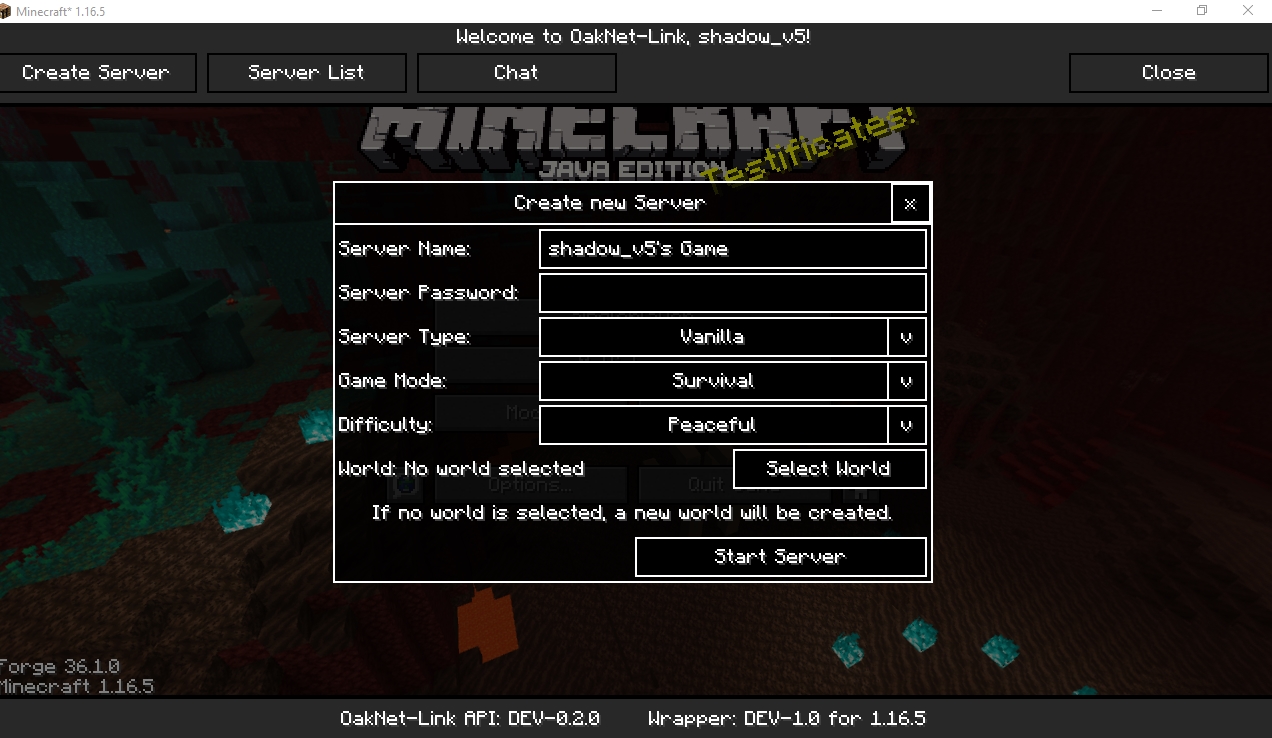
27.03.2020
I have decided to open the source code, you can find it here: https://github.com/StonedCoal/OakNet-Link-New
13.04.2021
I developed a new p2p API in the last months which implements true p2p other than the first version of the mod which was using a proxy server to forward Minecraft's packets. The first tests of that API used with Minecraft worked out really well...
Hello and welcome to the first Peer to Peer online multiplayer mod for Minecraft
You want to play with your friends but laziness overcomes? Renting or creating a server is too expensive? Port forwarding and router configurations are too complicated for you? We understand your needs and created this mod, a helping tool that creates a server on your PC. Just select a single-player world or create a new one.
With the OakNet-Link:
- you can show your friends your singleplayer world
- you play on a friend's server within seconds
- you don't have to pay for anything
- you don't need to forward/ share a port
- you can protect your server with a password
Just remember that every player needs the mod and that there's only one proxy-server yet which is located in Europe. We are in Beta now but don't hesitate to try it out.
How to find a server:

From the main menu in Minecraft go to multiplayer and press the new button in the upper left corner "OakNet-Link". There you can see all the active multiplayer games.
{width=500 height=285}
How to host a server:
You can start your own server by pressing the "Create Server" button. Name your server and switch with "Server Type" to a server with mods that can be selected or you play vanilla. Determine the game mode, the difficulty, and the maximum number of friends on your own new server.
We added a little feature: The server console, only available for the host over the chat. Just expand it with the button in the corner "expand" and there you can use all standard commands and of course server related commands like op someone, kick someone, and so on. Oh, and all server logs are findable there.
{width=500 height=281}
Do you have any questions, suggestions, or bugs for us? Contact us via E-Mail or comment.
Teamspeak 3: ts3.oaknetwork.de
Discord: Akinito#2341
We, the Oaknetwork-Team, hope that our mod puts a smile on your face.
Project description from CurseForge.
Pick your setup
OakNet-Link by Minecraft version and loader
Choose the version and loader you play, then open the matching release.
Minecraft version
1.14.2
1 loader buildMinecraft version
1.13.2
1 loader buildMinecraft version
1.12.2
1 loader buildCheck the dependencies, then try the file in a copied instance before changing a world you care about.
Recent files
OakNet-Link versions and loaders
OakNetLink-Beta 1.7.1 for MC1.13.2
OakNetLink-Beta 1.7.1-1.13.2.jar
4 Jul 2019
Client Source doesn’t say Server Source doesn’t say Dependencies No extras listed Listed on Release listing
Check the 1.13.2 setup 1.13.2 beta
Looking for an older file? The official CurseForge project page is in Resources.
 mod
CurseForge · Minecraft
FastValus
Server-side anti-lag utility featuring death-drop-safe item sweeps, wall-safe item & XP clumping, per-chunk entity limiting, and Entity + TileEntity lag diagnostics.
 mod
CurseForge · Minecraft
TONI's Base Defense
Reinforce any block so nobody else can break it, then guard your base with turrets, a force field dome and nasty traps that never hurt you or your friends.
 mod
CurseForge · Minecraft
Base Power
Base Power is a base library for Base Steam and Base Electric, which add machines to the Base Metals Mod. It is a continuation of Dr Cyano's Advantage series and is fully backwards compatible with worlds saved with those mods.