Minecraft version
Back to mods 
CurseForge · Minecraft mod
ExtendedRedstonePower
new Redstone Items: Greenstone and Bluestone, mixable
Choose a version Pick your version below, then grab the matching file.
Quick answer
Which ExtendedRedstonePower release matches 1.13.2?
Best match for your filters ExtendedRedstonePower-1.13.2-V1.1.jar
Game version 1.13.2
Loader forge
ExtendedRedstonePower-1.13.2-V1.1.jar targets 1.13.2. The project page does not say whether this file belongs on the client, dedicated server, or both. No extra mods listed for this file.
Where it goes
Is ExtendedRedstonePower required on the client, server, or both?
The project page does not say whether this file belongs on the client, dedicated server, or both.
Client Source doesn’t say
Dedicated server Source doesn’t say
Loader for this release No loader listed
Required install it here Optional supported, not mandatory Not supported do not install here Source doesn’t say do not assume
The source does not explicitly classify this release as client-only or server-only.
What else does ExtendedRedstonePower-1.13.2-V1.1.jar need?
ExtendedRedstonePower-1.13.2-V1.1.jar on 1.13.2. Every mod below is checked against that same setup.
This file does not list any required mods. Do not add a library just because a different file uses it.
This file does not list any required or optional mods.
Before you install it
Add ExtendedRedstonePower without breaking your instance.
Built for ExtendedRedstonePower-1.13.2-V1.1.jar on 1.13.2. Pick another file and the loader, install side or required mods may change.
- 01
Stick to this file
Use ExtendedRedstonePower-1.13.2-V1.1.jar. It targets 1.13.2; another release may have different loader, side or dependency requirements.
- 02
Bring the mods it needs
This file does not list any required mods. Do not add a library just because a different file uses it.
- 03
Put it on the correct side
The project page does not say whether this file belongs on the client, dedicated server, or both.
- 04
Pick the file you checked
Use the “Get this file” button beside ExtendedRedstonePower-1.13.2-V1.1.jar. It opens that exact file at the source.
About this project
What does ExtendedRedstonePower add?
additional Redstone lines "Greenstone" and "Bluestone", which can be laid like the normal Redstone lines. they can also be laid on top of each other (mixed) so that up to three signals run parallel in one line. Each has 15 separate signal strengths. There are corresponding new items "Greenstone_dust" and "Bluestone_dust".
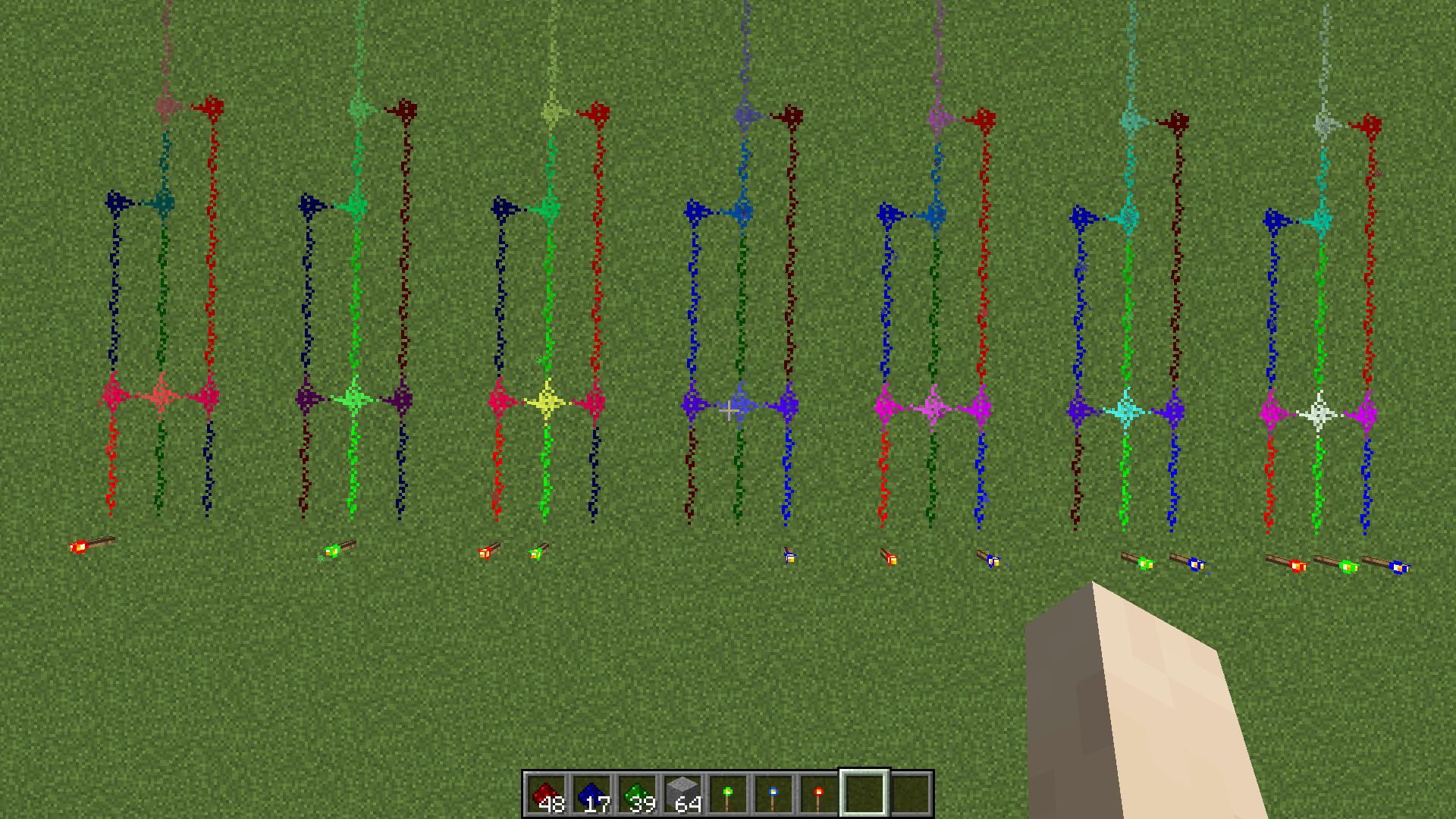
TORCHES, REPEATER, COMPARATORS
matching the corresponding torches for Greenstone and Bluestone. For example, a "Greenstone_Torch" can be extended into a yellow torch by adding a "Redstone_dust", which transports both Redstone and Greenstone in parallel. A total of 7 different torches are possible. There are also corresponding Repeaters and Comparators.

To extend a Redstone, Greenstone or Bluestone torch, you have to right-click on the torch with a dust item of the appropriate color to expand with. This process consumes a dust-item, which you get back when the torch is dismantled.Equally, repeaters and comparators can be expanded. For the extension of a repeater two dust-items are consumed. You have to hold at least two dust-items in your hand, otherwise it will not work !!!For the extension of a comparator three dust-items are consumed. You have to hold at least three dust-items in your hand, otherwise it will not work !!!-------------------------------------------------------------------------------------------------------------------------------------------------------------------------------------------------SPECIAL TORCHES
Extended torches can be converted into a special torch by right-clicking and back again. (Attention: if you hold a dust-item in your hand with which the torch has not yet been extended, the torch is extended to a white torch and not converted). Special torches work like a NAND gate. These may e.g. used to convert a color signal into another color signal.
-------------------------------------------------------------------------------------------------------------------------------------------------------------------------------------------------
BLOCKS
Greenstone Dust and Bluestone Dust can be crafted like Redstone to Greenstone or Bluestone Blocks. These can also be extended if you want to expand with dust items of the color with which you want to expand it. This process consumes 5 dust-items. You have to hold at least five dust-items in your hand, otherwise it will not work !!!
The blocks can be moved with a piston.
-------------------------------------------------------------------------------------------------------------------------------------------------------------------------------------------------
-------------------------------------------------------------------------------------------------------------------------------------------------------------------------------------------------
MULTICOLOR BLOCK
A multicolor block that can be controlled by all three Redstone types and can therefore assume 4096 different colors. Ideal for display systems and hidden clues.
The multicolor block can not be moved with a piston.

The recipe of a multicolor-block is a shapeless recipe included a dust-item of ever color and a glass-block.

REDSTONE LAUNCHER
The Redstone Launcher can transmit a Redstone signal over a distance of 15 blocks to a multicolor block. Signals coming from different directions are compared and taken the highest value.
By right-clicking on this block, the transmitter changes to an enable mode. If this block points to a multicolor block, the color signals coming from the other directions can be switched on and off.


Added since V1.0:
Redstone, Greenstone and Bluestone can now be placed on half stones, so that you can build even more compact circuits.
Torches, repeaters and comparators can now only be positioned in whole blocks.
Add since V1.2:
Double-Lever activate Redstone and Greenstone.
The double lever has no item, you create it by clicking with a lever on an already placed lever.

Stairs can be used as Redstone conductors where only the full surfaces can pick up or emit signals.

since 1.18.2-V1.2
Toml File "extendedredstonepower-common" added.
There you can choose whether the Minecraft-original instance should be placed when placing Redstone, Torch, repeater, comparator or Redstone block or the mod-owned one. By default, Redstone-Wire is placed as a mod-owned instance, all others are not.
A hotkey "I" inverts the setting in the toml file when pressed during placement.
Regular instances of torches, repeaters or comparators cannot receive signals through stairs, in which case a mod-own instance must be set.
It should not be combined original Redstone wires with mod's own Redstone wires, that could lead to problems. These should be separated by repeaters.
Project description from CurseForge.
Pick your setup
ExtendedRedstonePower by Minecraft version and loader
Choose the version and loader you play, then open the matching release.
Minecraft version
1.18.2
1 loader buildMinecraft version
1.17.1
1 loader buildMinecraft version
1.16.5
1 loader buildMinecraft version
1.15.2
1 loader buildMinecraft version
1.14.4
1 loader buildMinecraft version
1.13.2
1 loader buildMinecraft version
1.12.2
1 loader buildMinecraft version
1.9.1
1 loader buildMinecraft version
1.9
1 loader buildCheck the dependencies, then try the file in a copied instance before changing a world you care about.
Recent files
ExtendedRedstonePower versions and loaders
ExtendedRedstonePower-1.13.2-V1.1.jar
7 Nov 2019
Client Source doesn’t say Server Source doesn’t say Dependencies No extras listed Listed on Release listing
Check the 1.13.2 setup 1.13.2 release
ExtendedRedstonePower_1.13.2-V0.2.jar
21 May 2019
Client Source doesn’t say Server Source doesn’t say Dependencies No extras listed Listed on Release listing
Check the 1.13.2 setup 1.13.2 alpha
Looking for an older file? The official CurseForge project page is in Resources.