Minecraft version
Back to mods 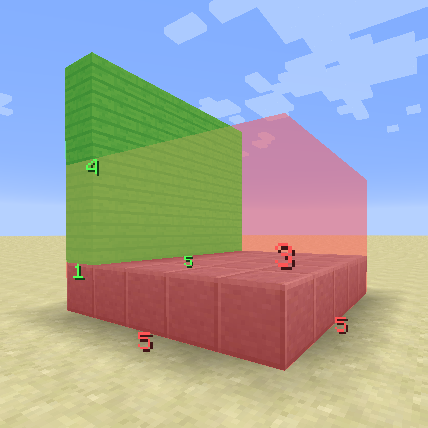
CurseForge · Minecraft mod
Measuring Compass
Client-side mod that allows existing items to be used to measure blocks.
Choose a version Pick your version below, then grab the matching file.
Quick answer
Which Measuring Compass release matches 1.12.2?
Best match for your filters measuringcompass-1.1.1.jar
Game version 1.12.2
Loader Not required
Measuring Compass measuringcompass-1.1.1.jar targets 1.12.2. The project page does not say whether this file belongs on the client, dedicated server, or both. No extra mods listed for this file.
Where it goes
Is Measuring Compass required on the client, server, or both?
The project page does not say whether this file belongs on the client, dedicated server, or both.
Client Source doesn’t say
Dedicated server Source doesn’t say
Loader for this release No loader listed
Required install it here Optional supported, not mandatory Not supported do not install here Source doesn’t say do not assume
The source does not explicitly classify this release as client-only or server-only.
What else does Measuring Compass measuringcompass-1.1.1.jar need?
measuringcompass-1.1.1.jar on 1.12.2. Every mod below is checked against that same setup.
This file does not list any required mods. Do not add a library just because a different file uses it.
This file does not list any required or optional mods.
Before you install it
Add Measuring Compass without breaking your instance.
Built for Measuring Compass measuringcompass-1.1.1.jar on 1.12.2. Pick another file and the loader, install side or required mods may change.
- 01
Stick to this file
Use measuringcompass-1.1.1.jar. It targets 1.12.2; another release may have different loader, side or dependency requirements.
- 02
Bring the mods it needs
This file does not list any required mods. Do not add a library just because a different file uses it.
- 03
Put it on the correct side
The project page does not say whether this file belongs on the client, dedicated server, or both.
- 04
Pick the file you checked
Use the “Get this file” button beside measuringcompass-1.1.1.jar. It opens that exact file at the source.
About this project
What does Measuring Compass add?
This is a client-side mod.
This mod adds functionality to an existing item (compass by default), which allows you to make measurements and visualize them. The item can be changed in the config file.
With the compass in your main hand, right-clicking a block will set that block as the first corner. Go ahead and right-click on another block to set the opposite corner, and you should see a box along with the lengths of each of its dimensions.
(Sneak) + Right-click deletes the most recent box.
To bring up the GUI, right-click in the air with the compass in your main hand.
You can set values (0-255) for red, green, blue, and alpha (opacity). There are a few presets for convenience.
You can toggle between two rendering modes: outline and filled.
Screenshots:


Changelog:
1.1.1:
- Fixed (sneak + rightclick) removing more than one box occasionally
- Fixed offsets displaying even after selecting second corner
- Fixed boxes drawing when selecting a corner and selecting the second in a different dimension
- Refactored code
1.1:
- Filled boxes now also render outlines (inversed color) to make it easier to see the shape
- Added shortcut for deleting the most recent box (right-click while sneaking)
- Added overlay when first corner is selected, showing XYZ offsets. This means the player's current position is NOT included in the numbers shown. If the offset says you're 15 blocks away, you're standing on the 16th block.
- Minor bug fixes and optimizations
1.0:
- Initial release
Project description from CurseForge.
Pick your setup
Measuring Compass by Minecraft version and loader
Choose the version and loader you play, then open the matching release.
Check the dependencies, then try the file in a copied instance before changing a world you care about.
Recent files
Measuring Compass versions and loaders
measuringcompass-1.1.1.jar
23 May 2019
Client Source doesn’t say Server Source doesn’t say Dependencies No extras listed Listed on Release listing
Check the 1.12.2 setup 1.12.2 release
measuringcompass-1.1.jar
22 May 2019
Client Source doesn’t say Server Source doesn’t say Dependencies No extras listed Listed on Release listing
Check the 1.12.2 setup 1.12.2 release
measuringcompass-1.0.jar
21 May 2019
Client Source doesn’t say Server Source doesn’t say Dependencies No extras listed Listed on Release listing
Check the 1.12.2 setup 1.12.2 release
Looking for an older file? The official CurseForge project page is in Resources.
 mod
CurseForge · Minecraft
AppleStats :timmer+ AppleSkin+ Jade +GUI Clock+Coordinates+Horse Stat
HUD:A lightweight Jade alternative ,effect timmer ,Target Info,Saturation and Coordinates Monitor ,Waila,HWYLA,show Horse speed and jump stats,death location,Death Finder
 mod
CurseForge · Minecraft
Natural Disaster Mod By Phnhh_8's
Natural Disater Mods for Fabric and Forge. 100 download for neoforge
 mod
CurseForge · Minecraft
Narcissus Farewell (水仙辞)
Teleport requests, homes, public waypoints and death returns, with configurable costs, safety checks and optional map integrations.