Minecraft version
Back to mods 
CurseForge · Minecraft mod
More Apples
A mod that adds apples to the game!
Choose a version Pick your version below, then grab the matching file.
Quick answer
Which More Apples release matches 1.12?
Best match for your filters More Apples 2.2.1 (1.12.2)
Game version 1.12.1, 1.12, 1.12.2
Loader forge
More Apples More Apples 2.2.1 (1.12.2) targets 1.12.1, 1.12, 1.12.2. The project page does not say whether this file belongs on the client, dedicated server, or both. No extra mods listed for this file.
Where it goes
Is More Apples required on the client, server, or both?
The project page does not say whether this file belongs on the client, dedicated server, or both.
Client Source doesn’t say
Dedicated server Source doesn’t say
Loader for this release No loader listed
Required install it here Optional supported, not mandatory Not supported do not install here Source doesn’t say do not assume
The source does not explicitly classify this release as client-only or server-only.
What else does More Apples More Apples 2.2.1 (1.12.2) need?
More Apples 2.2.1 (1.12.2) on 1.12. Every mod below is checked against that same setup.
This file does not list any required mods. Do not add a library just because a different file uses it.
This file does not list any required or optional mods.
Before you install it
Add More Apples without breaking your instance.
Built for More Apples More Apples 2.2.1 (1.12.2) on 1.12. Pick another file and the loader, install side or required mods may change.
- 01
Stick to this file
Use More Apples 2.2.1 (1.12.2). It targets 1.12.1, 1.12, 1.12.2; another release may have different loader, side or dependency requirements.
- 02
Bring the mods it needs
This file does not list any required mods. Do not add a library just because a different file uses it.
- 03
Put it on the correct side
The project page does not say whether this file belongs on the client, dedicated server, or both.
- 04
Pick the file you checked
Use the “Get this file” button beside More Apples 2.2.1 (1.12.2). It opens that exact file at the source.
About this project
What does More Apples add?
NEW 1.15.2 VERSION: COMPLETE REWRITE
A mod that lets you craft more apples and apple sauces with different effects. Gives apples more use with materials other than gold, mod integration coming soon! Since I don't have a secondary guide I will list everything you need to do here in order.
Permissions: Feel free to use it in a modpack, or develop addons or add integration with any other mod. It would be appreciated but not required to tell me about you using in, and if you find any unique problems because of your usage or otherwise.
https://discord.gg/e7trZym here is the discord if anyone wants it
Some of the people who helped me with this project are:
UINight - works with art and modeling you can also find him on discord under the name Narial on the MMD discord server.
How to use the mod:
Step One: Craft apples on sticks using 1 apple and 1 stick anywhere recipe shown below:
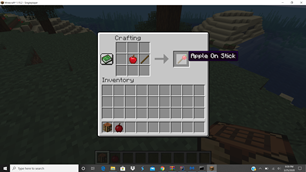
Step Two: Cook the apples on sticks using a camp fire.
Step Three: You now have options. You can eat the cooked apple, or using materials make it an apple that will give you status buffs. You can also craft a squeezer (recipe shown below) to make some material apple sauces, short but strong effects, or instead convert the apples into enchanted apples.

List of all apples, recipes and effects here:
Coal Apple


Effects: Night Vision and Glowing
Diamond Apple


Effects: Increased Health, Strength, Instant Health
Emerald


Effects: Hero Of The Village, Luck
Iron


Effect: Resistance
Lapis


Effects: Luck, Mining Fatigue
Obsidian


Effects: Resistance, Strength, Slowness
Redstone


Effects: Haste, Bad Luck
Anvil

Effect: Repairs all armor you are wearing and items you are holding
Arrow
Effect: Spawns a powerful arrow in the direction you are looking while eating the apple
Bed

Effects: Skips night, sets spawn at current location
Note: you can use any type of planks or wool.
Boat

Effects: Slow movement on land, fast movement in water.
Book

Less powerful knowledge apple (1 level)
Cactus

Effect: Thorny II Damages anything that attacks you for 2 hearts per level.
Cake

Effect: Full food a lot of saturation.
Chest

Effect: opens ender chest
Chorus Fruit

Effect: Teleports you to the end
Cobblestone

Effect: Gives you Cobblestone Destruction destroys all cobblestone in your inventory
Compass

Effect: Teleports you to world spawn
Dead Bush
 Effects: High hunger restore and saturation, High damage and poison
Dirt

Effects: Clears all effects, chance for poison and or damage
Enchantment Table

Effect: Enchants every unenchanted item in your inventory with a random enchantment for that tooltype
Fire Charge

Effect: summons fireballs around you.
Firework
 Effect: Launches you high in the sky and back down.
Fishing

Effect: gives you high amounts of luck
Flint

Effects: makes your attacks stronger
Food

(Craftable with any vanilla edible food)
Effect: Restores half of hunger bar and increased saturation
Glass

Effect: Invisibility
Glowstone

Effect: Glowing
Honey

Effects: slowness and regen
Knowledge

Effects: Chat message and EXP
Lava
 Effect: Fire Resistance
Milk

Effects: Clears all negative effects, but leaves the positive ones.
Note Block
Effect: Plays music
More Apples Coming Soon!
Good Luck and Have Fun!
If you find bugs, or want to suggest something the comments section is a great place for that or join my discord server and tell me there.
Project description from CurseForge.
Pick your setup
More Apples by Minecraft version and loader
Choose the version and loader you play, then open the matching release.
Minecraft version
1.16
1 loader buildMinecraft version
1.15.2
2 loader buildsMinecraft version
1.15.1
2 loader buildsMinecraft version
1.15
2 loader buildsMinecraft version
1.12.2
1 loader buildMinecraft version
1.12.1
1 loader buildMinecraft version
1.12
1 loader buildCheck the dependencies, then try the file in a copied instance before changing a world you care about.
Recent files
More Apples versions and loaders
More Apples 2.2.1 (1.12.2)
moreapples2.2.1A.jar
23 May 2020
Client Source doesn’t say Server Source doesn’t say Dependencies No extras listed Listed on Release listing
Check the 1.12 setup 1.12.11.121.12.2 release
More Apples 2.2 (1.12.2)
moreapples2.2A.jar
29 Apr 2020
Client Source doesn’t say Server Source doesn’t say Dependencies No extras listed Listed on Release listing
Check the 1.12 setup 1.12.11.121.12.2 release
More Apples v1.5
More Apples v1.5.jar
7 Jul 2019
Client Source doesn’t say Server Source doesn’t say Dependencies No extras listed Listed on Release listing
Check the 1.12 setup 1.12.11.121.12.2 release
More Apples v1.4
More Apples v1.4.jar
13 Jun 2019
Client Source doesn’t say Server Source doesn’t say Dependencies No extras listed Listed on Release listing
Check the 1.12 setup 1.12.11.121.12.2 release
More Apples v1.3.1
More Apples v1.3.1.jar
13 Jun 2019
Client Source doesn’t say Server Source doesn’t say Dependencies No extras listed Listed on Release listing
Check the 1.12 setup 1.12.11.121.12.2 release
More Apples v1.3
More Apples v1.3.jar
10 Jun 2019
Client Source doesn’t say Server Source doesn’t say Dependencies No extras listed Listed on Release listing
Check the 1.12 setup 1.12.11.121.12.2 release
More Apples v1.2
More Apples v1.2.jar
9 Jun 2019
Client Source doesn’t say Server Source doesn’t say Dependencies No extras listed Listed on Release listing
Check the 1.12 setup 1.12.11.121.12.2 release
More Apples v1.1
More Apples v1.1.jar
8 Jun 2019
Client Source doesn’t say Server Source doesn’t say Dependencies No extras listed Listed on Release listing
Check the 1.12 setup 1.12.11.121.12.2 release
More Apples v1.0.1
More Apples v1.0.1.jar
7 Jun 2019
Client Source doesn’t say Server Source doesn’t say Dependencies No extras listed Listed on Release listing
Check the 1.12 setup 1.12.11.121.12.2 release
More Apples v1
More Apples v1.jar
6 Jun 2019
Client Source doesn’t say Server Source doesn’t say Dependencies No extras listed Listed on Release listing
Check the 1.12 setup 1.12.11.121.12.2 release
Looking for an older file? The official CurseForge project page is in Resources.
 mod
CurseForge · Minecraft
TONI's Base Defense
Reinforce any block so nobody else can break it, then guard your base with turrets, a force field dome and nasty traps that never hurt you or your friends.
 mod
CurseForge · Minecraft
SKY ACES
Dogfight in 30+ flyable jets, WWII warbirds and helicopters, then take warships and submarines to sea. F-22, F-35, Spitfire, Apache, a sailing Nimitz carrier, air refuelling and a campaign. (Formerly known as Fighter Jets Overhaul)
 mod
CurseForge · Minecraft
ArmorPlus
ArmorPlus adds new armor sets, tools, weapons, building blocks, and progression content to enhance your Minecraft adventures.